
Python BERT 多任务学习
作者:追风剑情 发布于:2026-6-24 17:05 分类:AI
多任务学习(multi-task learning)是指通过同时训练模型完成多个相关任务提高模型的泛化能力。例如,可以同时训练一个模型进行图像分类和文本生成,从而使模型能够更好地理解图像和文本之间的关系。下面的实例演示了在模型训练中使用预训练模型实现多任务学习的过程。在这个例子中,使用预训练的ResNet模型提取图像特征,使用预训练的BERT模型提取文本特征,然后将这些特征用于两个不同的任务:图像分类和文本分类。
示例
# ---------- 1. 开启离线模式(必须在所有 import 之前) ----------
import os
os.environ["TRANSFORMERS_OFFLINE"] = "1"   # 禁止联网下载

# ---------- 2. 定义模型路径常量 ----------
BERT_MODEL_PATH = "./my_bert_model"          # BERT 模型本地目录
RESNET_WEIGHT_PATH = "resnet50-0676ba61.pth" # ResNet 权重文件路径

import torch
import torch.nn as nn
import torch.optim as optim
from torchvision import models, transforms
from torch.utils.data import Dataset, DataLoader
from PIL import Image
from transformers import BertTokenizer, BertModel

# ---------- 3. 数据集类 ----------
class MultimodalDataset(Dataset):
    def __init__(self, image_paths, texts, image_labels, text_labels, transform=None):
        self.image_paths = image_paths
        self.texts = texts
        self.image_labels = image_labels
        self.text_labels = text_labels
        self.transform = transform
        # 使用常量加载 BERT 分词器
        self.tokenizer = BertTokenizer.from_pretrained(BERT_MODEL_PATH)

    def __len__(self):
        return len(self.image_labels)

    def __getitem__(self, idx):
        # 图像处理
        image = Image.open(self.image_paths[idx]).convert("RGB")
        if self.transform:
            image = self.transform(image)

        # 文本处理
        text = self.texts[idx]
        encoding = self.tokenizer.encode_plus(
            text,
            add_special_tokens=True,
            max_length=128,
            padding='max_length',
            return_attention_mask=True,
            return_tensors='pt',
        )
        input_ids = encoding['input_ids'].flatten()
        attention_mask = encoding['attention_mask'].flatten()

        image_label = torch.tensor(self.image_labels[idx], dtype=torch.long)
        text_label = torch.tensor(self.text_labels[idx], dtype=torch.long)

        return {
            'image': image,
            'input_ids': input_ids,
            'attention_mask': attention_mask,
            'image_label': image_label,
            'text_label': text_label
        }

# ---------- 4. 模型类 ----------
class MultimodalModel(nn.Module):
    def __init__(self, num_classes_image=2, num_classes_text=2):
        super(MultimodalModel, self).__init__()
        # ----- 图像分支:从本地加载 ResNet50 权重(使用常量) -----
        resnet = models.resnet50(weights=None)
        state_dict = torch.load(RESNET_WEIGHT_PATH, map_location='cpu', weights_only=True)
        resnet.load_state_dict(state_dict, strict=False)
        self.image_model = nn.Sequential(*list(resnet.children())[:-1])
        self.image_classifier = nn.Linear(2048, num_classes_image)

        # ----- 文本分支:从本地目录加载 BERT 模型(使用常量) -----
        self.text_model = BertModel.from_pretrained(BERT_MODEL_PATH)
        self.text_classifier = nn.Linear(768, num_classes_text)

    def forward(self, image, input_ids, attention_mask):
        # 图像特征
        img_feat = self.image_model(image)
        img_feat = img_feat.view(img_feat.size(0), -1)
        image_output = self.image_classifier(img_feat)

        # 文本特征
        text_outputs = self.text_model(input_ids=input_ids, attention_mask=attention_mask)
        text_feat = text_outputs.last_hidden_state[:, 0, :]   # [CLS] 向量
        text_output = self.text_classifier(text_feat)

        return image_output, text_output

# ---------- 5. 数据预处理 ----------
transform = transforms.Compose([
    transforms.Resize((224, 224)),
    transforms.ToTensor(),
    transforms.Normalize(mean=[0.485, 0.456, 0.406], std=[0.229, 0.224, 0.225]),
])

# ---------- 6. 构造示例数据 ----------
image_paths = ['running_dog.png', 'sleeping_cat.png']   # 请替换为实际图片路径
texts = ['a dog running', 'a cat sleeping']
image_labels = [0, 1]   # 0: dog, 1: cat
text_labels = [0, 1]    # 0: 描述狗, 1: 描述猫

dataset = MultimodalDataset(image_paths, texts, image_labels, text_labels, transform=transform)
dataloader = DataLoader(dataset, batch_size=2, shuffle=True)

# ---------- 7. 初始化 ----------
device = torch.device('cuda' if torch.cuda.is_available() else 'cpu')
model = MultimodalModel(num_classes_image=2, num_classes_text=2).to(device)
criterion_image = nn.CrossEntropyLoss()
criterion_text = nn.CrossEntropyLoss()
optimizer = optim.Adam(model.parameters(), lr=1e-4)

# ---------- 8. 训练 ----------
model.train()
for epoch in range(5):
    for batch in dataloader:
        images = batch['image'].to(device)
        input_ids = batch['input_ids'].to(device)
        attention_mask = batch['attention_mask'].to(device)
        image_labels = batch['image_label'].to(device)
        text_labels = batch['text_label'].to(device)

        optimizer.zero_grad()
        image_outputs, text_outputs = model(images, input_ids, attention_mask)

        loss_image = criterion_image(image_outputs, image_labels)
        loss_text = criterion_text(text_outputs, text_labels)
        total_loss = loss_image + loss_text

        total_loss.backward()
        optimizer.step()

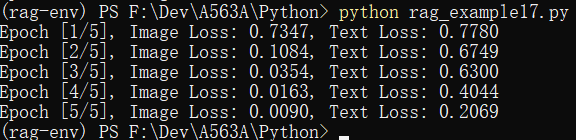
        print(f'Epoch [{epoch+1}/5], Image Loss: {loss_image.item():.4f}, Text Loss: {loss_text.item():.4f}')
运行测试
标签: AI
日历
最新文章
随机文章
热门文章
分类

存档
- 2026年7月(1)
- 2026年6月(17)
- 2026年5月(29)
- 2026年4月(7)
- 2026年3月(15)
- 2026年2月(3)
- 2026年1月(6)
- 2025年12月(1)
- 2025年11月(1)
- 2025年9月(3)
- 2025年7月(4)
- 2025年6月(5)
- 2025年5月(1)
- 2025年4月(5)
- 2025年3月(4)
- 2025年2月(3)
- 2025年1月(1)
- 2024年12月(5)
- 2024年11月(5)
- 2024年10月(5)
- 2024年9月(3)
- 2024年8月(3)
- 2024年7月(11)
- 2024年6月(3)
- 2024年5月(9)
- 2024年4月(10)
- 2024年3月(11)
- 2024年2月(24)
- 2024年1月(12)
- 2023年12月(3)
- 2023年11月(9)
- 2023年10月(7)
- 2023年9月(2)
- 2023年8月(7)
- 2023年7月(9)
- 2023年6月(6)
- 2023年5月(7)
- 2023年4月(11)
- 2023年3月(6)
- 2023年2月(11)
- 2023年1月(8)
- 2022年12月(2)
- 2022年11月(4)
- 2022年10月(10)
- 2022年9月(2)
- 2022年8月(13)
- 2022年7月(7)
- 2022年6月(11)
- 2022年5月(18)
- 2022年4月(29)
- 2022年3月(5)
- 2022年2月(6)
- 2022年1月(8)
- 2021年12月(5)
- 2021年11月(3)
- 2021年10月(4)
- 2021年9月(9)
- 2021年8月(14)
- 2021年7月(8)
- 2021年6月(5)
- 2021年5月(2)
- 2021年4月(3)
- 2021年3月(7)
- 2021年2月(2)
- 2021年1月(8)
- 2020年12月(7)
- 2020年11月(2)
- 2020年10月(6)
- 2020年9月(9)
- 2020年8月(10)
- 2020年7月(9)
- 2020年6月(18)
- 2020年5月(4)
- 2020年4月(25)
- 2020年3月(38)
- 2020年1月(21)
- 2019年12月(13)
- 2019年11月(29)
- 2019年10月(44)
- 2019年9月(17)
- 2019年8月(18)
- 2019年7月(25)
- 2019年6月(25)
- 2019年5月(17)
- 2019年4月(10)
- 2019年3月(36)
- 2019年2月(35)
- 2019年1月(28)
- 2018年12月(30)
- 2018年11月(22)
- 2018年10月(4)
- 2018年9月(7)
- 2018年8月(13)
- 2018年7月(13)
- 2018年6月(6)
- 2018年5月(5)
- 2018年4月(13)
- 2018年3月(5)
- 2018年2月(3)
- 2018年1月(8)
- 2017年12月(35)
- 2017年11月(17)
- 2017年10月(16)
- 2017年9月(17)
- 2017年8月(20)
- 2017年7月(34)
- 2017年6月(17)
- 2017年5月(15)
- 2017年4月(32)
- 2017年3月(8)
- 2017年2月(2)
- 2017年1月(5)
- 2016年12月(14)
- 2016年11月(26)
- 2016年10月(12)
- 2016年9月(25)
- 2016年8月(32)
- 2016年7月(14)
- 2016年6月(21)
- 2016年5月(17)
- 2016年4月(13)
- 2016年3月(8)
- 2016年2月(8)
- 2016年1月(18)
- 2015年12月(13)
- 2015年11月(15)
- 2015年10月(12)
- 2015年9月(18)
- 2015年8月(21)
- 2015年7月(35)
- 2015年6月(13)
- 2015年5月(9)
- 2015年4月(4)
- 2015年3月(5)
- 2015年2月(4)
- 2015年1月(13)
- 2014年12月(7)
- 2014年11月(5)
- 2014年10月(4)
- 2014年9月(8)
- 2014年8月(16)
- 2014年7月(26)
- 2014年6月(22)
- 2014年5月(28)
- 2014年4月(15)
友情链接
- Unity官网
- Unity圣典
- Unity在线手册
- Unity中文手册(圣典)
- Unity官方中文论坛
- Unity游戏蛮牛用户文档
- Unity下载存档
- Unity引擎源码下载
- Unity服务
- Unity Ads
- wiki.unity3d
- Visual Studio Code官网
- SenseAR开发文档
- MSDN
- C# 参考
- C# 编程指南
- .NET Framework类库
- .NET 文档
- .NET 开发
- WPF官方文档
- uLua
- xLua
- SharpZipLib
- Protobuf-net
- Protobuf.js
- OpenSSL
- OPEN CASCADE
- JSON
- MessagePack
- C在线工具
- 游戏蛮牛
- GreenVPN
- 聚合数据
- 热云
- 融云
- 腾讯云
- 腾讯开放平台
- 腾讯游戏服务
- 腾讯游戏开发者平台
- 腾讯课堂
- 微信开放平台
- 腾讯实时音视频
- 腾讯即时通信IM
- 微信公众平台技术文档
- 白鹭引擎官网
- 白鹭引擎开放平台
- 白鹭引擎开发文档
- FairyGUI编辑器
- PureMVC-TypeScript
- 讯飞开放平台
- 亲加通讯云
- Cygwin
- Mono开发者联盟
- Scut游戏服务器引擎
- KBEngine游戏服务器引擎
- Photon游戏服务器引擎
- 码云
- SharpSvn
- 腾讯bugly
- 4399原创平台
- 开源中国
- Firebase
- Firebase-Admob-Unity
- google-services-unity
- Firebase SDK for Unity
- Google-Firebase-SDK
- AppsFlyer SDK
- android-repository
- CQASO
- Facebook开发者平台
- gradle下载
- GradleBuildTool下载
- Android Developers
- Google中国开发者
- AndroidDevTools
- Android社区
- Android开发工具
- Google Play Games Services
- Google商店
- Google APIs for Android
- 金钱豹VPN
- TouchSense SDK
- MakeHuman
- Online RSA Key Converter
- Windows UWP应用
- Visual Studio For Unity
- Open CASCADE Technology
- 慕课网
- 阿里云服务器ECS
- 在线免费文字转语音系统
- AI Studio
- 网云穿
- 百度网盘开放平台
- 迅捷画图
- 菜鸟工具
- [CSDN] 程序员研修院
- 华为人脸识别
- 百度AR导航导览SDK
- 海康威视官网
- 海康开放平台
- 海康SDK下载
- git download
- Open CASCADE
- CascadeStudio
- OpenClaw中文社区
- three.js manual
- SVG官方文档
交流QQ群
-
Flash游戏设计: 86184192
Unity游戏设计: 171855449
游戏设计订阅号

捐赠 (用于支付服务器费用)
-
微信

支持宝

捐赠的朋友可与博主成为微信好友,点击下方【给我写信】给博主留言。


