
ESP32 OLED屏幕
作者:追风剑情 发布于:2026-5-27 21:50 分类:物联网
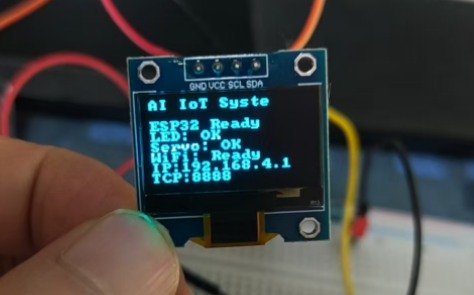
| 接线 | ||
| OLED 模块 | ESP32 引脚 | 说明 |
| GND | GND | 共地 |
| VCC | 3.3V | 模块供电,注意不要接到5V,以免损坏 |
| SCL | GPIO 22 | I2C 时钟线 |
| SDA | GPIO 21 | I2C 数据线 |
小贴士:某些开发板或模块可能将SCL和SDA引脚定义在不同的位置,但最通用的组合就是GPIO 21 (SDA) 和 GPIO 22 (SCL)。
安装驱动
idf.py add-dependency "chill-sam/ssd1306^1.1.0"
oled_control.h
#ifndef OLED_CONTROL_H
#define OLED_CONTROL_H

#include <stdbool.h>

// 初始化 OLED 屏幕(内部完成 I2C 总线初始化)
void oled_init(void);

// 按行显示文本(行号 0-7,每行最多 16 个英文字符)
void oled_show_text(int line, const char *text);

// 清屏
void oled_clear(void);

// 在指定像素坐标显示字符串(x: 0-127, y: 0-63)
void oled_draw_string(int x, int y, const char *text);

// 显示温湿度数据(专用接口,自动清除旧内容并刷新)
void oled_display_temp_humid(float temperature, float humidity);

#endif
oled_control.c
#include "oled_control.h"
#include <string.h>
#include <driver/i2c_master.h>
#include <ssd1306.h>
#include <esp_log.h>
#include <freertos/FreeRTOS.h>
#include <freertos/task.h>

// I2C 引脚配置
#define I2C_PORT        I2C_NUM_0
#define I2C_SDA_PIN     GPIO_NUM_21
#define I2C_SCL_PIN     GPIO_NUM_22
#define I2C_CLK_SPEED   400000          // 400 kHz

// OLED 显示参数
#define OLED_WIDTH      128
#define OLED_HEIGHT     64
#define OLED_I2C_ADDR   0x3C            // 常用地址

// 全局资源
static const char *TAG = "OLED";
static i2c_master_bus_handle_t i2c_bus = NULL;
static ssd1306_handle_t oled_handle = NULL;
static bool oled_ready = false;

// 初始化 I2C 总线(新版驱动)
static bool init_i2c_bus(void)
{
    i2c_master_bus_config_t bus_cfg = {
        .i2c_port = I2C_PORT,
        .sda_io_num = I2C_SDA_PIN,
        .scl_io_num = I2C_SCL_PIN,
        .clk_source = I2C_CLK_SRC_DEFAULT,
        .glitch_ignore_cnt = 7,
        .flags.enable_internal_pullup = true,
    };
    esp_err_t ret = i2c_new_master_bus(&bus_cfg, &i2c_bus);
    if (ret != ESP_OK) {
        ESP_LOGE(TAG, "Failed to create I2C bus: %s", esp_err_to_name(ret));
        return false;
    }
    ESP_LOGI(TAG, "I2C master bus created (SDA=%d, SCL=%d)", I2C_SDA_PIN, I2C_SCL_PIN);
    return true;
}

// 初始化 OLED 设备(使用新版驱动)
static bool init_oled_device(void)
{
    ssd1306_config_t cfg = {
        .bus = SSD1306_I2C,
        .width = OLED_WIDTH,
        .height = OLED_HEIGHT,
        .fb = NULL,               // 让驱动自动分配帧缓冲
        .fb_len = 0,
        .iface.i2c = {
            .port = I2C_PORT,
            .addr = OLED_I2C_ADDR,
            .rst_gpio = GPIO_NUM_NC,   // 无复位引脚
        },
    };
    esp_err_t ret = ssd1306_new_i2c(&cfg, &oled_handle);
    if (ret != ESP_OK) {
        ESP_LOGE(TAG, "Failed to create OLED device: %s", esp_err_to_name(ret));
        return false;
    }
    ESP_LOGI(TAG, "OLED device created (I2C addr=0x%02X)", OLED_I2C_ADDR);
    return true;
}

void oled_init(void)
{
    ESP_LOGI(TAG, "Initializing OLED...");

    if (!init_i2c_bus()) {
        oled_ready = false;
        return;
    }

    if (!init_oled_device()) {
        oled_ready = false;
        return;
    }

    // 清屏并刷新
    ssd1306_clear(oled_handle);
    ssd1306_display(oled_handle);

    oled_ready = true;
    ESP_LOGI(TAG, "OLED ready");
}

void oled_show_text(int line, const char *text)
{
    if (!oled_ready || oled_handle == NULL) {
        ESP_LOGW(TAG, "OLED not ready, cannot show text");
        return;
    }

    // 每行高度按 8 像素计算(适合默认字体)
    int y = line * 8;
    // 可选:清除该行区域(绘制黑色矩形)
    ssd1306_draw_rect(oled_handle, 0, y, OLED_WIDTH, 8, true);
    // 绘制文本(白色)
    ssd1306_draw_text(oled_handle, 0, y, text, true);
    // 刷新显示
    ssd1306_display(oled_handle);
}

void oled_clear(void)
{
    if (!oled_ready || oled_handle == NULL) return;
    ssd1306_clear(oled_handle);
    ssd1306_display(oled_handle);
}

void oled_draw_string(int x, int y, const char *text)
{
    if (!oled_ready || oled_handle == NULL) return;
    ssd1306_draw_text(oled_handle, x, y, text, true);
    ssd1306_display(oled_handle);
}

void oled_display_temp_humid(float temperature, float humidity)
{
    if (!oled_ready || oled_handle == NULL) {
        ESP_LOGE(TAG, "OLED not ready, cannot display data");
        return;
    }

    char buffer[32];

    // 清屏
    ssd1306_clear(oled_handle);

    // 标题(居中显示,需要计算起始X坐标,字体宽度约6像素,标题长度16字符)
    // 简单起见,从 x=16 开始显示
    ssd1306_draw_text(oled_handle, 16, 0, "Environment Data", true);

    // 温度
    snprintf(buffer, sizeof(buffer), "Temp: %.1f C", temperature);
    ssd1306_draw_text(oled_handle, 0, 24, buffer, true);

    // 湿度
    snprintf(buffer, sizeof(buffer), "Humidity: %.1f %%", humidity);
    ssd1306_draw_text(oled_handle, 0, 40, buffer, true);

    // 更新时间戳(底部)
    ssd1306_draw_text(oled_handle, 0, 56, "Updated", true);

    // 刷新显示
    ssd1306_display(oled_handle);

    ESP_LOGD(TAG, "Display updated: %.1f°C / %.1f%%", temperature, humidity);
}
main.c
#include <stdio.h>
#include "freertos/FreeRTOS.h"
#include "freertos/task.h"
#include "esp_log.h"
#include "led_control.h"
#include "servo_control.h"
#include "wifi_soft_ap.h"
#include "tcp_server.h"
#include "oled_control.h"

#define TCP_PORT 8888

static const char *TAG = "MAIN";

void app_main(void)
{
    // 1. 初始化 OLED(最先显示启动信息)
    oled_init();

    // 显示 IP 地址
    char ip_msg[32];
    snprintf(ip_msg, sizeof(ip_msg), "IP:%s", wifi_get_ip_str());
    oled_show_text(6, ip_msg);
    oled_show_text(7, "TCP:8888");

    while (1) {
        vTaskDelay(1000 / portTICK_PERIOD_MS);
    }
}
标签: IoT
日历
最新文章
随机文章
热门文章
分类

存档
- 2026年7月(1)
- 2026年6月(17)
- 2026年5月(29)
- 2026年4月(7)
- 2026年3月(15)
- 2026年2月(3)
- 2026年1月(6)
- 2025年12月(1)
- 2025年11月(1)
- 2025年9月(3)
- 2025年7月(4)
- 2025年6月(5)
- 2025年5月(1)
- 2025年4月(5)
- 2025年3月(4)
- 2025年2月(3)
- 2025年1月(1)
- 2024年12月(5)
- 2024年11月(5)
- 2024年10月(5)
- 2024年9月(3)
- 2024年8月(3)
- 2024年7月(11)
- 2024年6月(3)
- 2024年5月(9)
- 2024年4月(10)
- 2024年3月(11)
- 2024年2月(24)
- 2024年1月(12)
- 2023年12月(3)
- 2023年11月(9)
- 2023年10月(7)
- 2023年9月(2)
- 2023年8月(7)
- 2023年7月(9)
- 2023年6月(6)
- 2023年5月(7)
- 2023年4月(11)
- 2023年3月(6)
- 2023年2月(11)
- 2023年1月(8)
- 2022年12月(2)
- 2022年11月(4)
- 2022年10月(10)
- 2022年9月(2)
- 2022年8月(13)
- 2022年7月(7)
- 2022年6月(11)
- 2022年5月(18)
- 2022年4月(29)
- 2022年3月(5)
- 2022年2月(6)
- 2022年1月(8)
- 2021年12月(5)
- 2021年11月(3)
- 2021年10月(4)
- 2021年9月(9)
- 2021年8月(14)
- 2021年7月(8)
- 2021年6月(5)
- 2021年5月(2)
- 2021年4月(3)
- 2021年3月(7)
- 2021年2月(2)
- 2021年1月(8)
- 2020年12月(7)
- 2020年11月(2)
- 2020年10月(6)
- 2020年9月(9)
- 2020年8月(10)
- 2020年7月(9)
- 2020年6月(18)
- 2020年5月(4)
- 2020年4月(25)
- 2020年3月(38)
- 2020年1月(21)
- 2019年12月(13)
- 2019年11月(29)
- 2019年10月(44)
- 2019年9月(17)
- 2019年8月(18)
- 2019年7月(25)
- 2019年6月(25)
- 2019年5月(17)
- 2019年4月(10)
- 2019年3月(36)
- 2019年2月(35)
- 2019年1月(28)
- 2018年12月(30)
- 2018年11月(22)
- 2018年10月(4)
- 2018年9月(7)
- 2018年8月(13)
- 2018年7月(13)
- 2018年6月(6)
- 2018年5月(5)
- 2018年4月(13)
- 2018年3月(5)
- 2018年2月(3)
- 2018年1月(8)
- 2017年12月(35)
- 2017年11月(17)
- 2017年10月(16)
- 2017年9月(17)
- 2017年8月(20)
- 2017年7月(34)
- 2017年6月(17)
- 2017年5月(15)
- 2017年4月(32)
- 2017年3月(8)
- 2017年2月(2)
- 2017年1月(5)
- 2016年12月(14)
- 2016年11月(26)
- 2016年10月(12)
- 2016年9月(25)
- 2016年8月(32)
- 2016年7月(14)
- 2016年6月(21)
- 2016年5月(17)
- 2016年4月(13)
- 2016年3月(8)
- 2016年2月(8)
- 2016年1月(18)
- 2015年12月(13)
- 2015年11月(15)
- 2015年10月(12)
- 2015年9月(18)
- 2015年8月(21)
- 2015年7月(35)
- 2015年6月(13)
- 2015年5月(9)
- 2015年4月(4)
- 2015年3月(5)
- 2015年2月(4)
- 2015年1月(13)
- 2014年12月(7)
- 2014年11月(5)
- 2014年10月(4)
- 2014年9月(8)
- 2014年8月(16)
- 2014年7月(26)
- 2014年6月(22)
- 2014年5月(28)
- 2014年4月(15)
友情链接
- Unity官网
- Unity圣典
- Unity在线手册
- Unity中文手册(圣典)
- Unity官方中文论坛
- Unity游戏蛮牛用户文档
- Unity下载存档
- Unity引擎源码下载
- Unity服务
- Unity Ads
- wiki.unity3d
- Visual Studio Code官网
- SenseAR开发文档
- MSDN
- C# 参考
- C# 编程指南
- .NET Framework类库
- .NET 文档
- .NET 开发
- WPF官方文档
- uLua
- xLua
- SharpZipLib
- Protobuf-net
- Protobuf.js
- OpenSSL
- OPEN CASCADE
- JSON
- MessagePack
- C在线工具
- 游戏蛮牛
- GreenVPN
- 聚合数据
- 热云
- 融云
- 腾讯云
- 腾讯开放平台
- 腾讯游戏服务
- 腾讯游戏开发者平台
- 腾讯课堂
- 微信开放平台
- 腾讯实时音视频
- 腾讯即时通信IM
- 微信公众平台技术文档
- 白鹭引擎官网
- 白鹭引擎开放平台
- 白鹭引擎开发文档
- FairyGUI编辑器
- PureMVC-TypeScript
- 讯飞开放平台
- 亲加通讯云
- Cygwin
- Mono开发者联盟
- Scut游戏服务器引擎
- KBEngine游戏服务器引擎
- Photon游戏服务器引擎
- 码云
- SharpSvn
- 腾讯bugly
- 4399原创平台
- 开源中国
- Firebase
- Firebase-Admob-Unity
- google-services-unity
- Firebase SDK for Unity
- Google-Firebase-SDK
- AppsFlyer SDK
- android-repository
- CQASO
- Facebook开发者平台
- gradle下载
- GradleBuildTool下载
- Android Developers
- Google中国开发者
- AndroidDevTools
- Android社区
- Android开发工具
- Google Play Games Services
- Google商店
- Google APIs for Android
- 金钱豹VPN
- TouchSense SDK
- MakeHuman
- Online RSA Key Converter
- Windows UWP应用
- Visual Studio For Unity
- Open CASCADE Technology
- 慕课网
- 阿里云服务器ECS
- 在线免费文字转语音系统
- AI Studio
- 网云穿
- 百度网盘开放平台
- 迅捷画图
- 菜鸟工具
- [CSDN] 程序员研修院
- 华为人脸识别
- 百度AR导航导览SDK
- 海康威视官网
- 海康开放平台
- 海康SDK下载
- git download
- Open CASCADE
- CascadeStudio
- OpenClaw中文社区
- three.js manual
- SVG官方文档
交流QQ群
-
Flash游戏设计: 86184192
Unity游戏设计: 171855449
游戏设计订阅号

捐赠 (用于支付服务器费用)
-
微信

支持宝

捐赠的朋友可与博主成为微信好友,点击下方【给我写信】给博主留言。


