
合并文字到贴图
作者:追风剑情 发布于:2019-10-24 16:34 分类:Unity3d
示例:
工程截图
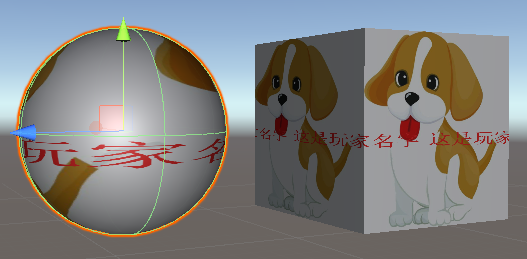
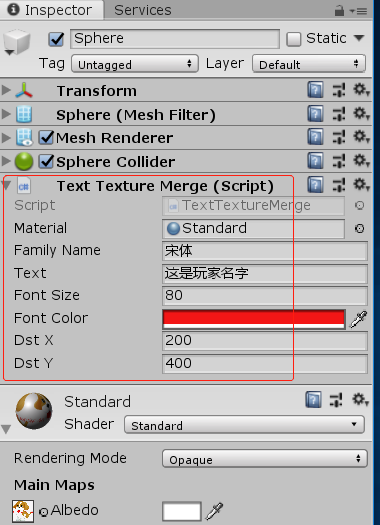
代码
using System;
using System.Collections;
using System.Collections.Generic;
using System.IO;
using System.Drawing;
using System.Drawing.Imaging;
using DrawingGraphics = System.Drawing.Graphics;
using DrawingFont = System.Drawing.Font;
using DrawingFontStyle = System.Drawing.FontStyle;
using DrawingColor = System.Drawing.Color;

using UnityEngine;
using UnityFont = UnityEngine.Font;
using UnityColor = UnityEngine.Color;

/// <summary>
/// 合并文字到贴图 (仅考虑Windows平台)
/// </summary>
public class TextTextureMerge : MonoBehaviour
{
    [ContextMenuItem("Test", "OnTestContextMenuItem")]
    public Material material;
    public string familyName = "宋体";
    public string text = "Test";
    public int fontSize = 24;
    public UnityColor fontColor;
    //文字在贴图中的坐标
    public int dstX = 0;
    public int dstY = 0;

    // 仅测试调用
    void OnTestContextMenuItem()
    {
        if (material == null || material.mainTexture == null)
            return;
        Texture2D dst = material.mainTexture as Texture2D;
        Texture2D tex = DrawString(text, dst, dstX, dstY, fontColor, fontSize, familyName);
        material.mainTexture = tex;
    }

    // 绘文字到Texture的指定位置
    public static Texture2D DrawString(string text, Texture2D dst, int dstX, int dstY, UnityColor color, int fontSize = 24, string familyName = "宋体")
    {
        DrawingColor draw_color = DrawingColor.FromArgb((int)(color.a * 255f), (int)(color.r * 255f), (int)(color.g * 255f), (int)(color.b * 255f));
        Texture2D src = DrawString(text, draw_color, fontSize);
        Texture2D tex = MergeTexture(src, dst, dstX, dstY, color);
        return tex;
    }

    // 文字转Texture
    public static Texture2D DrawString(string text, DrawingColor color, int fontSize = 24, string familyName="宋体")
    {
        string str = text;
        DrawingGraphics g = DrawingGraphics.FromImage(new Bitmap(1, 1));
        DrawingFont font = new DrawingFont(familyName, fontSize, DrawingFontStyle.Regular, GraphicsUnit.Pixel);
        SizeF sizeF = g.MeasureString(str, font); //测量出字体的高度和宽度
        Brush brush; //笔刷,颜色
        //brush = Brushes.Lime;
        brush = new SolidBrush(color);
        PointF pf = new PointF(0, 0);
        Bitmap img = new Bitmap(Convert.ToInt32(sizeF.Width), Convert.ToInt32(sizeF.Height), PixelFormat.Format32bppArgb);
        g = DrawingGraphics.FromImage(img);
        g.DrawString(str, font, brush, pf);
        //输出图片
        MemoryStream ms = new MemoryStream();
        img.Save(ms, ImageFormat.Png);
        byte[] bytes = ms.ToArray();

        Texture2D tex = new Texture2D(img.Width, img.Height, TextureFormat.RGBA32, false);
        tex.LoadImage(bytes);
        tex.Apply();

        return tex;
    }

    // 合并Texture
    public static Texture2D MergeTexture(Texture2D src, Texture2D dst, int dstX, int dstY, UnityColor color)
    {
        //克隆一个副本
        Texture2D tex = new Texture2D(dst.width, dst.height, TextureFormat.RGBA32, false);
        tex.SetPixels(0, 0, dst.width, dst.height, dst.GetPixels());
        //tex.SetPixels(dstX, dstY, src.width, src.height, src.GetPixels());
        for (int y = 0; y < src.height; y++)
        {
            for (int x = 0; x < src.width; x++)
            {
                UnityColor src_color = src.GetPixel(x, y);
                if (Mathf.Approximately(src_color.a, 0f))
                    continue;
                tex.SetPixel(dstX + x, dstY + y, color);
            }
        }
        tex.Apply();
        return tex;
    }
}
Android平台文字转图片(将下面的工具类封装成jar或aar,在Unity中调用即可)
package com.deltalpha.image;
import android.graphics.Bitmap;
import android.graphics.Bitmap.CompressFormat;
import android.graphics.Paint;
import android.graphics.Canvas;
import android.text.TextPaint;
import android.util.Log;

import java.io.ByteArrayOutputStream;

public class TextToImage
{
    public int imageWidth;
    public int imageHeight;

    // Text转Bitmap
    public Bitmap generateBitmap(String text, int textColor, int textSize, int alpha)
    {
        // 设置基本属性
        TextPaint textPaint = new TextPaint();
        textPaint.setColor(textColor);//0xff0000
        textPaint.setTextSize(textSize);
        textPaint.setAntiAlias(true);//抗锯齿
        textPaint.setAlpha(alpha);//0-255

        // 获取文字尺寸
        Paint.FontMetrics fm = textPaint.getFontMetrics();
        float textWidth = textPaint.measureText(text);
        float textHeight = fm.descent - fm.ascent;
        imageWidth = (int)Math.ceil(textWidth);
        imageHeight = (int)Math.ceil(textHeight);

        // 生成图片
        Bitmap bitmap = Bitmap.createBitmap(imageWidth, imageHeight, Bitmap.Config.ARGB_8888);
        Canvas canvas = new Canvas(bitmap);
        canvas.drawText(text, 0f, textHeight, textPaint);

        return bitmap;
    }

    // Text转Bitmap bytes (Unity中调用此接口获取图片数据)
    public byte[] generatePngBytes(String text, int textColor, int textSize, int alpha)
    {
        Bitmap bitmap = generateBitmap(text, textColor, textSize, alpha);
        ByteArrayOutputStream baos = new ByteArrayOutputStream();
        bitmap.compress(CompressFormat.PNG, 100, baos);
        return baos.toByteArray();
    }

    // 打印日志
    public void printLog(final String message){
        Log.d("alpha", message);
    }
}
标签: Unity3d
« 颜色渐变
|
C语言—putchar()»
日历
最新文章
随机文章
热门文章
分类

存档
- 2026年7月(1)
- 2026年6月(17)
- 2026年5月(29)
- 2026年4月(7)
- 2026年3月(15)
- 2026年2月(3)
- 2026年1月(6)
- 2025年12月(1)
- 2025年11月(1)
- 2025年9月(3)
- 2025年7月(4)
- 2025年6月(5)
- 2025年5月(1)
- 2025年4月(5)
- 2025年3月(4)
- 2025年2月(3)
- 2025年1月(1)
- 2024年12月(5)
- 2024年11月(5)
- 2024年10月(5)
- 2024年9月(3)
- 2024年8月(3)
- 2024年7月(11)
- 2024年6月(3)
- 2024年5月(9)
- 2024年4月(10)
- 2024年3月(11)
- 2024年2月(24)
- 2024年1月(12)
- 2023年12月(3)
- 2023年11月(9)
- 2023年10月(7)
- 2023年9月(2)
- 2023年8月(7)
- 2023年7月(9)
- 2023年6月(6)
- 2023年5月(7)
- 2023年4月(11)
- 2023年3月(6)
- 2023年2月(11)
- 2023年1月(8)
- 2022年12月(2)
- 2022年11月(4)
- 2022年10月(10)
- 2022年9月(2)
- 2022年8月(13)
- 2022年7月(7)
- 2022年6月(11)
- 2022年5月(18)
- 2022年4月(29)
- 2022年3月(5)
- 2022年2月(6)
- 2022年1月(8)
- 2021年12月(5)
- 2021年11月(3)
- 2021年10月(4)
- 2021年9月(9)
- 2021年8月(14)
- 2021年7月(8)
- 2021年6月(5)
- 2021年5月(2)
- 2021年4月(3)
- 2021年3月(7)
- 2021年2月(2)
- 2021年1月(8)
- 2020年12月(7)
- 2020年11月(2)
- 2020年10月(6)
- 2020年9月(9)
- 2020年8月(10)
- 2020年7月(9)
- 2020年6月(18)
- 2020年5月(4)
- 2020年4月(25)
- 2020年3月(38)
- 2020年1月(21)
- 2019年12月(13)
- 2019年11月(29)
- 2019年10月(44)
- 2019年9月(17)
- 2019年8月(18)
- 2019年7月(25)
- 2019年6月(25)
- 2019年5月(17)
- 2019年4月(10)
- 2019年3月(36)
- 2019年2月(35)
- 2019年1月(28)
- 2018年12月(30)
- 2018年11月(22)
- 2018年10月(4)
- 2018年9月(7)
- 2018年8月(13)
- 2018年7月(13)
- 2018年6月(6)
- 2018年5月(5)
- 2018年4月(13)
- 2018年3月(5)
- 2018年2月(3)
- 2018年1月(8)
- 2017年12月(35)
- 2017年11月(17)
- 2017年10月(16)
- 2017年9月(17)
- 2017年8月(20)
- 2017年7月(34)
- 2017年6月(17)
- 2017年5月(15)
- 2017年4月(32)
- 2017年3月(8)
- 2017年2月(2)
- 2017年1月(5)
- 2016年12月(14)
- 2016年11月(26)
- 2016年10月(12)
- 2016年9月(25)
- 2016年8月(32)
- 2016年7月(14)
- 2016年6月(21)
- 2016年5月(17)
- 2016年4月(13)
- 2016年3月(8)
- 2016年2月(8)
- 2016年1月(18)
- 2015年12月(13)
- 2015年11月(15)
- 2015年10月(12)
- 2015年9月(18)
- 2015年8月(21)
- 2015年7月(35)
- 2015年6月(13)
- 2015年5月(9)
- 2015年4月(4)
- 2015年3月(5)
- 2015年2月(4)
- 2015年1月(13)
- 2014年12月(7)
- 2014年11月(5)
- 2014年10月(4)
- 2014年9月(8)
- 2014年8月(16)
- 2014年7月(26)
- 2014年6月(22)
- 2014年5月(28)
- 2014年4月(15)
友情链接
- Unity官网
- Unity圣典
- Unity在线手册
- Unity中文手册(圣典)
- Unity官方中文论坛
- Unity游戏蛮牛用户文档
- Unity下载存档
- Unity引擎源码下载
- Unity服务
- Unity Ads
- wiki.unity3d
- Visual Studio Code官网
- SenseAR开发文档
- MSDN
- C# 参考
- C# 编程指南
- .NET Framework类库
- .NET 文档
- .NET 开发
- WPF官方文档
- uLua
- xLua
- SharpZipLib
- Protobuf-net
- Protobuf.js
- OpenSSL
- OPEN CASCADE
- JSON
- MessagePack
- C在线工具
- 游戏蛮牛
- GreenVPN
- 聚合数据
- 热云
- 融云
- 腾讯云
- 腾讯开放平台
- 腾讯游戏服务
- 腾讯游戏开发者平台
- 腾讯课堂
- 微信开放平台
- 腾讯实时音视频
- 腾讯即时通信IM
- 微信公众平台技术文档
- 白鹭引擎官网
- 白鹭引擎开放平台
- 白鹭引擎开发文档
- FairyGUI编辑器
- PureMVC-TypeScript
- 讯飞开放平台
- 亲加通讯云
- Cygwin
- Mono开发者联盟
- Scut游戏服务器引擎
- KBEngine游戏服务器引擎
- Photon游戏服务器引擎
- 码云
- SharpSvn
- 腾讯bugly
- 4399原创平台
- 开源中国
- Firebase
- Firebase-Admob-Unity
- google-services-unity
- Firebase SDK for Unity
- Google-Firebase-SDK
- AppsFlyer SDK
- android-repository
- CQASO
- Facebook开发者平台
- gradle下载
- GradleBuildTool下载
- Android Developers
- Google中国开发者
- AndroidDevTools
- Android社区
- Android开发工具
- Google Play Games Services
- Google商店
- Google APIs for Android
- 金钱豹VPN
- TouchSense SDK
- MakeHuman
- Online RSA Key Converter
- Windows UWP应用
- Visual Studio For Unity
- Open CASCADE Technology
- 慕课网
- 阿里云服务器ECS
- 在线免费文字转语音系统
- AI Studio
- 网云穿
- 百度网盘开放平台
- 迅捷画图
- 菜鸟工具
- [CSDN] 程序员研修院
- 华为人脸识别
- 百度AR导航导览SDK
- 海康威视官网
- 海康开放平台
- 海康SDK下载
- git download
- Open CASCADE
- CascadeStudio
- OpenClaw中文社区
- three.js manual
- SVG官方文档
交流QQ群
-
Flash游戏设计: 86184192
Unity游戏设计: 171855449
游戏设计订阅号

捐赠 (用于支付服务器费用)
-
微信

支持宝

捐赠的朋友可与博主成为微信好友,点击下方【给我写信】给博主留言。


