
自定义头像
作者:追风剑情 发布于:2018-1-29 15:16 分类:Android
让玩家通过从相册选择照片或拍照来制作自己的头像
以下为demo
AndroidManifest.xml
<?xml version="1.0" encoding="utf-8"?>
<manifest xmlns:android="http://schemas.android.com/apk/res/android"
    package="com.example.testcam"
    android:versionCode="1"
    android:versionName="1.0" >

   <uses-sdk
        android:minSdkVersion="18"
        android:targetSdkVersion="25" />

    <uses-permission android:name="android.permission.CAMERA"/>
    <!-- 写sd卡的权限 -->
	<uses-permission android:name="android.permission.WRITE_EXTERNAL_STORAGE"/>
	<!-- 读sd卡权限 -->
	<uses-permission android:name="android.permission.READ_EXTERNAL_STORAGE"/>
	<uses-permission android:name="android.permission.MOUNT_UNMOUNT_FILESYSTEMS" />


    <application
        android:allowBackup="true"
        android:icon="@drawable/ic_launcher"
        android:label="@string/app_name"
        android:theme="@android:style/Theme.NoTitleBar.Fullscreen" >
        <activity
            android:name=".MainActivity"
            android:label="@string/app_name" >
            <intent-filter>
                <action android:name="android.intent.action.MAIN" />

                <category android:name="android.intent.category.LAUNCHER" />
            </intent-filter>
        </activity>

        <!-- 适配Android 7.0+ -->
        <!--
        name可以为FileProvider的子类
        authorities这个可以随便定义,只要不与其他程序冲突就行
        exported必须为false
        grantUriPermissions必须为true
        -->
        <provider
	        android:name="android.support.v4.content.FileProvider"
	        android:authorities="com.zwwx.ssss.filesprovider"
	        android:exported="false"
	        android:grantUriPermissions="true">
            <!-- 定义content://URI与真实file路径之间的映射关系(配在一个xml文件中) -->
            <meta-data
                android:name="android.support.FILE_PROVIDER_PATHS"
                android:resource="@xml/filepaths"/>
    	</provider>
    	<!-- end -->
    </application>

</manifest>
filepaths.xml
<?xml version="1.0" encoding="utf-8"?>
<paths xmlns:android="http://schemas.android.com/apk/res/android">
    <root-path name="root" path="" />
    <files-path name="files" path="" />
    <cache-path name="cache" path="" />
    <external-path name="external" path="" />
    <external-files-path name="name" path="path" />
    <external-cache-path name="name" path="path" />
</paths>
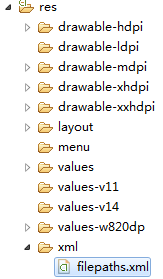
参见 https://www.jianshu.com/p/be817f3aa145
activity_main.xml
<LinearLayout xmlns:android="http://schemas.android.com/apk/res/android"
    xmlns:tools="http://schemas.android.com/tools"
    android:layout_width="match_parent"
    android:layout_height="match_parent"
    android:paddingBottom="@dimen/activity_vertical_margin"
    android:paddingLeft="@dimen/activity_horizontal_margin"
    android:paddingRight="@dimen/activity_horizontal_margin"
    android:paddingTop="@dimen/activity_vertical_margin"
    android:orientation="vertical"
    tools:context="com.example.testphoto.MainActivity" >

    <TextView
        android:layout_width="wrap_content"
        android:layout_height="wrap_content"
        android:text="@string/hello_world" />

    <Button
        android:id="@+id/btnPick"
        android:layout_width="165px"
        android:layout_height="wrap_content"
        android:text="选择图片"/>

    <ImageView
        android:id="@+id/imgView"
        android:layout_width="wrap_content"
        android:layout_height="wrap_content"/>
</LinearLayout>
MainActivity.java
package com.example.testcam;

import java.io.File;
import java.io.FileInputStream;
import java.io.FileNotFoundException;
import java.io.FileOutputStream;
import java.io.InputStream;

import android.Manifest;
import android.annotation.SuppressLint;
import android.app.Activity;
import android.content.ContentValues;
import android.content.Intent;
import android.content.pm.PackageManager;
import android.graphics.Bitmap;
import android.graphics.BitmapFactory;
import android.net.Uri;
import android.os.Build;
import android.os.Bundle;
import android.os.Environment;
import android.os.StrictMode;
import android.provider.MediaStore;
import android.widget.Button;
import android.widget.ImageView;
import android.util.Log;
import android.view.View;
import android.support.v4.app.ActivityCompat;
import android.support.v4.content.ContextCompat;
import android.support.v4.content.FileProvider;

/**
 * 上传头像功能demo
 * @author
 */
public class MainActivity extends Activity {

	private static final int REQUEST_CODE_PICK_PHOTO = 1; //选择照片返回
	private static final int REQUEST_CODE_TAKE_PHOTO = 2; //拍照返回
	private static final int REQUEST_CODE_CUT_OK = 3;	  //编辑返回

	private int apiVersion;
	private Uri saveUri; //最终处理后的相片保存路径
	private Uri cameraSaveUri; //相机拍照保存路径
	private int clipWidth = 100;
	private int clipHeight = 100;
	private String clipFileName;
	private String cameraSaveFileName = "avatar_tmp.jpg";

	//对应AndroidManifest中provider的authorities
	private String authorities = "com.zwwx.ssss.filesprovider";

    @Override
    protected void onCreate(Bundle savedInstanceState) {
        super.onCreate(savedInstanceState);
        setContentView(R.layout.activity_main);
        apiVersion = android.os.Build.VERSION.SDK_INT;

        Button btnPick = (Button) findViewById(R.id.btnPick);
        btnPick.setOnClickListener(new View.OnClickListener(){
        	@Override
			public void onClick(View v) {
        		takePhoto(1, 80, 80, "avatar.jpg");
			}
        });

        /*if (Build.VERSION.SDK_INT >= Build.VERSION_CODES.N) {
        	debug("*** StrictMode");
            StrictMode.VmPolicy.Builder builder = new StrictMode.VmPolicy.Builder();
            StrictMode.setVmPolicy(builder.build());
        }*/
    }

    //--begin
    // 内存紧张的手机启动拍照功能时活动可能会被系统销毁,当返回活动时需要自己处理数据重建。

    @Override
    public void onSaveInstanceState(Bundle outState) {
    	debug("onSaveInstanceState()");
        outState.putString("savePath", getPhotoSavePath());
        outState.putInt("clipWidth", clipWidth);
        outState.putInt("clipHeight", clipHeight);
        outState.putString("clipFileName", clipFileName);
        super.onSaveInstanceState(outState);
    }

    @Override
    public void onRestoreInstanceState(Bundle savedInstanceState) {
       super.onRestoreInstanceState(savedInstanceState);
       debug("onRestoreInstanceState()");
       String savePath = savedInstanceState.getString("savePath");
       saveUri = Uri.parse(savePath);
       clipWidth = savedInstanceState.getInt("clipWidth");
       clipHeight = savedInstanceState.getInt("clipHeight");
       clipFileName = savedInstanceState.getString("clipFileName");
    }
    //--end

    public void takePhoto(int type, int clipWidth, int clipHeight, String clipFileName)
    {
    	debug((String.format("takePhoto(clipWidth=%d, clipHeight=%d, clipFileName=%s)", clipWidth, clipHeight, clipFileName)));

    	this.clipWidth = clipWidth;
    	this.clipHeight = clipHeight;
    	this.clipFileName = clipFileName;

    	switch(type){
	    	case 1://相机
	    		if (checkPermissionCamera()) {
	    			openCamera();
	    		}
	    		break;
	    	case 2://相册
	    		openAlbum();
	    		break;
    	}
    }

    /**
     * 检查权限
     * @return true有权限  false无权限
     */
    private Boolean checkPermissionCamera()
    {
    	if (ContextCompat.checkSelfPermission(this,Manifest.permission.CAMERA) != PackageManager.PERMISSION_GRANTED ||
    		ContextCompat.checkSelfPermission(this,Manifest.permission.WRITE_EXTERNAL_STORAGE) != PackageManager.PERMISSION_GRANTED ||
    		ContextCompat.checkSelfPermission(this,Manifest.permission.READ_EXTERNAL_STORAGE) != PackageManager.PERMISSION_GRANTED) {
    		ActivityCompat.requestPermissions(
        			MainActivity.this,
        			new String[]{
    					Manifest.permission.CAMERA,
    					Manifest.permission.WRITE_EXTERNAL_STORAGE,
    					Manifest.permission.READ_EXTERNAL_STORAGE
        			},
        			REQUEST_CODE_TAKE_PHOTO);
    		return false;
		}
    	return true;
    }

    /**
     * 打开相机拍照
     */
    private void openCamera()
    {
    	debug("Open Camera");
    	debug("Android API Version: "+apiVersion);

    	deleteSavedPhoto();
    	deleteCameraSavedPhoto();

    	File file = getCameraSaveFile();
    	Uri uri = getUriForFile(file);

    	Intent intent = new Intent(MediaStore.ACTION_IMAGE_CAPTURE);
    	intent.putExtra(MediaStore.EXTRA_OUTPUT, uri);
    	if (apiVersion >= Build.VERSION_CODES.N){//适配Android7.0+
    		//临时授权允许其他程序访问本应用的Uri
    		intent.addFlags(Intent.FLAG_GRANT_READ_URI_PERMISSION);
    	}

        startActivityForResult(intent, REQUEST_CODE_TAKE_PHOTO);
    }

    /**
     * 打开本地相册
     */
    private void openAlbum()
    {
    	debug("Open Album");
    	deleteSavedPhoto();
    	Intent i = new Intent(Intent.ACTION_PICK, null);
        i.setDataAndType(MediaStore.Images.Media.EXTERNAL_CONTENT_URI, "image/*");
        //设定结果返回
        startActivityForResult(i, REQUEST_CODE_PICK_PHOTO);
    }

    /**
     * 裁剪图片方法
     * @param uri
     */
    private void clipPhoto(Uri uri)
    {
    	debug("load clip uri="+uri.toString());
        Intent intent = new Intent("com.android.camera.action.CROP");
        intent.addFlags(Intent.FLAG_GRANT_WRITE_URI_PERMISSION | Intent.FLAG_GRANT_READ_URI_PERMISSION);
        //可以选择图片类型,如果是*表明所有类型的图片
        intent.setDataAndType(uri, "image/*");
        // 下面这个crop = true是设置在开启的Intent中设置显示的VIEW可裁剪
        intent.putExtra("crop", "true");
        // aspectX aspectY 是宽高的比例,这里设置的是正方形(长宽比为1:1)
        intent.putExtra("aspectX", 1);
        intent.putExtra("aspectY", 1);
        // outputX outputY 是裁剪图片宽高
        intent.putExtra("outputX", clipWidth);
        intent.putExtra("outputY", clipHeight);
        //裁剪时是否保留图片的比例,这里的比例是1:1
        intent.putExtra("scale", true);
        intent.putExtra("scaleUpIfNeeded", true);
        //是否是圆形裁剪区域,设置了也不一定有效
        //intent.putExtra("circleCrop", true);
        //设置输出的格式
        if(clipFileName.endsWith(".jpg"))
        	intent.putExtra("outputFormat", Bitmap.CompressFormat.JPEG.toString());
        else
        	intent.putExtra("outputFormat", Bitmap.CompressFormat.PNG.toString());
        //是否将数据保留在Bitmap中返回(这种方式只适合返回小的裁剪图片,否则会内存占用过多导致闪退或卡死)
        //intent.putExtra("return-data", true);
        intent.putExtra("return-data", false);//部分手机需要明确设置为false

        //将裁剪图片直接保存到指定目录
        File file = getClipSaveFile();
        //注意:Android7.0+还是要用原来的Uri格式作为输出路径,不然会保存失败
        saveUri = Uri.fromFile(file);
        debug("save clip uri="+saveUri.toString());
        intent.putExtra(MediaStore.EXTRA_OUTPUT, saveUri);

        startActivityForResult(intent, REQUEST_CODE_CUT_OK);
    }

    @Override
    protected void onActivityResult(int requestCode, int resultCode, Intent data) {
    	super.onActivityResult(requestCode, resultCode, data);
    	debug("on activity result: requestCode="+requestCode+" resultCode="+resultCode);
    	File file;
    	Uri uri;
    	switch(requestCode){
    		case REQUEST_CODE_PICK_PHOTO://从相册选择照片后返回
    			if(null != data){
    				uri = data.getData();
    				if(null != uri){//如果取消了选择这里返回null
	        			debug("return selected photo. uri="+uri.toString());
	        	    	clipPhoto(uri);
    				}
    			}
    	    	break;
    		case REQUEST_CODE_TAKE_PHOTO://拍照确认后返回
    			file = getCameraSaveFile();
    			debug("return camera photo. absolute path="+file.getAbsolutePath());
    			debug("camera photo, exists="+file.exists());
    			if(file.exists()){
    				uri = getUriForFile(file);
    				clipPhoto(uri);
    			}else{
    				debug("Error: camera photo not exists. absolute path="+file.getAbsolutePath());
    			}
    			break;
    		case REQUEST_CODE_CUT_OK://裁剪编辑确认后返回
    			file = getClipSaveFile();
    			debug("return edit photo. absolute path="+file.getAbsolutePath());
    			debug("edited photo, exists="+file.exists());
    			if(file.exists())
    				ShowSavedPhoto();
    			break;
    	}
    }

    //用户授权返回
    @Override
    public void onRequestPermissionsResult(int requestCode, String[] permissions, int[] grantResults)
    {
    	debug(String.format("onRequestPermissionsResult(requestCode=%d)", requestCode));
    	switch(requestCode){
    		case REQUEST_CODE_TAKE_PHOTO:
    			if (null != permissions) {
    				Boolean grant = true;
    				for (int i=0; i<permissions.length; i++) {//检查所需权限是否都被授予
    					if (grantResults[i] != PackageManager.PERMISSION_GRANTED) {
    						grant = false;
    						break;
    					}
    				}
    				if (grant) {
    					this.openCamera();
    				}else{
    					debug("permissions denied");
    				}
    			}
    			break;
    	}
    }

    //--- 文件路径--------
    private Uri getUriForFile(File file)
    {
    	Uri uri;
    	if (apiVersion < Build.VERSION_CODES.N){ //Android7.0之前
    		uri = Uri.fromFile(file);
    	}else{
    		uri = FileProvider.getUriForFile(this, authorities, file);
    	}
    	return uri;
    }

    private String getPhotoSavePath()
    {
    	return getPath(clipFileName, true);
    }

    private File getClipSaveFile()
    {
    	File file = new File(getPath(clipFileName, false));
    	return file;
    }

    private File getCameraSaveFile()
    {
    	File file = new File(getPath(cameraSaveFileName, false));
    	return file;
    }

    private String getPath(String fileName, Boolean filePrefix)
    {
    	String path;
    	if(filePrefix){
    		path = "file:%s/"+fileName;
    	}else{
    		path = "%s/"+fileName;
    	}
        Boolean sdcardExist = Environment.getExternalStorageState().equals(android.os.Environment.MEDIA_MOUNTED);
        if(sdcardExist){
        	path = String.format(path, this.getExternalFilesDir(""));
        }else{
        	//Toast.makeText(this.mActivity, "SDCard not exist!", Toast.LENGTH_LONG).show();
        	debug("SDCard not exist!");
        	path = String.format(path, this.getFilesDir());
        }
    	return path;
    }

    private void deleteSavedPhoto()
    {
    	File file = new File(getPath(clipFileName, false));
    	if(file.exists()){//发现用exists()时,文件路径不能有协议头.否则会一直返回false
    		debug("save delete "+file.getPath());
    		file.delete();
    	}
    }

    private void deleteCameraSavedPhoto(){
    	File file = new File(getPath(cameraSaveFileName, false));
    	if(file.exists()){
    		debug("camera delete "+file.getPath());
    		file.delete();
    	}
    }
    //--end

    private void ShowSavedPhoto()
    {
    	try {
			Bitmap bitmap = BitmapFactory.decodeStream(getContentResolver().openInputStream(saveUri));
			ImageView imgView = (ImageView)findViewById(R.id.imgView);
			imgView.setImageBitmap(bitmap);
		} catch (FileNotFoundException e) {
			Log.e("zwwx", "read save photo failure! uri="+saveUri.toString());
		}
    }

    private void debug(String msg)
    {
    	Log.d("zwwx", msg);
    }
}
标签: Android
日历
最新文章
随机文章
热门文章
分类

存档
- 2026年7月(1)
- 2026年6月(17)
- 2026年5月(29)
- 2026年4月(7)
- 2026年3月(15)
- 2026年2月(3)
- 2026年1月(6)
- 2025年12月(1)
- 2025年11月(1)
- 2025年9月(3)
- 2025年7月(4)
- 2025年6月(5)
- 2025年5月(1)
- 2025年4月(5)
- 2025年3月(4)
- 2025年2月(3)
- 2025年1月(1)
- 2024年12月(5)
- 2024年11月(5)
- 2024年10月(5)
- 2024年9月(3)
- 2024年8月(3)
- 2024年7月(11)
- 2024年6月(3)
- 2024年5月(9)
- 2024年4月(10)
- 2024年3月(11)
- 2024年2月(24)
- 2024年1月(12)
- 2023年12月(3)
- 2023年11月(9)
- 2023年10月(7)
- 2023年9月(2)
- 2023年8月(7)
- 2023年7月(9)
- 2023年6月(6)
- 2023年5月(7)
- 2023年4月(11)
- 2023年3月(6)
- 2023年2月(11)
- 2023年1月(8)
- 2022年12月(2)
- 2022年11月(4)
- 2022年10月(10)
- 2022年9月(2)
- 2022年8月(13)
- 2022年7月(7)
- 2022年6月(11)
- 2022年5月(18)
- 2022年4月(29)
- 2022年3月(5)
- 2022年2月(6)
- 2022年1月(8)
- 2021年12月(5)
- 2021年11月(3)
- 2021年10月(4)
- 2021年9月(9)
- 2021年8月(14)
- 2021年7月(8)
- 2021年6月(5)
- 2021年5月(2)
- 2021年4月(3)
- 2021年3月(7)
- 2021年2月(2)
- 2021年1月(8)
- 2020年12月(7)
- 2020年11月(2)
- 2020年10月(6)
- 2020年9月(9)
- 2020年8月(10)
- 2020年7月(9)
- 2020年6月(18)
- 2020年5月(4)
- 2020年4月(25)
- 2020年3月(38)
- 2020年1月(21)
- 2019年12月(13)
- 2019年11月(29)
- 2019年10月(44)
- 2019年9月(17)
- 2019年8月(18)
- 2019年7月(25)
- 2019年6月(25)
- 2019年5月(17)
- 2019年4月(10)
- 2019年3月(36)
- 2019年2月(35)
- 2019年1月(28)
- 2018年12月(30)
- 2018年11月(22)
- 2018年10月(4)
- 2018年9月(7)
- 2018年8月(13)
- 2018年7月(13)
- 2018年6月(6)
- 2018年5月(5)
- 2018年4月(13)
- 2018年3月(5)
- 2018年2月(3)
- 2018年1月(8)
- 2017年12月(35)
- 2017年11月(17)
- 2017年10月(16)
- 2017年9月(17)
- 2017年8月(20)
- 2017年7月(34)
- 2017年6月(17)
- 2017年5月(15)
- 2017年4月(32)
- 2017年3月(8)
- 2017年2月(2)
- 2017年1月(5)
- 2016年12月(14)
- 2016年11月(26)
- 2016年10月(12)
- 2016年9月(25)
- 2016年8月(32)
- 2016年7月(14)
- 2016年6月(21)
- 2016年5月(17)
- 2016年4月(13)
- 2016年3月(8)
- 2016年2月(8)
- 2016年1月(18)
- 2015年12月(13)
- 2015年11月(15)
- 2015年10月(12)
- 2015年9月(18)
- 2015年8月(21)
- 2015年7月(35)
- 2015年6月(13)
- 2015年5月(9)
- 2015年4月(4)
- 2015年3月(5)
- 2015年2月(4)
- 2015年1月(13)
- 2014年12月(7)
- 2014年11月(5)
- 2014年10月(4)
- 2014年9月(8)
- 2014年8月(16)
- 2014年7月(26)
- 2014年6月(22)
- 2014年5月(28)
- 2014年4月(15)
友情链接
- Unity官网
- Unity圣典
- Unity在线手册
- Unity中文手册(圣典)
- Unity官方中文论坛
- Unity游戏蛮牛用户文档
- Unity下载存档
- Unity引擎源码下载
- Unity服务
- Unity Ads
- wiki.unity3d
- Visual Studio Code官网
- SenseAR开发文档
- MSDN
- C# 参考
- C# 编程指南
- .NET Framework类库
- .NET 文档
- .NET 开发
- WPF官方文档
- uLua
- xLua
- SharpZipLib
- Protobuf-net
- Protobuf.js
- OpenSSL
- OPEN CASCADE
- JSON
- MessagePack
- C在线工具
- 游戏蛮牛
- GreenVPN
- 聚合数据
- 热云
- 融云
- 腾讯云
- 腾讯开放平台
- 腾讯游戏服务
- 腾讯游戏开发者平台
- 腾讯课堂
- 微信开放平台
- 腾讯实时音视频
- 腾讯即时通信IM
- 微信公众平台技术文档
- 白鹭引擎官网
- 白鹭引擎开放平台
- 白鹭引擎开发文档
- FairyGUI编辑器
- PureMVC-TypeScript
- 讯飞开放平台
- 亲加通讯云
- Cygwin
- Mono开发者联盟
- Scut游戏服务器引擎
- KBEngine游戏服务器引擎
- Photon游戏服务器引擎
- 码云
- SharpSvn
- 腾讯bugly
- 4399原创平台
- 开源中国
- Firebase
- Firebase-Admob-Unity
- google-services-unity
- Firebase SDK for Unity
- Google-Firebase-SDK
- AppsFlyer SDK
- android-repository
- CQASO
- Facebook开发者平台
- gradle下载
- GradleBuildTool下载
- Android Developers
- Google中国开发者
- AndroidDevTools
- Android社区
- Android开发工具
- Google Play Games Services
- Google商店
- Google APIs for Android
- 金钱豹VPN
- TouchSense SDK
- MakeHuman
- Online RSA Key Converter
- Windows UWP应用
- Visual Studio For Unity
- Open CASCADE Technology
- 慕课网
- 阿里云服务器ECS
- 在线免费文字转语音系统
- AI Studio
- 网云穿
- 百度网盘开放平台
- 迅捷画图
- 菜鸟工具
- [CSDN] 程序员研修院
- 华为人脸识别
- 百度AR导航导览SDK
- 海康威视官网
- 海康开放平台
- 海康SDK下载
- git download
- Open CASCADE
- CascadeStudio
- OpenClaw中文社区
- three.js manual
- SVG官方文档
交流QQ群
-
Flash游戏设计: 86184192
Unity游戏设计: 171855449
游戏设计订阅号

捐赠 (用于支付服务器费用)
-
微信

支持宝

捐赠的朋友可与博主成为微信好友,点击下方【给我写信】给博主留言。


