
HybridCLR代码混淆
作者:追风剑情 发布于:2026-1-27 14:22 分类:Unity3d
本教程使用 HybridCLR+Obfuz 方案来混淆代码(dll)防止破解。
一、安装 Obfuz 与 obfuz4hybridclr
通过 Unity Package Manager 安装:
https://gitee.com/focus-creative-games/obfuz.git
https://gitee.com/focus-creative-games/obfuz4hybridclr.git
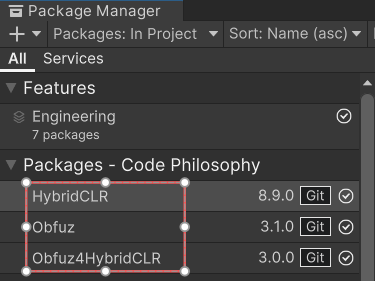
安装 Obfuz 时会报错,这是因为 Obfuz 和 HybridCLR 同时包含了 dnlib.dll 文件导致的,解决方法就是删除 HybridCLR 包下面的 dnlib.dll。
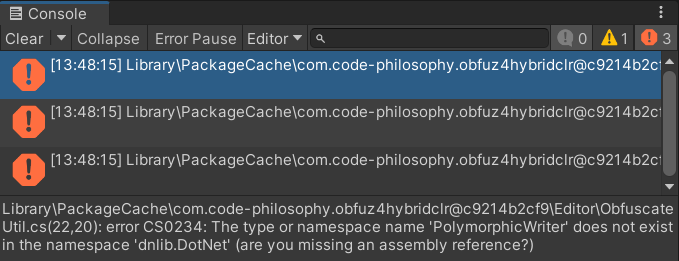
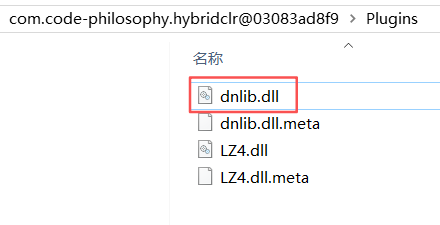
删除 HybridCLR 包下面的 dnlib.dll
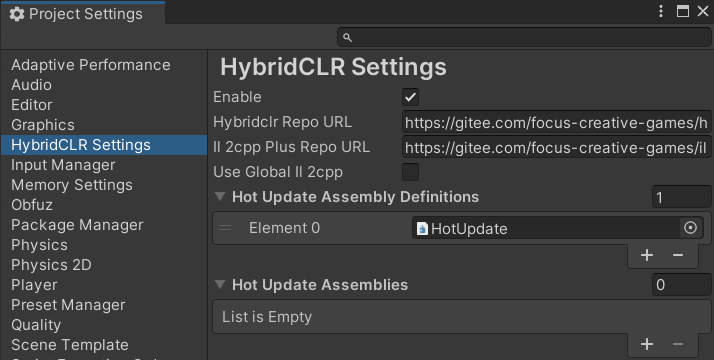
二、配置 Project Settings
HotUpdate程序集的创建在《HybridCLR快速入门》中已讲解。
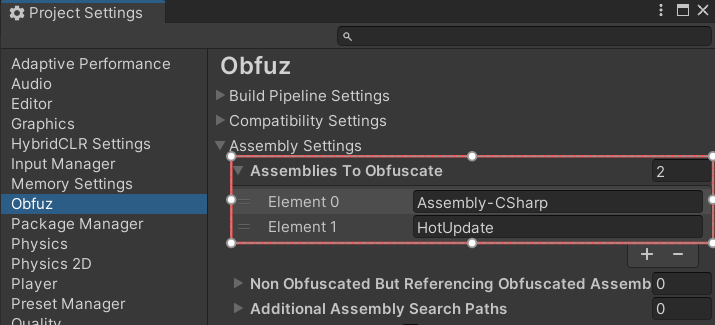
三、创建热更测试脚本 Assets\HotUpdate\Entry.cs
using UnityEngine;

public class Entry : MonoBehaviour
{
    void Start()
    {
        Debug.Log("Entry Start");
    }

    void Update()
    {

    }
}
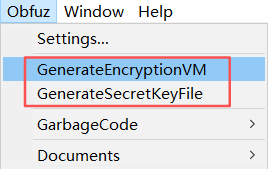
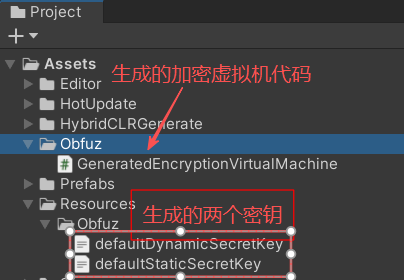
四、生成加密虚拟机及密钥
执行菜单【Obfuz】->GenerateEncryptionVM 和 【Obfuz】->GenerateSecretKeyFile 命令。
五、生成混淆后的DLL
在 Assets/Editor/HybridCLREditor.cs 中新增一个功能菜单。
using HybridCLR.Editor;
using HybridCLR.Editor.AOT;
using HybridCLR.Editor.Commands;
using Obfuz.Settings;
using Obfuz4HybridCLR;
using System.Collections.Generic;
using System.IO;
using UnityEditor;
using UnityEngine;

public class HybridCLREditor
{
    // 进一步剔除AOT dll中非泛型函数元数据,输出到StrippedAOTAssembly2目录下
    [MenuItem("HybridCLR/Strip AOT Assembly")]
    public static void StripAOTAssembly()
    {
        BuildTarget target = EditorUserBuildSettings.activeBuildTarget;
        string srcDir = SettingsUtil.GetAssembliesPostIl2CppStripDir(target);
        string dstDir = $"{SettingsUtil.HybridCLRDataDir}/StrippedAOTAssembly2/{target}";
        foreach (var src in Directory.GetFiles(srcDir, "*.dll"))
        {
            string dllName = Path.GetFileName(src);
            string dstFile = $"{dstDir}/{dllName}";
            AOTAssemblyMetadataStripper.Strip(src, dstFile);
        }
    }

    [MenuItem("HybridCLR/CompileAndObfuscateAndCopyToStreamingAssets")]
    public static void CompileAndObfuscateAndCopyToStreamingAssets()
    {
        BuildTarget target = EditorUserBuildSettings.activeBuildTarget;
        CompileDllCommand.CompileDll(target);

        string obfuscatedHotUpdateDllPath = PrebuildCommandExt.GetObfuscatedHotUpdateAssemblyOutputPath(target);
        ObfuscateUtil.ObfuscateHotUpdateAssemblies(target, obfuscatedHotUpdateDllPath);

        Directory.CreateDirectory(Application.streamingAssetsPath);

        string hotUpdateDllPath = $"{SettingsUtil.GetHotUpdateDllsOutputDirByTarget(target)}";
        List<string> obfuscationRelativeAssemblyNames = ObfuzSettings.Instance.assemblySettings.GetObfuscationRelativeAssemblyNames();

        foreach (string assName in SettingsUtil.HotUpdateAssemblyNamesIncludePreserved)
        {
            string srcDir = obfuscationRelativeAssemblyNames.Contains(assName) ? obfuscatedHotUpdateDllPath : hotUpdateDllPath;
            string srcFile = $"{srcDir}/{assName}.dll";
            string dstFile = $"{Application.streamingAssetsPath}/{assName}.dll.bytes";
            if (File.Exists(srcFile))
            {
                File.Copy(srcFile, dstFile, true);
                Debug.Log($"[CompileAndObfuscate] Copy {srcFile} to {dstFile}");
            }
        }
    }
}
执行菜单 【HybridCLR】->ObfuzExtension->GenerateAll 生成混淆后的程序集(dll)
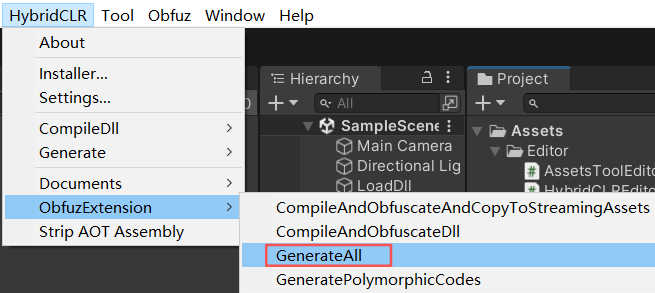
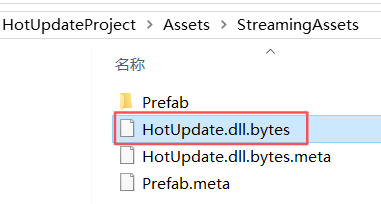
再执行菜单 【HybridCLR】->ObfuzExtension->CompileAndObfuscateAndCopyToStreamingAssets 将混淆后的热更DLL复制到StreamingAssets下。
六、创建启动脚本
using HybridCLR;
using Obfuz;
using Obfuz.EncryptionVM;
using System;
using System.Collections;
using System.Collections.Generic;
using System.IO;
using System.Linq;
using System.Reflection;
using UnityEngine;
/// <summary>
/// 引导程序
/// </summary>
public class Bootstrap : MonoBehaviour
{
    // 初始化EncryptionService后被混淆的代码才能正常运行,
    // 因此尽可能地早地初始化它。
    [RuntimeInitializeOnLoadMethod(RuntimeInitializeLoadType.AfterAssembliesLoaded)]
    private static void SetUpStaticSecretKey()
    {
        Debug.Log("SetUpStaticSecret begin");
        EncryptionService<DefaultStaticEncryptionScope>.Encryptor = new GeneratedEncryptionVirtualMachine(Resources.Load<TextAsset>("Obfuz/defaultStaticSecretKey").bytes);
        Debug.Log("SetUpStaticSecret end");
    }

    void Start()
    {
#if UNITY_EDITOR
        Assembly ass = AppDomain.CurrentDomain.GetAssemblies().First(ass => ass.GetName().Name == "HotUpdate");
#else
        LoadMetadataForAOTAssemblies();
        Assembly ass = Assembly.Load(File.ReadAllBytes($"{Application.streamingAssetsPath}/HotUpdate.dll.bytes"));
#endif
        Type entry = ass.GetType("Entry");
        this.gameObject.AddComponent(entry);
    }

    private static void LoadMetadataForAOTAssemblies()
    {
        HomologousImageMode mode = HomologousImageMode.SuperSet;
        var aotDlls = new string[] { "mscorlib" };
        foreach (var aotDllName in aotDlls)
        {
            string filePath = $"{Application.streamingAssetsPath}/{aotDllName}.dll.bytes";
            if (!File.Exists(filePath))
                continue;
            byte[] dllBytes = File.ReadAllBytes(filePath);
            LoadImageErrorCode err = RuntimeApi.LoadMetadataForAOTAssembly(dllBytes, mode);
            Debug.Log($"LoadMetadataForAOTAssembly:{aotDllName}. mode:{mode} ret:{err}");
        }
    }
}
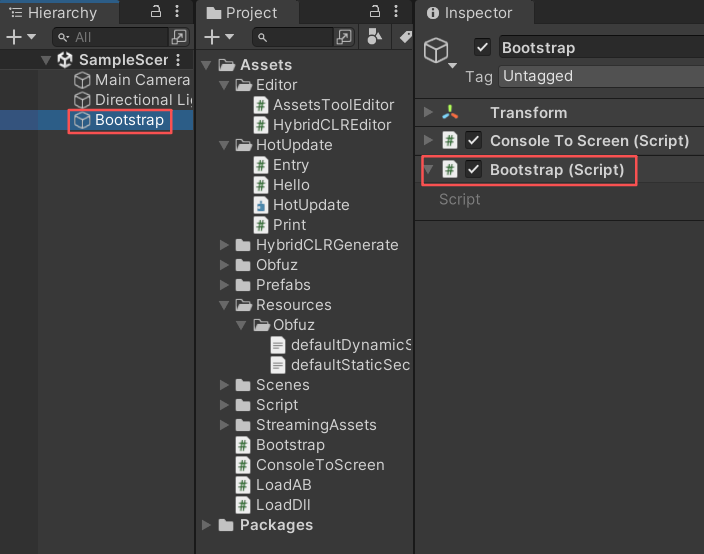
将启动脚本添加到场景中
七、用ILSpy查看HotUpdate.dll.bytes
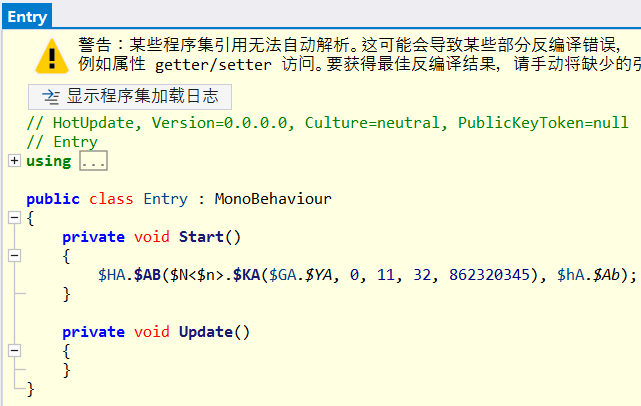
从上面的截图可以看出热更程序集中的代码已经被混淆。这里要注意的是,Unity脚本类名和特殊方法名不会被混淆。
八、打包运行测试
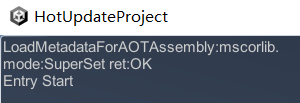
从窗口中打印出的日志“Entry Start”可以看出混淆后的热更程序集(HotUpdate.dll.bytes)被正确执行。
标签: Unity3d
日历
最新文章
随机文章
热门文章
分类

存档
- 2026年7月(1)
- 2026年6月(17)
- 2026年5月(29)
- 2026年4月(7)
- 2026年3月(15)
- 2026年2月(3)
- 2026年1月(6)
- 2025年12月(1)
- 2025年11月(1)
- 2025年9月(3)
- 2025年7月(4)
- 2025年6月(5)
- 2025年5月(1)
- 2025年4月(5)
- 2025年3月(4)
- 2025年2月(3)
- 2025年1月(1)
- 2024年12月(5)
- 2024年11月(5)
- 2024年10月(5)
- 2024年9月(3)
- 2024年8月(3)
- 2024年7月(11)
- 2024年6月(3)
- 2024年5月(9)
- 2024年4月(10)
- 2024年3月(11)
- 2024年2月(24)
- 2024年1月(12)
- 2023年12月(3)
- 2023年11月(9)
- 2023年10月(7)
- 2023年9月(2)
- 2023年8月(7)
- 2023年7月(9)
- 2023年6月(6)
- 2023年5月(7)
- 2023年4月(11)
- 2023年3月(6)
- 2023年2月(11)
- 2023年1月(8)
- 2022年12月(2)
- 2022年11月(4)
- 2022年10月(10)
- 2022年9月(2)
- 2022年8月(13)
- 2022年7月(7)
- 2022年6月(11)
- 2022年5月(18)
- 2022年4月(29)
- 2022年3月(5)
- 2022年2月(6)
- 2022年1月(8)
- 2021年12月(5)
- 2021年11月(3)
- 2021年10月(4)
- 2021年9月(9)
- 2021年8月(14)
- 2021年7月(8)
- 2021年6月(5)
- 2021年5月(2)
- 2021年4月(3)
- 2021年3月(7)
- 2021年2月(2)
- 2021年1月(8)
- 2020年12月(7)
- 2020年11月(2)
- 2020年10月(6)
- 2020年9月(9)
- 2020年8月(10)
- 2020年7月(9)
- 2020年6月(18)
- 2020年5月(4)
- 2020年4月(25)
- 2020年3月(38)
- 2020年1月(21)
- 2019年12月(13)
- 2019年11月(29)
- 2019年10月(44)
- 2019年9月(17)
- 2019年8月(18)
- 2019年7月(25)
- 2019年6月(25)
- 2019年5月(17)
- 2019年4月(10)
- 2019年3月(36)
- 2019年2月(35)
- 2019年1月(28)
- 2018年12月(30)
- 2018年11月(22)
- 2018年10月(4)
- 2018年9月(7)
- 2018年8月(13)
- 2018年7月(13)
- 2018年6月(6)
- 2018年5月(5)
- 2018年4月(13)
- 2018年3月(5)
- 2018年2月(3)
- 2018年1月(8)
- 2017年12月(35)
- 2017年11月(17)
- 2017年10月(16)
- 2017年9月(17)
- 2017年8月(20)
- 2017年7月(34)
- 2017年6月(17)
- 2017年5月(15)
- 2017年4月(32)
- 2017年3月(8)
- 2017年2月(2)
- 2017年1月(5)
- 2016年12月(14)
- 2016年11月(26)
- 2016年10月(12)
- 2016年9月(25)
- 2016年8月(32)
- 2016年7月(14)
- 2016年6月(21)
- 2016年5月(17)
- 2016年4月(13)
- 2016年3月(8)
- 2016年2月(8)
- 2016年1月(18)
- 2015年12月(13)
- 2015年11月(15)
- 2015年10月(12)
- 2015年9月(18)
- 2015年8月(21)
- 2015年7月(35)
- 2015年6月(13)
- 2015年5月(9)
- 2015年4月(4)
- 2015年3月(5)
- 2015年2月(4)
- 2015年1月(13)
- 2014年12月(7)
- 2014年11月(5)
- 2014年10月(4)
- 2014年9月(8)
- 2014年8月(16)
- 2014年7月(26)
- 2014年6月(22)
- 2014年5月(28)
- 2014年4月(15)
友情链接
- Unity官网
- Unity圣典
- Unity在线手册
- Unity中文手册(圣典)
- Unity官方中文论坛
- Unity游戏蛮牛用户文档
- Unity下载存档
- Unity引擎源码下载
- Unity服务
- Unity Ads
- wiki.unity3d
- Visual Studio Code官网
- SenseAR开发文档
- MSDN
- C# 参考
- C# 编程指南
- .NET Framework类库
- .NET 文档
- .NET 开发
- WPF官方文档
- uLua
- xLua
- SharpZipLib
- Protobuf-net
- Protobuf.js
- OpenSSL
- OPEN CASCADE
- JSON
- MessagePack
- C在线工具
- 游戏蛮牛
- GreenVPN
- 聚合数据
- 热云
- 融云
- 腾讯云
- 腾讯开放平台
- 腾讯游戏服务
- 腾讯游戏开发者平台
- 腾讯课堂
- 微信开放平台
- 腾讯实时音视频
- 腾讯即时通信IM
- 微信公众平台技术文档
- 白鹭引擎官网
- 白鹭引擎开放平台
- 白鹭引擎开发文档
- FairyGUI编辑器
- PureMVC-TypeScript
- 讯飞开放平台
- 亲加通讯云
- Cygwin
- Mono开发者联盟
- Scut游戏服务器引擎
- KBEngine游戏服务器引擎
- Photon游戏服务器引擎
- 码云
- SharpSvn
- 腾讯bugly
- 4399原创平台
- 开源中国
- Firebase
- Firebase-Admob-Unity
- google-services-unity
- Firebase SDK for Unity
- Google-Firebase-SDK
- AppsFlyer SDK
- android-repository
- CQASO
- Facebook开发者平台
- gradle下载
- GradleBuildTool下载
- Android Developers
- Google中国开发者
- AndroidDevTools
- Android社区
- Android开发工具
- Google Play Games Services
- Google商店
- Google APIs for Android
- 金钱豹VPN
- TouchSense SDK
- MakeHuman
- Online RSA Key Converter
- Windows UWP应用
- Visual Studio For Unity
- Open CASCADE Technology
- 慕课网
- 阿里云服务器ECS
- 在线免费文字转语音系统
- AI Studio
- 网云穿
- 百度网盘开放平台
- 迅捷画图
- 菜鸟工具
- [CSDN] 程序员研修院
- 华为人脸识别
- 百度AR导航导览SDK
- 海康威视官网
- 海康开放平台
- 海康SDK下载
- git download
- Open CASCADE
- CascadeStudio
- OpenClaw中文社区
- three.js manual
- SVG官方文档
交流QQ群
-
Flash游戏设计: 86184192
Unity游戏设计: 171855449
游戏设计订阅号

捐赠 (用于支付服务器费用)
-
微信

支持宝

捐赠的朋友可与博主成为微信好友,点击下方【给我写信】给博主留言。


