
一个简单的 URP Shader
作者:追风剑情 发布于:2025-7-7 15:56 分类:Shader
Shader
Shader "Custom/SimpleURP"
{
    Properties
    {
        [MainTexture] //标记为主纹理
        _BaseMap("Base Map", 2D) = "white" {}
        [MainColor] //标记为主颜色
        _BaseColor("Base Color", Color) = (1, 1, 1, 1)
        _Smoothness("Smoothness", Range(0,1)) = 0.5
    }

    SubShader
    {
        Tags
        {
            "RenderType" = "Opaque"
            //声明此Shader只在URP管线中执行
            "RenderPipeline" = "UniversalPipeline"
        }

        Pass
        {
            Blend One Zero
			ZTest Always
			ZWrite On
			Cull Back

            HLSLPROGRAM
            #pragma vertex vert
            #pragma fragment frag

            //所有GPU实例相关的宏,只有在Inspector窗口启用 "Enable GPU Instancing" 时才会生效
            //开启GPU实例
            #pragma multi_compile_instancing
            //开启每实例渲染层
            #pragma instancing_options renderinglayer

            //Core.hlsl相当于BRP中的UnityCG.cginc
            #include "Packages/com.unity.render-pipelines.universal/ShaderLibrary/Core.hlsl"
            //包含核心光照库
            #include "Packages/com.unity.render-pipelines.universal/ShaderLibrary/Lighting.hlsl"

            struct Attributes
            {
                //模型空间中的顶点坐标
                float4 positionOS : POSITION;
                //纹理UV坐标
                float2 uv : TEXCOORD0;
                //模型空间法线
                float3 normalOS : NORMAL;
                //声明GPU实例ID
				UNITY_VERTEX_INPUT_INSTANCE_ID
            };

            struct Varyings
            {
                //剪裁空间中的顶点坐标
                float4 positionHCS : SV_POSITION;
                //纹理UV坐标
                float2 uv : TEXCOORD0;
                //世界空间法线
                float3 normalWS : TEXCOORD1;
                //世界空间坐标
                float3 positionWS : TEXCOORD2;
                //声明GPU实例ID
				UNITY_VERTEX_INPUT_INSTANCE_ID
            };

            //纹理和对应的采样器定义
            TEXTURE2D(_BaseMap);
            SAMPLER(sampler_BaseMap);

            //静态变量放在 CBUFFER 中
            CBUFFER_START(UnityPerMaterial)
                //纹理的缩放和偏移参数
                float4 _BaseMap_ST;
                float _Smoothness;
            CBUFFER_END

            //实例变量放 INSTANCING_BUFFER 中
            UNITY_INSTANCING_BUFFER_START(Props)
                UNITY_DEFINE_INSTANCED_PROP(float4, _BaseColor) //每实例颜色
            UNITY_INSTANCING_BUFFER_END(Props)

            Varyings vert(Attributes input)
            {
                Varyings output;
                //参见UnityInstancing.hlsl
                //设置当前处理的GPU实例ID
                UNITY_SETUP_INSTANCE_ID(input);
                //将GPU实例ID从input传递到output
				UNITY_TRANSFER_INSTANCE_ID(input, output);
                //坐标变换
                output.positionHCS = TransformObjectToHClip(input.positionOS.xyz);
                output.positionWS = TransformObjectToWorld(input.positionOS.xyz);
                output.normalWS = TransformObjectToWorldNormal(input.normalOS);
                //计算纹理坐标(宏中封装了缩放和偏移处理)
                output.uv = TRANSFORM_TEX(input.uv, _BaseMap);
                return output;
            }

            half4 frag(Varyings input) : SV_Target
            {
                //设置当前处理的GPU实例ID
                UNITY_SETUP_INSTANCE_ID(input);
                //访问实例变量
                float4 baseColor = UNITY_ACCESS_INSTANCED_PROP(Props, _BaseColor);
                //纹理采样
                half4 color = SAMPLE_TEXTURE2D(_BaseMap, sampler_BaseMap, input.uv) * baseColor;

                //准备光照输入数据
                InputData lightingInput = (InputData)0;
                lightingInput.positionWS = input.positionWS;
                lightingInput.normalWS = normalize(input.normalWS);
                lightingInput.viewDirectionWS = GetWorldSpaceViewDir(input.positionWS);

                //准备表面数据
                SurfaceData surfaceData = (SurfaceData)0;
                surfaceData.albedo = color.rgb;
                surfaceData.alpha = color.a;
                surfaceData.smoothness = _Smoothness;
                surfaceData.metallic = 0; //非金属材质

                //计算PBR光照
                return UniversalFragmentPBR(lightingInput, surfaceData);
            }
            ENDHLSL
        }
    }
}
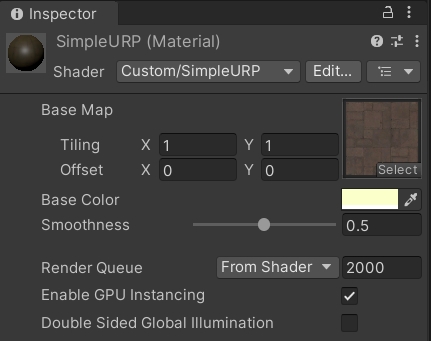
工程截图
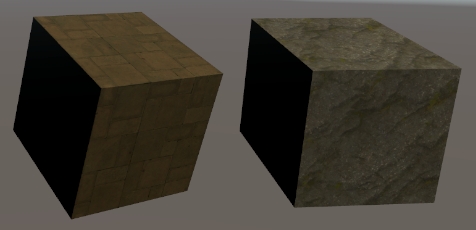
效果
标签: Shader
日历
最新文章
随机文章
热门文章
分类

存档
- 2026年7月(1)
- 2026年6月(17)
- 2026年5月(29)
- 2026年4月(7)
- 2026年3月(15)
- 2026年2月(3)
- 2026年1月(6)
- 2025年12月(1)
- 2025年11月(1)
- 2025年9月(3)
- 2025年7月(4)
- 2025年6月(5)
- 2025年5月(1)
- 2025年4月(5)
- 2025年3月(4)
- 2025年2月(3)
- 2025年1月(1)
- 2024年12月(5)
- 2024年11月(5)
- 2024年10月(5)
- 2024年9月(3)
- 2024年8月(3)
- 2024年7月(11)
- 2024年6月(3)
- 2024年5月(9)
- 2024年4月(10)
- 2024年3月(11)
- 2024年2月(24)
- 2024年1月(12)
- 2023年12月(3)
- 2023年11月(9)
- 2023年10月(7)
- 2023年9月(2)
- 2023年8月(7)
- 2023年7月(9)
- 2023年6月(6)
- 2023年5月(7)
- 2023年4月(11)
- 2023年3月(6)
- 2023年2月(11)
- 2023年1月(8)
- 2022年12月(2)
- 2022年11月(4)
- 2022年10月(10)
- 2022年9月(2)
- 2022年8月(13)
- 2022年7月(7)
- 2022年6月(11)
- 2022年5月(18)
- 2022年4月(29)
- 2022年3月(5)
- 2022年2月(6)
- 2022年1月(8)
- 2021年12月(5)
- 2021年11月(3)
- 2021年10月(4)
- 2021年9月(9)
- 2021年8月(14)
- 2021年7月(8)
- 2021年6月(5)
- 2021年5月(2)
- 2021年4月(3)
- 2021年3月(7)
- 2021年2月(2)
- 2021年1月(8)
- 2020年12月(7)
- 2020年11月(2)
- 2020年10月(6)
- 2020年9月(9)
- 2020年8月(10)
- 2020年7月(9)
- 2020年6月(18)
- 2020年5月(4)
- 2020年4月(25)
- 2020年3月(38)
- 2020年1月(21)
- 2019年12月(13)
- 2019年11月(29)
- 2019年10月(44)
- 2019年9月(17)
- 2019年8月(18)
- 2019年7月(25)
- 2019年6月(25)
- 2019年5月(17)
- 2019年4月(10)
- 2019年3月(36)
- 2019年2月(35)
- 2019年1月(28)
- 2018年12月(30)
- 2018年11月(22)
- 2018年10月(4)
- 2018年9月(7)
- 2018年8月(13)
- 2018年7月(13)
- 2018年6月(6)
- 2018年5月(5)
- 2018年4月(13)
- 2018年3月(5)
- 2018年2月(3)
- 2018年1月(8)
- 2017年12月(35)
- 2017年11月(17)
- 2017年10月(16)
- 2017年9月(17)
- 2017年8月(20)
- 2017年7月(34)
- 2017年6月(17)
- 2017年5月(15)
- 2017年4月(32)
- 2017年3月(8)
- 2017年2月(2)
- 2017年1月(5)
- 2016年12月(14)
- 2016年11月(26)
- 2016年10月(12)
- 2016年9月(25)
- 2016年8月(32)
- 2016年7月(14)
- 2016年6月(21)
- 2016年5月(17)
- 2016年4月(13)
- 2016年3月(8)
- 2016年2月(8)
- 2016年1月(18)
- 2015年12月(13)
- 2015年11月(15)
- 2015年10月(12)
- 2015年9月(18)
- 2015年8月(21)
- 2015年7月(35)
- 2015年6月(13)
- 2015年5月(9)
- 2015年4月(4)
- 2015年3月(5)
- 2015年2月(4)
- 2015年1月(13)
- 2014年12月(7)
- 2014年11月(5)
- 2014年10月(4)
- 2014年9月(8)
- 2014年8月(16)
- 2014年7月(26)
- 2014年6月(22)
- 2014年5月(28)
- 2014年4月(15)
友情链接
- Unity官网
- Unity圣典
- Unity在线手册
- Unity中文手册(圣典)
- Unity官方中文论坛
- Unity游戏蛮牛用户文档
- Unity下载存档
- Unity引擎源码下载
- Unity服务
- Unity Ads
- wiki.unity3d
- Visual Studio Code官网
- SenseAR开发文档
- MSDN
- C# 参考
- C# 编程指南
- .NET Framework类库
- .NET 文档
- .NET 开发
- WPF官方文档
- uLua
- xLua
- SharpZipLib
- Protobuf-net
- Protobuf.js
- OpenSSL
- OPEN CASCADE
- JSON
- MessagePack
- C在线工具
- 游戏蛮牛
- GreenVPN
- 聚合数据
- 热云
- 融云
- 腾讯云
- 腾讯开放平台
- 腾讯游戏服务
- 腾讯游戏开发者平台
- 腾讯课堂
- 微信开放平台
- 腾讯实时音视频
- 腾讯即时通信IM
- 微信公众平台技术文档
- 白鹭引擎官网
- 白鹭引擎开放平台
- 白鹭引擎开发文档
- FairyGUI编辑器
- PureMVC-TypeScript
- 讯飞开放平台
- 亲加通讯云
- Cygwin
- Mono开发者联盟
- Scut游戏服务器引擎
- KBEngine游戏服务器引擎
- Photon游戏服务器引擎
- 码云
- SharpSvn
- 腾讯bugly
- 4399原创平台
- 开源中国
- Firebase
- Firebase-Admob-Unity
- google-services-unity
- Firebase SDK for Unity
- Google-Firebase-SDK
- AppsFlyer SDK
- android-repository
- CQASO
- Facebook开发者平台
- gradle下载
- GradleBuildTool下载
- Android Developers
- Google中国开发者
- AndroidDevTools
- Android社区
- Android开发工具
- Google Play Games Services
- Google商店
- Google APIs for Android
- 金钱豹VPN
- TouchSense SDK
- MakeHuman
- Online RSA Key Converter
- Windows UWP应用
- Visual Studio For Unity
- Open CASCADE Technology
- 慕课网
- 阿里云服务器ECS
- 在线免费文字转语音系统
- AI Studio
- 网云穿
- 百度网盘开放平台
- 迅捷画图
- 菜鸟工具
- [CSDN] 程序员研修院
- 华为人脸识别
- 百度AR导航导览SDK
- 海康威视官网
- 海康开放平台
- 海康SDK下载
- git download
- Open CASCADE
- CascadeStudio
- OpenClaw中文社区
- three.js manual
- SVG官方文档
交流QQ群
-
Flash游戏设计: 86184192
Unity游戏设计: 171855449
游戏设计订阅号

捐赠 (用于支付服务器费用)
-
微信

支持宝

捐赠的朋友可与博主成为微信好友,点击下方【给我写信】给博主留言。


