
摄像机跟随主角
作者:追风剑情 发布于:2016-4-22 15:23 分类:Unity3d
一、创建脚本
using UnityEngine;
using System.Collections;

/// <summary>
/// 把此类挂到要跟随物体的相机上
/// </summary>
public class FollowPlayer : MonoBehaviour {

    //跟随目标对象
    public Transform target;

    //相机与目标的相对位置偏移
    public Vector3 offset = Vector3.zero;

    private Transform cacheTran;

    void Awake()
    {
        cacheTran = GetComponent<Transform>();
    }

    void Update () {
        if (null == target)
            return;

        cacheTran.position = target.position + offset;
    }
}
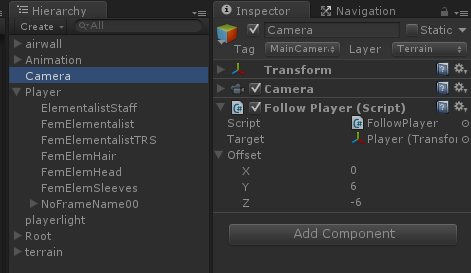
二、调整参数
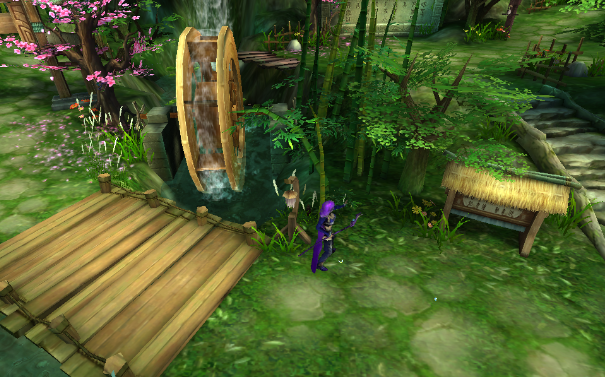
运行效果
using UnityEngine;
using UnityEngine.AI;

/// <summary>
/// 把此类挂到要跟随物体的相机上
/// </summary>
public class CameraFollowPlayer : MonoBehaviour
{
    public Transform player;
    public bool fixCamera;
    public bool mouseRightRotate;
    public float sensitivity = 1.0f;
    public float nearRate = 0.9f;
    public float farRate = 1.1f;
    private Transform mTransform;
    private Vector3 originPosition;
    private Vector3 offset;
    private float distance;
    private bool rightMouseDown;
    private Vector3 mouseLastPosition;
    private Vector3 playerHeadPosition;
    private float agentHeight;
    private bool m_Initialized;

    void Awake()
    {
        if (player != null)
            Initialize();
    }

    void Initialize()
    {
        m_Initialized = true;
        NavMeshAgent agent = player.GetComponent<NavMeshAgent>();
        agentHeight = agent.height;
        mTransform = transform;
        originPosition = mTransform.position;
        //offset相对于头顶坐标
        playerHeadPosition = player.position;
        playerHeadPosition.y += agentHeight;
        offset = originPosition - playerHeadPosition;
        distance = Vector3.Distance(originPosition, playerHeadPosition);
    }

    void Update()
    {
        if (player == null)
            return;

        if (player != null && !m_Initialized)
            Initialize();

        if (fixCamera)
        {
            //自动跟随
            playerHeadPosition = player.position;
            playerHeadPosition.y += agentHeight;
            mTransform.position = playerHeadPosition + offset;

            //支持鼠标右键旋转镜头
            if (mouseRightRotate)
            {
                if (Input.GetMouseButtonDown(1))
                {
                    rightMouseDown = true;
                    mouseLastPosition = Input.mousePosition;
                }
                if (Input.GetMouseButtonUp(1))
                    rightMouseDown = false;

                if (rightMouseDown)
                {
                    Vector3 mousePosition = Input.mousePosition;
                    float deltaX = mousePosition.x - mouseLastPosition.x;
                    mTransform.RotateAround(player.position, Vector3.up, deltaX * sensitivity);
                    mouseLastPosition = mousePosition;
                    offset = mTransform.position - playerHeadPosition;
                }
            }

            //支持鼠标滚轮推拉镜头
            Vector2 mouseScrollDelta = Input.mouseScrollDelta;
            if (mouseScrollDelta.y > 0) //镜头拉近
            {
                if (Vector3.Magnitude(offset) > distance * nearRate)
                    offset *= 0.9f;
            }
            else if (mouseScrollDelta.y < 0) //镜头拉远
            {
                if (Vector3.Magnitude(offset) < distance * farRate)
                    offset *= 1.1f;
            }
        }
        else
        {
            //自动跟随&旋转镜头
            Vector3 back = -player.forward;
            Vector3 camPos = player.position + back * distance;
            camPos.y = originPosition.y;
            mTransform.position = camPos;
            mTransform.LookAt(player);
        }
    }
}
第三版:适合自由控制镜头的RPG游戏
建议在 FixedUpdate() 中控制 NavMeshAgent 或 Rigidbody 移动。在 LateUpdate() 中控制镜头跟随。
using System.Collections.Generic;
using UnityEngine;
using UnityEngine.AI;
using UnityEngine.EventSystems;
/// <summary>
/// 把此类挂到要跟随玩家的相机上
/// 适合:自由控制镜头的RPG游戏
/// 功能:自动跟随玩家、鼠标右键/手指旋转镜头
/// </summary>
public class CameraFollowPlayer : MonoBehaviour
{
    public Transform player;
    //是否允许旋转镜头
    public bool allowRotate = true;
    //像机相对玩家中部的垂直偏移
    public float offsetHeight = 4f;
    //像机距离玩家后方的距离
    public float offsetDistance = 5f;
    //像机绕玩家中心旋转的最小半径
    public float minRadius = 1;
    //像机绕玩家中心旋转的最大半径
    public float maxRadius = 5;
    private Transform mTransform;
    private Vector3 originPosition;
    private Vector3 offset;
    private Vector3 playerHeadPosition;
    private float agentHeight;
    private bool m_Initialized;
    private Vector3 lastPlayerPosition;

    //滑动屏幕旋转像机
    [Tooltip("旋转速度")]
    [SerializeField]
    private float m_RotationSpeed = 0.1f;
    //玩家到像机向量与Y轴的最小夹角,取值范围(0, 90)
    private readonly float m_MinLookupAngle = 20;
    //玩家到像机向量与Y轴的最大夹角,取值范围(0, 90)
    private readonly float m_MaxLookupAngle = 80;
    private Vector3 lastPosition;
    private bool m_IsPointerOverUI;
    private Touch m_RotTouch; //控制旋转的手指
    private Dictionary<int, bool> m_FingerOverUIDic = new Dictionary<int, bool>();
    private float radiusOffset = 0f;
    //End

    #region 上帝视角
    public bool godPerspective;
    public float godHeight = 40;
    #endregion

    //摄像机最小距离
    [SerializeField]
    private float m_MinCameraDistance = 20f;
    //摄像机最大距离
    [SerializeField]
    private float m_MaxCameraDistance = 600f;
    //鼠标滚轮灵敏度
    [SerializeField]
    private float m_ScrollWheelSensitivity = 40f;
    //是否开启鼠标滚轮
    [SerializeField]
    private bool m_ScrollWheelEnabled = true;

    void Awake()
    {
        mTransform = transform;
        radiusOffset = maxRadius - minRadius;
        if (player != null)
            Initialize();
    }

    void Initialize()
    {
        m_Initialized = true;
        NavMeshAgent agent = player.GetComponent<NavMeshAgent>();
        if (agent)
            agentHeight = agent.height;
        ResetCamera();
    }

    public void ResetCamera()
    {
        lastPlayerPosition = player.position;
        playerHeadPosition = player.position;
        playerHeadPosition.y += agentHeight;
        //将像机设置到Player后上方
        originPosition = player.position - player.forward * offsetDistance;
        originPosition.y += offsetHeight;
        offset = originPosition - PlayerCenterPosition;
        offset = offset.normalized * OffsetRadius;
        mTransform.position = PlayerCenterPosition + offset;
        mTransform.LookAt(PlayerCenterPosition);
    }

    // 计算离环绕点的半径
    public float OffsetRadius
    {
        get
        {
            float cameraY = mTransform.position.y;
            float playerY = PlayerCenterPosition.y;
            float playerTopY = playerY + maxRadius;
            float playerBottomY = playerY - minRadius;
            float t = (cameraY - playerBottomY) / (playerTopY - playerBottomY);
            float radius = Mathf.Lerp(minRadius, maxRadius, t);
            return radius;
        }
    }

    // 玩家中心点坐标
    public Vector3 PlayerCenterPosition
    {
        get
        {
            Vector3 p = player.position;
            p.y += agentHeight / 2;
            return p;
        }
    }

    // 计算环绕半径
    void CalculateRoundRadius()
    {
        offset = mTransform.position - PlayerCenterPosition;
        offset = offset.normalized * OffsetRadius;
        mTransform.position = PlayerCenterPosition + offset;
        mTransform.LookAt(PlayerCenterPosition);
    }

    void LateUpdate()
    {
        if (player == null)
            return;

        if (player != null && !m_Initialized)
            Initialize();

        //如果是上帝视角
        if (godPerspective)
        {
            var pos = player.position;
            pos.y += godHeight;
            mTransform.position = pos;
            mTransform.LookAt(player);
            return;
        }

        //自动跟随
        FollowPlayer();

        //支持鼠标右键/手指旋转镜头
        if (allowRotate)
        {
            MouseRotation();
            TouchRotation();
            CalculateRoundRadius();
        }

        MouseScrollWheel();
    }

    // 跟随玩家
    void FollowPlayer()
    {
        //相对于上一帧玩家偏移
        Vector3 moveOffset = player.position - lastPlayerPosition;
        lastPlayerPosition = player.position;
        mTransform.position += moveOffset;
    }

    // 鼠标控制旋转
    void MouseRotation()
    {
        if (!Input.mousePresent)
            return;

        if (!Input.GetMouseButton(1))
            return;

        if (Input.GetMouseButtonDown(1))
        {
            lastPosition = Input.mousePosition;
            m_IsPointerOverUI = IsPointerOverUI();
            return;
        }

        if (m_IsPointerOverUI)
            return;

        Vector3 mousePosition = Input.mousePosition;
        Vector3 offset = mousePosition - lastPosition;
        CameraRotation(offset);
        lastPosition = mousePosition;
    }

    // 触摸控制旋转
    void TouchRotation()
    {
        if (!Input.touchSupported)
            return;

        if (Input.touchCount <= 0)
        {
            m_FingerOverUIDic.Clear();
            return;
        }

        int touchCount = Input.touchCount;
        for (int i = 0; i < touchCount; i++)
        {
            int fingerId = Input.touches[i].fingerId;
            if (Input.touches[i].phase == TouchPhase.Began)
            {
                //记录下在Began阶段,哪些手指处于UI上
                bool overUI = IsPointerOverUI(i);
                if (m_FingerOverUIDic.ContainsKey(fingerId))
                    m_FingerOverUIDic[fingerId] = overUI;
                else
                    m_FingerOverUIDic.Add(fingerId, overUI);

                if (overUI)
                    continue;

                //找到Began阶段,未处于UI上的手指
                m_RotTouch = Input.touches[i];
                lastPosition = m_RotTouch.position;
                return;
            }
            else if (Input.touches[i].phase == TouchPhase.Moved)
            {
                //与Began阶段选中的手指作比较
                if (m_RotTouch.fingerId == Input.touches[i].fingerId)
                    m_RotTouch = Input.touches[i];
            }
            else if (Input.touches[i].phase == TouchPhase.Ended)
            {
                //手指离开屏幕后移除记录
                if (m_FingerOverUIDic.ContainsKey(fingerId))
                    m_FingerOverUIDic.Remove(fingerId);
            }
        }
        if (!m_FingerOverUIDic.ContainsKey(m_RotTouch.fingerId))
            return;
        if (m_FingerOverUIDic[m_RotTouch.fingerId])
            return;

        Vector3 firstTouch = m_RotTouch.position;
        Vector3 offset = firstTouch - lastPosition;
        CameraRotation(offset);
        lastPosition = firstTouch;
    }

    // 像机旋转
    private void CameraRotation(Vector3 offset)
    {
        float t = offset.x;
        offset.x = offset.y;
        offset.y = t;

        if (player)
        {
            Vector3 camV = mTransform.position - PlayerCenterPosition;
            float angle = Vector3.Angle(camV, Vector3.up);
            //已达到最大府角
            if (angle < m_MinLookupAngle && offset.x <= 0)
                offset.x = 0;
            //已达到最大仰角
            if (angle > m_MaxLookupAngle && offset.x >= 0)
                offset.x = 0;

            //府视/仰视 旋转轴
            Vector3 rotAxis = Vector3.Cross(PlayerCenterPosition - mTransform.position, Vector3.up);
            mTransform.RotateAround(PlayerCenterPosition, rotAxis, offset.x * m_RotationSpeed);
            mTransform.RotateAround(PlayerCenterPosition, Vector3.up, offset.y * m_RotationSpeed);
            //重置Z轴
            Vector3 localEulerAngles = mTransform.localEulerAngles;
            localEulerAngles.z = 0;
            mTransform.localEulerAngles = localEulerAngles;
        }
        else
        {
            mTransform.Rotate(offset.x * m_RotationSpeed, 0, 0, Space.Self);
            mTransform.Rotate(0, offset.y * m_RotationSpeed, 0, Space.World);
        }
    }

    // 鼠标滚轮
    private void MouseScrollWheel()
    {
        if (!m_ScrollWheelEnabled)
            return;
        float scrollWheel = Input.GetAxis("Mouse ScrollWheel");
        if (scrollWheel == 0f) return;

        float distanceOffset = scrollWheel* m_ScrollWheelSensitivity;
        if (minRadius - distanceOffset <= m_MinCameraDistance)
        {
            minRadius = m_MinCameraDistance;
            maxRadius = minRadius + radiusOffset;
            return;
        }
        if (maxRadius - distanceOffset >= m_MaxCameraDistance)
        {
            maxRadius = m_MaxCameraDistance;
            minRadius = maxRadius - radiusOffset;
            return;
        }


        minRadius -= distanceOffset;
        maxRadius -= distanceOffset;
    }

    // 判断点击事件是否发生在UI上
    public static bool IsPointerOverUI(int touchIndex = 0)
    {
        bool over = false;
        if (Input.GetMouseButtonDown(1) || Input.touchCount > 0)
        {
            if (EventSystem.current == null)
                return over;
#if UNITY_EDITOR || UNITY_STANDALONE_WIN
            if (EventSystem.current.IsPointerOverGameObject())
#elif UNITY_IPHONE || UNITY_ANDROID
            if (EventSystem.current.IsPointerOverGameObject(Input.GetTouch(touchIndex).fingerId))
#else
            if (EventSystem.current.IsPointerOverGameObject())
#endif
                over = true;

            else
                over = false;
        }
        return over;
    }
}
/// <summary>
/// 中介
/// </summary>
public class CameraFollowPlayerMediator : GameEventBehaviour
{
    public CameraFollowPlayer cameraFollowPlayer;

    protected override void OnAwake()
    {
        this.AddListener(GameEventType.INSTANTIATE_PLAYER_COMPLETE, OnInstantiatePlayerComplete);
        this.AddListener(GameEventType.PLAYER_DESTROY, OnPlayerDestroy);
        this.AddListener(GameEventType.INVOKE_CAMERA_FOLLOW_SETTING, OnInvokeCameraFollowSetting);
    }

    private void OnInstantiatePlayerComplete(GameEventType type, object data)
    {
        Transform player = data as Transform;
        cameraFollowPlayer.player = player;
    }

    private void OnPlayerDestroy(GameEventType type, object data)
    {
        cameraFollowPlayer.player = null;
    }

    private void OnInvokeCameraFollowSetting(GameEventType type, object data)
    {
        CameraFollowParam p = data as CameraFollowParam;
        cameraFollowPlayer.offsetDistance = p.offsetDistance;
        cameraFollowPlayer.offsetHeight = p.offsetHeight;
        cameraFollowPlayer.allowRotate = p.allowRotate;
        cameraFollowPlayer.ResetCamera();

        //近镜头
        //var p = new CameraFollowParam();
        //p.offsetDistance = 0.5f;
        //p.offsetHeight = 0.2f;
        //FireEvent(GameEventType.INVOKE_CAMERA_FOLLOW_SETTING, p);

        //远镜头
        //var p = new CameraFollowParam();
        //p.offsetDistance = 3;
        //p.offsetHeight = 1;
        //FireEvent(GameEventType.INVOKE_CAMERA_FOLLOW_SETTING, p);
    }
}

public class CameraFollowParam
{
    public float offsetDistance = 3;
    public float offsetHeight = 2;
    public bool allowRotate = true;
}

问题:解决NavMeshAgent旋转太慢
using System.Collections;
using System.Collections.Generic;
using UnityEngine;
using UnityEngine.AI;
/// <summary>
/// NavMeshAgent的旋转太慢
/// 可用此脚本替换NavMeshAgent的旋转功能
/// </summary>
public class NavMeshAgentRotation : MonoBehaviour
{
    [SerializeField]
    private NavMeshAgent navMeshAgent;
    public float angularSpeed = 10f;
    private Transform mTransform;

    private void Awake()
    {
        mTransform = transform;
        if (navMeshAgent == null)
            navMeshAgent = this.GetComponent<NavMeshAgent>();
    }

    void Update()
    {
        if (navMeshAgent == null)
            return;
        //代理是否绑定到导航网格
        if (!navMeshAgent.isOnNavMesh)
            return;
        if (navMeshAgent.isStopped || navMeshAgent.pathPending || !navMeshAgent.hasPath)
            return;
        navMeshAgent.updateRotation = navMeshAgent.remainingDistance < 0.1f;
        /* 由NavMeshAgent控制旋转 */
        if (navMeshAgent.updateRotation)
            return;

        /* 手动控制旋转 */
        //当前朝向
        Quaternion forward = Quaternion.identity;
        forward.SetLookRotation(mTransform.forward);
        //目标朝向
        Vector3 targetForward = navMeshAgent.steeringTarget - mTransform.position;
        Quaternion steering = Quaternion.identity;
        steering.SetLookRotation(targetForward);
        //旋转插值
        Quaternion rotation = Quaternion.Lerp(forward, steering, Time.deltaTime * angularSpeed);
        mTransform.rotation = rotation;
    }
}
赛车游戏镜头
using UnityEngine;
/// <summary>
/// 镜头跟随,实用于赛车游戏
/// 支持 第一人称视角 & 第三人称视角
/// 用法:将脚本挂到要跟随汽车的Camera上
/// </summary>
[DisallowMultipleComponent]
public class CameraFollowCar : MonoBehaviour
{
    [SerializeField]
    private PersonPerspective perspective;
    //第三人称视角要跟随的目标对象
    public Transform thirdTarget;
    //第一人称视角所在位置
    public Transform firstTarget;

    #region 第三人称视角参数
    //镜头相对于汽车后方的距离偏移(跟车距离)
    [SerializeField]
    private float backOffset = 5f;
    //镜头相对于汽车的高度偏移
    [SerializeField]
    private float heightOffset = 2f;
    //镜头旋转速度
    [SerializeField]
    private float rotationSpeed = 4f;
    //镜头移动速度
    [SerializeField]
    private float motionSpeed = 0.002f;
    #endregion

    #region 上帝视角参数
    public float godHeight = 10;
    #endregion

    private Transform cacheTransform;

    //视角
    public enum PersonPerspective
    {
        First, //第一人称视角
        Third, //第三人称视角
        God    //上帝视角
    }

    void Awake()
    {
        cacheTransform = transform;
        if (thirdTarget != null)
        {
            cacheTransform.position = CalcCameraPosition();
            cacheTransform.LookAt(thirdTarget);
        }
    }

    // 切换到第一人称视角
    public void ChangeFirstPerspective()
    {
        this.perspective = PersonPerspective.First;
    }

    // 切换到第三人称视角
    public void ChangeThirdPerspective()
    {
        this.perspective = PersonPerspective.Third;
        cacheTransform.position = CalcCameraPosition();
        cacheTransform.LookAt(thirdTarget);
    }

    // 切换到上帝视角
    public void ChangeGodPerspective()
    {
        this.perspective = PersonPerspective.God;
    }

    // 计算摄像机坐标
    private Vector3 CalcCameraPosition()
    {
        Vector3 back = -thirdTarget.forward * backOffset;
        Vector3 camPos = thirdTarget.position + back;
        camPos.y += heightOffset;

        #region 绘制辅助线
        //后方距离
        Debug.DrawRay(thirdTarget.position, back, Color.red);
        //back方向矢量转位置矢量
        Vector3 backPos = thirdTarget.position + back;
        Debug.DrawRay(backPos, thirdTarget.up * heightOffset, Color.red);
        //摄像机正方向
        Vector3 camForward = thirdTarget.position - camPos;
        Debug.DrawRay(camPos, camForward, Color.yellow);
        #endregion

        return camPos;
    }

    private void LateUpdate()
    {
        if (perspective == PersonPerspective.First)
        {
            cacheTransform.position = firstTarget.position;
            cacheTransform.rotation = firstTarget.rotation;
        }
        else if (perspective == PersonPerspective.God)
        {
            var pos = thirdTarget.position;
            pos.y += godHeight;
            cacheTransform.position = pos;
            cacheTransform.LookAt(thirdTarget);
        }
    }

    void FixedUpdate()
    {
        if (perspective == PersonPerspective.Third)
        {
            var new_position = CalcCameraPosition();

            //------Camera Tween Motion--------
            var cur_position = cacheTransform.position;
            cur_position.y = thirdTarget.position.y;
            //摄像机相对于汽车所在方位
            var cur_direction = cur_position - thirdTarget.position;
            cur_direction.Normalize();
            //摄像机与汽车保持恒定跟车距离
            var dis_direction = cur_direction * backOffset;
            //摄像机坐标
            cur_position = thirdTarget.position + dis_direction;
            //摄像机与汽车保持恒定高度
            cur_position.y = thirdTarget.position.y + heightOffset;
            //通过插值运算缓慢运动到最终位置
            cacheTransform.position = Vector3.Lerp(cur_position, new_position, motionSpeed * Time.time);
            //------End------------------------

            //------Camera Tween Rotation-------
            //之前的摄像机方向矢量
            Vector3 preCamForward = cacheTransform.forward;
            //之后的摄像机方向矢量
            Vector3 curCamForward = thirdTarget.position - new_position;
            curCamForward.Normalize();
            //镜头旋转缓动插值
            Quaternion preCamForwardQua = Quaternion.LookRotation(preCamForward);
            Quaternion curCamForwardQua = Quaternion.LookRotation(curCamForward);
            Quaternion lerpQua = Quaternion.Lerp(preCamForwardQua, curCamForwardQua, rotationSpeed * Time.fixedDeltaTime);
            cacheTransform.rotation = lerpQua;
            //-------End-------------------------
        }
    }
}
标签: Unity3d
« 牛顿迭代法
|
播放动画(Animation)»
日历
最新文章
随机文章
热门文章
分类

存档
- 2026年7月(1)
- 2026年6月(17)
- 2026年5月(29)
- 2026年4月(7)
- 2026年3月(15)
- 2026年2月(3)
- 2026年1月(6)
- 2025年12月(1)
- 2025年11月(1)
- 2025年9月(3)
- 2025年7月(4)
- 2025年6月(5)
- 2025年5月(1)
- 2025年4月(5)
- 2025年3月(4)
- 2025年2月(3)
- 2025年1月(1)
- 2024年12月(5)
- 2024年11月(5)
- 2024年10月(5)
- 2024年9月(3)
- 2024年8月(3)
- 2024年7月(11)
- 2024年6月(3)
- 2024年5月(9)
- 2024年4月(10)
- 2024年3月(11)
- 2024年2月(24)
- 2024年1月(12)
- 2023年12月(3)
- 2023年11月(9)
- 2023年10月(7)
- 2023年9月(2)
- 2023年8月(7)
- 2023年7月(9)
- 2023年6月(6)
- 2023年5月(7)
- 2023年4月(11)
- 2023年3月(6)
- 2023年2月(11)
- 2023年1月(8)
- 2022年12月(2)
- 2022年11月(4)
- 2022年10月(10)
- 2022年9月(2)
- 2022年8月(13)
- 2022年7月(7)
- 2022年6月(11)
- 2022年5月(18)
- 2022年4月(29)
- 2022年3月(5)
- 2022年2月(6)
- 2022年1月(8)
- 2021年12月(5)
- 2021年11月(3)
- 2021年10月(4)
- 2021年9月(9)
- 2021年8月(14)
- 2021年7月(8)
- 2021年6月(5)
- 2021年5月(2)
- 2021年4月(3)
- 2021年3月(7)
- 2021年2月(2)
- 2021年1月(8)
- 2020年12月(7)
- 2020年11月(2)
- 2020年10月(6)
- 2020年9月(9)
- 2020年8月(10)
- 2020年7月(9)
- 2020年6月(18)
- 2020年5月(4)
- 2020年4月(25)
- 2020年3月(38)
- 2020年1月(21)
- 2019年12月(13)
- 2019年11月(29)
- 2019年10月(44)
- 2019年9月(17)
- 2019年8月(18)
- 2019年7月(25)
- 2019年6月(25)
- 2019年5月(17)
- 2019年4月(10)
- 2019年3月(36)
- 2019年2月(35)
- 2019年1月(28)
- 2018年12月(30)
- 2018年11月(22)
- 2018年10月(4)
- 2018年9月(7)
- 2018年8月(13)
- 2018年7月(13)
- 2018年6月(6)
- 2018年5月(5)
- 2018年4月(13)
- 2018年3月(5)
- 2018年2月(3)
- 2018年1月(8)
- 2017年12月(35)
- 2017年11月(17)
- 2017年10月(16)
- 2017年9月(17)
- 2017年8月(20)
- 2017年7月(34)
- 2017年6月(17)
- 2017年5月(15)
- 2017年4月(32)
- 2017年3月(8)
- 2017年2月(2)
- 2017年1月(5)
- 2016年12月(14)
- 2016年11月(26)
- 2016年10月(12)
- 2016年9月(25)
- 2016年8月(32)
- 2016年7月(14)
- 2016年6月(21)
- 2016年5月(17)
- 2016年4月(13)
- 2016年3月(8)
- 2016年2月(8)
- 2016年1月(18)
- 2015年12月(13)
- 2015年11月(15)
- 2015年10月(12)
- 2015年9月(18)
- 2015年8月(21)
- 2015年7月(35)
- 2015年6月(13)
- 2015年5月(9)
- 2015年4月(4)
- 2015年3月(5)
- 2015年2月(4)
- 2015年1月(13)
- 2014年12月(7)
- 2014年11月(5)
- 2014年10月(4)
- 2014年9月(8)
- 2014年8月(16)
- 2014年7月(26)
- 2014年6月(22)
- 2014年5月(28)
- 2014年4月(15)
友情链接
- Unity官网
- Unity圣典
- Unity在线手册
- Unity中文手册(圣典)
- Unity官方中文论坛
- Unity游戏蛮牛用户文档
- Unity下载存档
- Unity引擎源码下载
- Unity服务
- Unity Ads
- wiki.unity3d
- Visual Studio Code官网
- SenseAR开发文档
- MSDN
- C# 参考
- C# 编程指南
- .NET Framework类库
- .NET 文档
- .NET 开发
- WPF官方文档
- uLua
- xLua
- SharpZipLib
- Protobuf-net
- Protobuf.js
- OpenSSL
- OPEN CASCADE
- JSON
- MessagePack
- C在线工具
- 游戏蛮牛
- GreenVPN
- 聚合数据
- 热云
- 融云
- 腾讯云
- 腾讯开放平台
- 腾讯游戏服务
- 腾讯游戏开发者平台
- 腾讯课堂
- 微信开放平台
- 腾讯实时音视频
- 腾讯即时通信IM
- 微信公众平台技术文档
- 白鹭引擎官网
- 白鹭引擎开放平台
- 白鹭引擎开发文档
- FairyGUI编辑器
- PureMVC-TypeScript
- 讯飞开放平台
- 亲加通讯云
- Cygwin
- Mono开发者联盟
- Scut游戏服务器引擎
- KBEngine游戏服务器引擎
- Photon游戏服务器引擎
- 码云
- SharpSvn
- 腾讯bugly
- 4399原创平台
- 开源中国
- Firebase
- Firebase-Admob-Unity
- google-services-unity
- Firebase SDK for Unity
- Google-Firebase-SDK
- AppsFlyer SDK
- android-repository
- CQASO
- Facebook开发者平台
- gradle下载
- GradleBuildTool下载
- Android Developers
- Google中国开发者
- AndroidDevTools
- Android社区
- Android开发工具
- Google Play Games Services
- Google商店
- Google APIs for Android
- 金钱豹VPN
- TouchSense SDK
- MakeHuman
- Online RSA Key Converter
- Windows UWP应用
- Visual Studio For Unity
- Open CASCADE Technology
- 慕课网
- 阿里云服务器ECS
- 在线免费文字转语音系统
- AI Studio
- 网云穿
- 百度网盘开放平台
- 迅捷画图
- 菜鸟工具
- [CSDN] 程序员研修院
- 华为人脸识别
- 百度AR导航导览SDK
- 海康威视官网
- 海康开放平台
- 海康SDK下载
- git download
- Open CASCADE
- CascadeStudio
- OpenClaw中文社区
- three.js manual
- SVG官方文档
交流QQ群
-
Flash游戏设计: 86184192
Unity游戏设计: 171855449
游戏设计订阅号

捐赠 (用于支付服务器费用)
-
微信

支持宝

捐赠的朋友可与博主成为微信好友,点击下方【给我写信】给博主留言。


