
Unity中播放GIF
作者:追风剑情 发布于:2021-5-10 9:54 分类:Unity3d
GIF文件格式介绍 https://www.jianshu.com/p/4fabac6b15b3
GIF文件格式介绍 https://blog.csdn.net/wzy198852/article/details/17266507
GIFLIB 项目
下载GIF播放插件 https://github.com/WestHillApps/UniGif
如果播放时GIF背景显示纯黑色,可以修改下源码让GIF的背景显示为透明色:
修改 UniGifDecoder.cs 中的 GetColorTableAndSetBgColor() 方法:
/// <summary>
/// Get color table and set background color (local or global)
/// </summary>
private static List<byte[]> GetColorTableAndSetBgColor(GifData gifData, ImageBlock imgBlock, int transparentIndex, out Color32 bgColor)
{
	List<byte[]> colorTable = imgBlock.m_localColorTableFlag ? imgBlock.m_localColorTable : gifData.m_globalColorTableFlag ? gifData.m_globalColorTable : null;

	// 注释掉原来的代码
	//if (colorTable != null)
	//{
	//    // Set background color from color table
	//    byte[] bgRgb = colorTable[gifData.m_bgColorIndex];
	//    bgColor = new Color32(bgRgb[0], bgRgb[1], bgRgb[2], (byte)(transparentIndex == gifData.m_bgColorIndex ? 0 : 255));
	//}
	//else
	//{
	//    bgColor = Color.black;
	//}

	// 直接修改成透明背景
	bgColor = Color.black;
	bgColor.a = 0;

	return colorTable;
}
GIF文件结构
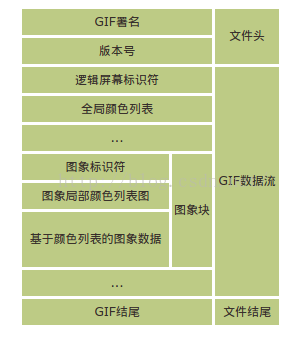
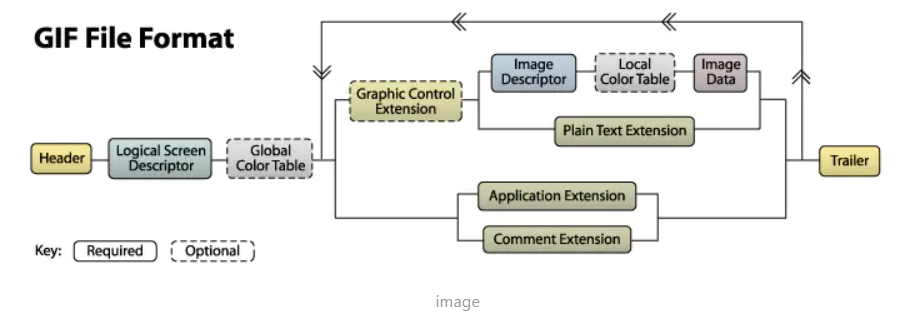
图形控制器扩展(graphic control extension)中的透明颜色索引(transparent color index)对应全局颜色表(global color table)中的索引。
GIF辅助类
#define DEBUG_GIF_DECODE
using System;
using System.Text;
using System.Collections;
using System.Collections.Generic;
using System.Diagnostics;
using UnityEngine;
/// <summary>
/// GIF 辅助类
/// GIF用的LZW压缩算法能将图像尺寸压缩20%~25%
/// 字符=ASCII:
/// 'G'=71,'I'=73,'F'=70,'7'=55,'8'=56,'9'=57,'a'=97
/// 参考 https://blog.csdn.net/Swallow_he/article/details/76165202
/// </summary>
public sealed class GIFHelper
{
#region 文件头
//判断是否为GIF文件
public static bool IsGIF(byte[] bytes)
{
byte b0 = bytes[0];
byte b1 = bytes[1];
byte b2 = bytes[2];
return 71 == b0 && 73 == b1 && 70 == b2;
}
//判断GIF版本是否为 GIF87a
public static bool IsGIF87a(byte[] bytes)
{
if (!IsGIF(bytes))
return false;
byte b3 = bytes[3];
byte b4 = bytes[4];
byte b5 = bytes[5];
return 56 == b3 && 55 == b4 && 97 == b5;
}
//判断GIF版本是否为 GIF89a
//这个版本才支持动画和透明背景
public static bool IsGIF89a(byte[] bytes)
{
if (!IsGIF(bytes))
return false;
byte b3 = bytes[3];
byte b4 = bytes[4];
byte b5 = bytes[5];
return 56 == b3 && 57 == b4 && 97 == b5;
}
//获取标记域和版本号
public static string SignatureVersion(byte[] bytes)
{
StringBuilder sb = new StringBuilder();
for (int i = 0; i < 6; i++)
sb.Append((char)bytes[i]);
return sb.ToString();
}
#endregion
#region 逻辑描述块(LogicalScreen Descriptor), 包含7个字节
#region 图片宽高
//获取逻辑显示屏宽度 (图片宽度), 2字节
public static ushort LogicalScreenWidth(byte[] bytes)
{
//byte b6 = bytes[6];
//byte b7 = bytes[7];
////小端
//short width = (short)((b7 << 8) | (b6 & 0xff));
ushort width = BitConverter.ToUInt16(bytes, 6);
return width;
}
//获取逻辑显示屏高度 (图片高度), 2字节
public static ushort LogicalScreenHeight(byte[] bytes)
{
//byte b8 = bytes[8];
//byte b9 = bytes[9];
////小端
//short height = (short)((b9 << 8) | (b8 & 0xff));
ushort height = BitConverter.ToUInt16(bytes, 8);
return height;
}
#endregion
#region 包装域(Packed Fields) (G CR S Size), 1字节
//Size of Global Color Table 占 3bit
//Sort Flag 占 1bit
//Color Resolution 占 3bit
//Global Color Table Flag 占 1bit
//全局彩色表大小,代表每个像素的位数, 7bit可表示0~255
public static int SizeOfGlobalColorTable(byte[] bytes)
{
byte b10 = bytes[10];
byte size = (byte)(b10 & 7); //7: 00000111
//表项数目
int table_size = (int)Math.Pow(2, size + 1);
//每个表项由3个字节组成(R、G、B)
//彩色表的字节数等于 3 * table_size
return table_size;
}
//彩色表排序标志
//Flag=1: 表示全局彩色表中的颜色存在重要性排序,重要的颜色被排在前面
public static byte SortFlag(byte[] bytes)
{
byte b10 = bytes[10];
byte flag = (byte)((b10 >> 3) & 1);//00001000
return flag;
}
//调色板中的基色占几bit
//例如 CR=3, 表示占4bit
public static byte ColorResolution(byte[] bytes)
{
byte b10 = bytes[10];
byte cr = (byte)((b10 >> 4) & 7);//01110000
return cr;
}
//全局彩色表标志
//G=1: 表示存在全局彩色表
public static byte GlobalColorTableFlag(byte[] bytes)
{
byte b10 = bytes[10];
byte G = (byte)(b10 >> 7);//?0000000
return G;
}
#endregion
#region 背景颜色索引
//获取背景颜色索引(彩色表位置)
//如果Global Color Table Flag为0,则该值也设为0
public static byte BackgroundColorIndex(byte[] bytes)
{
byte b11 = bytes[11];
return b11;
}
#endregion
#region 像素宽高比
//像素宽高比,是原始图像像素的宽高比的一个近似值
//宽高比计算公式: Aspect Ratio = (Pixel AspectRatio + 15) / 64
public static byte PixelAspectRatio(byte[] bytes)
{
byte b12 = bytes[12];
return b12;
}
#endregion
#region 全局彩色表
//获取全局彩色表
public static List<byte[]> GlobalColorTable(byte[] bytes)
{
var globalColorTable = new List<byte[]>();
if (GlobalColorTableFlag(bytes) == 0)
return globalColorTable;
int byteIndex = 13;
int sizeOfGlobalColorTable = SizeOfGlobalColorTable(bytes);
// Global Color Table(0~255×3 Bytes)
for (int i = byteIndex; i < byteIndex + (sizeOfGlobalColorTable * 3); i += 3)
{
globalColorTable.Add(new byte[] { bytes[i], bytes[i + 1], bytes[i + 2] });
}
return globalColorTable;
}
#endregion
#endregion
}
/// <summary>
/// GIF图像
/// </summary>
public class GIFImage
{
//头信息
public GIFHeader Header { get; private set; }
//屏幕逻辑描述符
public GIFLogicalScreenDescriptor LogicalScreenDescriptor { get; private set; }
//全局颜色表
public GIFGlobalColorTable GlobalColorTable { get; private set; }
//图形控制扩展
public List<GIFGraphicControlExtension> graphicControlExtList { get; private set; }
//文本扩展
public List<GIFPlainTextExtension> plainTextExtList { get; private set; }
//应用程序扩展
public List<GIFApplicationExtension> applicationExtList { get; private set; }
//注释扩展
public List<GIFCommentExtension> commentExtList { get; private set; }
//图像描述符
public List<GIFImageDescriptor> imageDescriptorList { get; private set; }
//Texture2D 列表
public List<Texture2D> textures {
get {
if (gifData == null)
return new List<Texture2D>();
return gifData.textures;
}
}
private GIFData gifData;
/// <summary>
/// 构造方法
/// </summary>
/// <param name="bytes">gif文件二进制数据</param>
public GIFImage(byte[] bytes)
{
LoadFileData(bytes);
}
//载入GIF文件数据
public void LoadFileData(byte[] bytes)
{
GIFDebug.Log("<i><b>*** gif decode start... ***</b></i>");
gifData = new GIFData();
int byteIndex = 0;
Header = new GIFHeader(bytes, ref byteIndex);
LogicalScreenDescriptor = new GIFLogicalScreenDescriptor(bytes, ref byteIndex);
if (LogicalScreenDescriptor.packedField.globalColorTableFlag == 1)
{
GlobalColorTable = new GIFGlobalColorTable(bytes, ref byteIndex,
LogicalScreenDescriptor.packedField.sizeOfGlobalColorTable);
gifData.m_globalColorTable = GlobalColorTable;
}
gifData.m_logicalScreenDescriptor = LogicalScreenDescriptor;
graphicControlExtList = new List<GIFGraphicControlExtension>();
plainTextExtList = new List<GIFPlainTextExtension>();
applicationExtList = new List<GIFApplicationExtension>();
commentExtList = new List<GIFCommentExtension>();
imageDescriptorList = new List<GIFImageDescriptor>();
while (true)
{
//特殊标志
//0x21: 扩展入口(Extension Introducer)
//0x3b: GIF文件结束标志
byte specialFlag = bytes[byteIndex];
byteIndex++;
//扩展入口
if (0x21 == specialFlag)
{
//扩展类型
byte extensionFlag = bytes[byteIndex];
byteIndex++;
switch (extensionFlag)
{
case 0xf9:// Graphic Control Extension(0x21 0xf9)
var gExt = new GIFGraphicControlExtension(bytes, ref byteIndex);
graphicControlExtList.Add(gExt);
gifData.m_graphicControlExtension = gExt;
break;
case 0xfe:// Comment Extension(0x21 0xfe)
var cExt = new GIFCommentExtension(bytes, ref byteIndex);
commentExtList.Add(cExt);
break;
case 0x01:// Plain Text Extension(0x21 0x01)
var pExt = new GIFPlainTextExtension(bytes, ref byteIndex);
plainTextExtList.Add(pExt);
break;
case 0xff:// Application Extension(0x21 0xff)
var aExt = new GIFApplicationExtension(bytes, ref byteIndex);
applicationExtList.Add(aExt);
break;
default:
break;
}
}
//图像描述符(Image Descriptor)
else if (0x2c == specialFlag)
{
var imgDes = new GIFImageDescriptor(bytes, ref byteIndex, gifData);
imageDescriptorList.Add(imgDes);
}
//GIF结束
else if (0x3b == specialFlag)
{
GIFDebug.Log("<i><b>*** gif decode completed (0x3b) ***</b></i>");
break;
}
}
}
}
/// <summary>
/// GIF文件头
/// </summary>
public sealed class GIFHeader
{
//"GIF"
public string signature;
//"87a" 或 "89a"
public string version;
public GIFHeader(byte[] bytes, ref int byteIndex)
{
signature = BitConverter.ToString(bytes, byteIndex, 3);
byteIndex += 3;
version = BitConverter.ToString(bytes, byteIndex, 3);
byteIndex += 3;
}
}
/// <summary>
/// 逻辑屏幕描述符
/// </summary>
public sealed class GIFLogicalScreenDescriptor
{
//画布宽度
public int canvasWidth;
//画布高度
public int canvasHeight;
public GIFPackedField packedField;
//表示 GIF 的背景色在 Global Color Table 中的索引
public byte backgroundColorIndex;
//表示用于计算原始图像中像素宽高比的近似因子,一般情况为 0
public byte pixelAspectRatio;
public GIFLogicalScreenDescriptor(byte[] bytes, ref int byteIndex)
{
canvasWidth = BitConverter.ToInt16(bytes, byteIndex);
byteIndex += 2;
canvasHeight = BitConverter.ToInt16(bytes, byteIndex);
byteIndex += 2;
packedField = new GIFPackedField(bytes[byteIndex]);
byteIndex++;
backgroundColorIndex = bytes[byteIndex];
byteIndex++;
pixelAspectRatio = bytes[byteIndex];
byteIndex++;
Print();
packedField.Print();
}
public void Print()
{
GIFDebug.Log("<color=green>[GIFLogicalScreenDescriptor]</color>");
GIFDebug.LogFormat("->width={0}", canvasWidth);
GIFDebug.LogFormat("->height={0}", canvasHeight);
GIFDebug.LogFormat("->backgroundColorIndex={0}", backgroundColorIndex);
GIFDebug.LogFormat("->pixelAspectRatio={0}", pixelAspectRatio);
}
/// <summary>
/// GIF包装域
/// </summary>
public sealed class GIFPackedField
{
//全局彩色表大小
public int sizeOfGlobalColorTable;
//彩色表排序标志
public byte sortFlag;
//彩色分辨率
public byte colorResolution;
//全局彩色表标志, 1:表示存在全局颜色表
public byte globalColorTableFlag;
public GIFPackedField(byte b)
{
byte size = (byte)(b & 7); //7: 00000111
//表项数目
sizeOfGlobalColorTable = (int)Math.Pow(2, size + 1);
//每个表项由3个字节组成(R、G、B)
//彩色表的字节数等于 3 * table_size
sortFlag = (byte)((b >> 3) & 1);//00001000
colorResolution = (byte)((b >> 4) & 7);//01110000
globalColorTableFlag = (byte)(b >> 7);//10000000
}
public void Print()
{
GIFDebug.LogFormat("->sizeOfGlobalColorTable={0}", sizeOfGlobalColorTable);
GIFDebug.LogFormat("->sortFlag={0}", sortFlag);
GIFDebug.LogFormat("->colorResolution={0}", colorResolution);
GIFDebug.LogFormat("->globalColorTableFlag={0}", globalColorTableFlag);
}
}
}
/// <summary>
/// GIF全局颜色表
/// </summary>
public sealed class GIFGlobalColorTable
{
public List<byte[]> Table { get; private set; }
public GIFGlobalColorTable(byte[] bytes, ref int byteIndex, int sizeOfGlobalColorTable)
{
Table = new List<byte[]>();
// Global Color Table(0~255×3 Bytes)
for (int i = byteIndex; i < byteIndex + (sizeOfGlobalColorTable * 3); i += 3)
{
Table.Add(new byte[] { bytes[i], bytes[i + 1], bytes[i + 2] });
}
byteIndex += sizeOfGlobalColorTable * 3;
}
}
/// <summary>
/// GIF图形控制扩展
/// </summary>
public sealed class GIFGraphicControlExtension
{
//表示接下来的有效数据字节数
public byte byteSize;
//是一个包装字段,内部不同位的意义也不同
public GIFPackedField packedField;
//表示 GIF 动图每一帧之间的间隔,单位为百分之一秒。当为 0 时间隔由解码器管理
public short delayTime;
//当 Transparent Flag 为 1 时,此字节有效,表示此索引在 Global Color Table 中对应的颜色将被当做透明色做处理。
public byte transparentColorIndex;
//表示 Extension 到此结束
public byte blockTerminator;//总是0
public GIFGraphicControlExtension(byte[] bytes, ref int byteIndex)
{
GIFDebug.LogFormat("<color=green>GIFGraphicControlExtension</color> byteIndex={0}", byteIndex);
byteSize = bytes[byteIndex];
byteIndex++;
packedField = new GIFPackedField(bytes[byteIndex]);
byteIndex++;
delayTime = BitConverter.ToInt16(bytes, byteIndex);
byteIndex += 2;
transparentColorIndex = bytes[byteIndex];
byteIndex++;
blockTerminator = bytes[byteIndex];
byteIndex++;
//Debug.LogFormat("-- end byteIndex={0}", byteIndex);
}
//包装字段
public sealed class GIFPackedField
{
//当该值为 1 时,后面的 Transparent Color Index 指定的颜色将被当做透明色处理。为 0 则不做处理。
public byte transparentColorFlag; //1bit
//表示是否需要在得到用户的输入时才进行下一帧的输入(具体用户输入指什么视应用而定)。
//0: 表示无需用户输入
//1: 表示需要用户输入
public byte userInputFlag; //1bit
//表示在进行逐帧渲染时,前一帧留下的图像作何处理:
//0: 不做任何处理
//1: 保留前一帧图像,在此基础上进行渲染
//2: 渲染前将图像置为背景色
//3: 将被下一帧覆盖的图像重置
public byte disposalMethod;//3bit
//保留位,暂无用处
public byte reservedForFutureUse;//3bit
public GIFPackedField(byte b)
{
transparentColorFlag = (byte)(b & 1);//00000001
userInputFlag = (byte)((b >> 1) & 1);//00000010
disposalMethod = (byte)((b >> 2) & 7);//00011100
reservedForFutureUse = (byte)((b >> 5) & 7);//11100000
}
}
}
/// <summary>
/// GIF文本扩展 (存储额外信息)
/// </summary>
public sealed class GIFPlainTextExtension
{
public GIFPlainTextExtension(byte[] bytes, ref int byteIndex)
{
GIFDebug.LogFormat("<color=green>GIFPlainTextExtension</color> byteIndex={0}", byteIndex);
//暂时不关心这部分数据,直接找结束标记0
while (bytes[byteIndex++] != 0) ;
}
}
/// <summary>
/// GIF应用扩展 (存储额外信息)
/// </summary>
public sealed class GIFApplicationExtension
{
public GIFApplicationExtension(byte[] bytes, ref int byteIndex)
{
GIFDebug.LogFormat("<color=green>GIFApplicationExtension</color> byteIndex={0}", byteIndex);
//暂时不关心这部分数据,直接找结束标记0
while (bytes[byteIndex++] != 0) ;
}
}
/// <summary>
/// GIF注释扩展 (存储额外信息)
/// </summary>
public sealed class GIFCommentExtension
{
public GIFCommentExtension(byte[] bytes, ref int byteIndex)
{
GIFDebug.LogFormat("<color=green>GIFCommentExtension</color> byteIndex={0}", byteIndex);
//暂时不关心这部分数据,直接找结束标记0
while (bytes[byteIndex++] != 0) ;
}
}
/// <summary>
/// GIF图像描述符
/// </summary>
public sealed class GIFImageDescriptor
{
//该值表示当前帧图像渲染位置离画布左边的距离
public short left;
//该值表示当前帧图像渲染位置离画布上边的距离
public short top;
//该值表示当前帧图像的宽度
public short width;
//该值表示当前帧图像的高度
public short height;
//这是一个包装字段,内部不同位的意义也不同
public GIFPackedField packedField;
public GIFLocalColorTable localColorTable;
public GIFImageData imageData;
private GIFData gifData;
public GIFImageDescriptor(byte[] bytes, ref int byteIndex, GIFData gifData)
{
GIFDebug.LogFormat("<color=green>GIFImageDescriptor</color> byteIndex={0}", byteIndex);
this.gifData = gifData;
left = BitConverter.ToInt16(bytes, byteIndex);
byteIndex += 2;
top = BitConverter.ToInt16(bytes, byteIndex);
byteIndex += 2;
width = BitConverter.ToInt16(bytes, byteIndex);
byteIndex += 2;
height = BitConverter.ToInt16(bytes, byteIndex);
byteIndex += 2;
packedField = new GIFPackedField(bytes[byteIndex]);
byteIndex++;
if (packedField.localColorTableFlag == 1)
{
localColorTable = new GIFLocalColorTable(bytes, ref byteIndex, packedField.sizeOfLocalColorTable);
}
bool interlaceFlag = (packedField.interlaceFlag == 1);
imageData = new GIFImageData(bytes, ref byteIndex, width, height, interlaceFlag);
//利用解压出来的图像数据生成Texture2D
Texture2D tex = CreateTexture2D();
gifData.textures.Add(tex);
}
private List<byte[]> GetColorTable()
{
//存在局部颜色表,则使用局部颜色表,否则使用全局颜色表
List<byte[]> colorTable = (packedField.localColorTableFlag == 1) ? localColorTable.Table : gifData.m_globalColorTable.Table;
return colorTable;
}
public Texture2D CreateTexture2D()
{
List<byte[]> colorTable = GetColorTable();
int canvasWidth = gifData.m_logicalScreenDescriptor.canvasWidth;
int canvasHeight = gifData.m_logicalScreenDescriptor.canvasHeight;
Texture2D tex = new Texture2D(canvasWidth, canvasHeight, TextureFormat.ARGB32, false);
tex.filterMode = FilterMode.Bilinear;
tex.wrapMode = TextureWrapMode.Clamp;
//判断背景色
byte transparentIndex = gifData.m_graphicControlExtension.transparentColorIndex;
int bgColorIndex = gifData.m_logicalScreenDescriptor.backgroundColorIndex;
byte[] bgRgb = colorTable[bgColorIndex];
Color32 bgColor = new Color32(bgRgb[0], bgRgb[1], bgRgb[2], (byte)(transparentIndex == bgColorIndex ? 0 : 255));
Color32[] pix;
bool filledTexture = false;
//初始化图像像素
byte disposalMethod = gifData.m_graphicControlExtension.packedField.disposalMethod;
GIFDebug.LogFormat("disposalMethod={0}", disposalMethod);
switch (disposalMethod)
{
case 0://不做任何处理
break;
case 1://保留前一帧图像,在此基础上进行渲染
if (gifData.textures.Count > 0)
{
Texture2D preTex = gifData.textures[gifData.textures.Count - 1];
pix = preTex.GetPixels32();
tex.SetPixels32(pix);
tex.Apply();
filledTexture = true;
}
break;
case 2://渲染前将图像置为背景色
pix = new Color32[tex.width * tex.height];
for (int i = 0; i < pix.Length; i++)
{
pix[i] = bgColor;
}
tex.SetPixels32(pix);
tex.Apply();
filledTexture = true;
break;
case 3://将被下一帧覆盖的图像重置
break;
}
int dataIndex = 0;
//dataIndex是从图像的左上角开始存储的,图像的原点在左下角
for (int y = canvasHeight - 1; y >= 0; y--)
{
int row = canvasHeight - y - 1;
for (int x = 0; x < canvasWidth; x++)
{
//(left,top)左上角坐标
if (x < left || x >= left + width ||
row < top || row >= top + height)
{
if (!filledTexture)
tex.SetPixel(x, y, bgColor);
continue;
}
//越界检测
if (dataIndex >= imageData.decodedData.Count)
{
if (filledTexture == false)
{
tex.SetPixel(x, y, bgColor);
if (dataIndex == imageData.decodedData.Count)
{
GIFDebug.LogError("dataIndex exceeded the size of decodedData. dataIndex:" + dataIndex + " decodedData.Length:" + imageData.decodedData.Count + " y:" + y + " x:" + x);
}
}
dataIndex++;
continue;
}
//像素索引对应颜色表中的索引
int colorIndex = imageData.decodedData[dataIndex];
//越界检测
if (colorTable == null || colorTable.Count <= colorIndex)
{
if (filledTexture == false)
{
tex.SetPixel(x, y, bgColor);
if (colorTable == null)
{
GIFDebug.LogError("colorIndex exceeded the size of colorTable. colorTable is null. colorIndex:" + colorIndex);
}
else
{
GIFDebug.LogError("colorIndex exceeded the size of colorTable. colorTable.Count:" + colorTable.Count + " colorIndex:" + colorIndex);
}
}
dataIndex++;
continue;
}
byte[] rgb = colorTable[colorIndex];
//Alpha的判断规则
byte alpha = transparentIndex >= 0 && transparentIndex == colorIndex ? (byte)0 : (byte)255;
if (filledTexture == false || alpha != 0)
{
Color32 color = new Color32(rgb[0], rgb[1], rgb[2], alpha);
tex.SetPixel(x, y, color);
}
dataIndex++;
}
}
tex.Apply();
return tex;
}
public sealed class GIFPackedField
{
//本地颜色表大小
public int sizeOfLocalColorTable;
//保留位
public byte reservedForFutureUse;
//如果需要 Local Color Table 的话,这个字段表示其排列顺序,同 Global Color Table
public byte sortFlag;
//表示是否需要隔行扫描。1 为需要,0 为不需要
public byte interlaceFlag;
//表示下一帧图像是否需要一个独立的颜色表。1 为需要,0 为不需要
public byte localColorTableFlag;
public GIFPackedField(byte b)
{
byte size = (byte)(b & 7); //7: 00000111
//表项数目
sizeOfLocalColorTable = (int)Math.Pow(2, size + 1);
//每个表项由3个字节组成(R、G、B)
//彩色表的字节数等于 3 * table_size
reservedForFutureUse = (byte)((b >> 3) & 3);
sortFlag = (byte)((b >> 5) & 1);
interlaceFlag = (byte)((b >> 6) & 1);
localColorTableFlag = (byte)((b >> 7) & 1);
}
}
}
/// <summary>
/// GIF本地颜色表
/// </summary>
public sealed class GIFLocalColorTable
{
public List<byte[]> Table { get; private set; }
public GIFLocalColorTable(byte[] bytes, ref int byteIndex, int sizeOfLocalColorTable)
{
Table = new List<byte[]>();
// Global Color Table(0~255×3 Bytes)
for (int i = byteIndex; i < byteIndex + (sizeOfLocalColorTable * 3); i += 3)
{
Table.Add(new byte[] { bytes[i], bytes[i + 1], bytes[i + 2] });
}
byteIndex += (sizeOfLocalColorTable * 3);
}
}
/// <summary>
/// GIF图像数据
/// </summary>
public sealed class GIFImageData
{
//LZW最小编码表大小
public byte lzwMinimumCodeSize;
//压缩数据(LZW Data)
public List<byte> lzwData;
//解压数据
public List<byte> decodedData;
//0x00 表示Image Data结束
public byte blockTerminator = 0;
private int width;
private int height;
private int needDataSize;//该帧有多少个像素
private bool interlaceFlag;
public GIFImageData(byte[] bytes, ref int byteIndex, int width, int height, bool interlaceFlag)
{
this.width = width;
this.height = height;
this.needDataSize = width * height;
this.interlaceFlag = interlaceFlag;
lzwMinimumCodeSize = bytes[byteIndex];
GIFDebug.LogFormat("->>[GIFImageData] lzwMinimumCodeSize={0}", lzwMinimumCodeSize);
byteIndex++;
lzwData = new List<byte>();
//因为图像数据长度是用byte表示,所以可能有多个子块数据
while (ReadDataSubBlock(bytes, ref byteIndex) > 0) ;
//对图像数据解码
DecodeLZWData();
}
private int ReadDataSubBlock(byte[] bytes, ref int byteIndex)
{
//size取值范围[0x1~0xFF],0表示整个Image Data结束,
byte size = bytes[byteIndex];
byteIndex++;
try
{
int length = byteIndex + size;
while (byteIndex < length)
lzwData.Add(bytes[byteIndex++]);
}
catch (IndexOutOfRangeException e)
{
UnityEngine.Debug.LogErrorFormat("{0}\nbyteIndex={1}", e.Message, byteIndex);
}
return size;
}
/// <summary>
/// 参考 https://www.pianshen.com/article/3347116142/
/// 对LZW数据解码 (参考 UniGif)
/// 1、gif中最大编码长度为12位,能表示的最大数字为4096,因此,编译表中序号不能超过4096
/// 2、gif最大支持256色
/// 3、gif定义了clear code,清除标记为原始数据长度+1
/// 4、gif定义了end code,结束标记的值为清除标记+1
/// </summary>
private void DecodeLZWData()
{
decodedData = new List<byte>();
int lzwCodeSize = 0;//数据块大小,这是个变长值
int clearCode = 0;
int finishCode = 0;
//初始化编码表
var dic = new Dictionary<int, string>();
InitDictionary(dic, lzwMinimumCodeSize, out lzwCodeSize, out clearCode, out finishCode);
//转成bit数组
var bitData = new BitArray(lzwData.ToArray());
//用来保存解码后的字节数组
byte[] output = new byte[needDataSize];
int outputAddIndex = 0;
bool dicInitFlag = false;
string prevEntry = null;
int bitDataIndex = 0;
while (bitDataIndex < bitData.Length)
{
if (dicInitFlag)
{
InitDictionary(dic, lzwMinimumCodeSize, out lzwCodeSize, out clearCode, out finishCode);
dicInitFlag = false;
}
string entry = null;//LZW算法中的后缀
int key = bitData.GetInt(bitDataIndex, lzwCodeSize);
//发现清除标记,说明当前数据块读取完毕
if (key == clearCode)
{
// Clear (Initialize dictionary)
dicInitFlag = true;
bitDataIndex += lzwCodeSize;
prevEntry = null;
continue;
}
//发现结束标记,说明所有数据块已读取完毕
else if (key == finishCode)
{
// Exit
GIFDebug.LogWarning("early stop code. bitDataIndex:" + bitDataIndex + " lzwCodeSize:" + lzwCodeSize + " key:" + key + " dic.Count:" + dic.Count);
break;
}
else if (dic.ContainsKey(key))
{
// Output from dictionary
entry = dic[key];
}
else if (key >= dic.Count)
{
if (prevEntry != null)
{
// Output from estimation
entry = prevEntry + prevEntry[0];
}
else
{
//读到一个不合理的数据,这里直接跳过此数据
GIFDebug.LogWarning("It is strange that come here. bitDataIndex:" + bitDataIndex + " lzwCodeSize:" + lzwCodeSize + " key:" + key + " dic.Count:" + dic.Count);
bitDataIndex += lzwCodeSize;
continue;
}
}
else
{
//读到一个不合理的数据,这里直接跳过此数据
GIFDebug.LogWarning("It is strange that come here. bitDataIndex:" + bitDataIndex + " lzwCodeSize:" + lzwCodeSize + " key:" + key + " dic.Count:" + dic.Count);
bitDataIndex += lzwCodeSize;
continue;
}
// Output
// Take out 8 bits from the string.
// 将后缀字符(或字符串)转成字节数组并输出
byte[] temp = Encoding.Unicode.GetBytes(entry);
for (int i = 0; i < temp.Length; i++)
{
//Unicode.GetBytes() API会将每个字符用两个字节表示,
//跳过没用的高位字节
if (i % 2 == 0)
{
output[outputAddIndex] = temp[i];
outputAddIndex++;
}
}
if (outputAddIndex >= needDataSize)
{
// Exit
break;
}
if (prevEntry != null)
{
// Add to dictionary
dic.Add(dic.Count, prevEntry + entry[0]);
}
prevEntry = entry;
bitDataIndex += lzwCodeSize;
//GIF中LZW算法采用变长参数记录后面数据块中每个数字(字符)用几个bit表示
//第1个数据块中的不同字符(或字符串)用3bit表示,总共能表示8种,当字典存满8项后,清空字典,后面的数据存入第2个数据块。
//第2个数据块中的不同字符(或字符串)用4bit表示,总共能表示16种,当字典存满16项后,清空字典,后面的数据存入第3个数据块。
//依此递推......
if (lzwCodeSize == 3 && dic.Count >= 8)
{
lzwCodeSize = 4;
}
else if (lzwCodeSize == 4 && dic.Count >= 16)
{
lzwCodeSize = 5;
}
else if (lzwCodeSize == 5 && dic.Count >= 32)
{
lzwCodeSize = 6;
}
else if (lzwCodeSize == 6 && dic.Count >= 64)
{
lzwCodeSize = 7;
}
else if (lzwCodeSize == 7 && dic.Count >= 128)
{
lzwCodeSize = 8;
}
else if (lzwCodeSize == 8 && dic.Count >= 256)
{
lzwCodeSize = 9;
}
else if (lzwCodeSize == 9 && dic.Count >= 512)
{
lzwCodeSize = 10;
}
else if (lzwCodeSize == 10 && dic.Count >= 1024)
{
lzwCodeSize = 11;
}
else if (lzwCodeSize == 11 && dic.Count >= 2048)
{
lzwCodeSize = 12;
}
//GIF的LZW规定最大使用12bit来表示1个字符(或字符串)
//字典存满后,则继续读下一个数据块, lzwCodeSize的值不再变化
else if (lzwCodeSize == 12 && dic.Count >= 4096)
{
int nextKey = bitData.GetNumeral(bitDataIndex, lzwCodeSize);
//字典已满,即便下一个字符不是清除标记,也要重置字典
if (nextKey != clearCode)
{
dicInitFlag = true;
}
}
}
//是否需要交错排序
if (interlaceFlag)
output = SortInterlaceGifData(output, width);
decodedData.AddRange(output);
}
/// <summary>
/// 初始化字典 (代码引用 UniGif)
/// </summary>
/// <param name="dic">Dictionary</param>
/// <param name="lzwMinimumCodeSize">LZW minimum code size</param>
/// <param name="lzwCodeSize">out LZW code size</param>
/// <param name="clearCode">out Clear code</param>
/// <param name="finishCode">out Finish code</param>
private static void InitDictionary(Dictionary<int, string> dic, int lzwMinimumCodeSize, out int lzwCodeSize, out int clearCode, out int finishCode)
{
int dicLength = (int)Math.Pow(2, lzwMinimumCodeSize);
clearCode = dicLength;
finishCode = clearCode + 1;
dic.Clear();
for (int i = 0; i < dicLength + 2; i++)
{
dic.Add(i, ((char)i).ToString());
}
lzwCodeSize = lzwMinimumCodeSize + 1;
}
/// <summary>
/// 代码引用 UniGif
/// 交错排序(Sort interlace GIF data)
/// </summary>
/// <param name="decodedData">Decoded GIF data</param>
/// <param name="xNum">Pixel number of horizontal row</param>
/// <returns>Sorted data</returns>
private byte[] SortInterlaceGifData(byte[] decodedData, int xNum)
{
int rowNo = 0;
int dataIndex = 0;
var newArr = new byte[decodedData.Length];
// Every 8th. row, starting with row 0.
for (int i = 0; i < newArr.Length; i++)
{
if (rowNo % 8 == 0)
{
newArr[i] = decodedData[dataIndex];
dataIndex++;
}
if (i != 0 && i % xNum == 0)
{
rowNo++;
}
}
rowNo = 0;
// Every 8th. row, starting with row 4.
for (int i = 0; i < newArr.Length; i++)
{
if (rowNo % 8 == 4)
{
newArr[i] = decodedData[dataIndex];
dataIndex++;
}
if (i != 0 && i % xNum == 0)
{
rowNo++;
}
}
rowNo = 0;
// Every 4th. row, starting with row 2.
for (int i = 0; i < newArr.Length; i++)
{
if (rowNo % 4 == 2)
{
newArr[i] = decodedData[dataIndex];
dataIndex++;
}
if (i != 0 && i % xNum == 0)
{
rowNo++;
}
}
rowNo = 0;
// Every 2nd. row, starting with row 1.
for (int i = 0; i < newArr.Length; i++)
{
if (rowNo % 8 != 0 && rowNo % 8 != 4 && rowNo % 4 != 2)
{
newArr[i] = decodedData[dataIndex];
dataIndex++;
}
if (i != 0 && i % xNum == 0)
{
rowNo++;
}
}
return newArr;
}
}
//代码引用 UniGif
public static class BitArrayExtension
{
public static int GetInt(this BitArray array, int startIndex, int bitLength)
{
var newArray = new BitArray(bitLength);
for (int i = 0; i < bitLength; i++)
{
if (array.Length <= startIndex + i)
{
newArray[i] = false;
}
else
{
bool bit = array.Get(startIndex + i);
newArray[i] = bit;
}
}
return newArray.ToInt();
}
public static int ToInt(this BitArray array)
{
if (array == null)
{
GIFDebug.LogError("array is nothing.");
return 0;
}
if (array.Length > 32)
{
GIFDebug.LogError("must be at most 32 bits long.");
return 0;
}
var result = new int[1];
array.CopyTo(result, 0);
return result[0];
}
}
//保存解析完成后的GIF数据
public sealed class GIFData
{
public GIFLogicalScreenDescriptor m_logicalScreenDescriptor;
public GIFGraphicControlExtension m_graphicControlExtension;
public GIFGlobalColorTable m_globalColorTable;
public List<Texture2D> textures = new List<Texture2D>();
}
public sealed class GIFDebug
{
[Conditional("UNITY_EDITOR")]
public static void Log(string msg)
{
#if DEBUG_GIF_DECODE
UnityEngine.Debug.Log(msg);
#endif
}
[Conditional("UNITY_EDITOR")]
public static void LogFormat(string format, params object[] args)
{
#if DEBUG_GIF_DECODE
UnityEngine.Debug.LogFormat(format, args);
#endif
}
public static void LogError(string msg)
{
UnityEngine.Debug.LogError(msg);
}
public static void LogErrorFormat(string format, params object[] args)
{
UnityEngine.Debug.LogErrorFormat(format, args);
}
public static void LogWarning(string msg)
{
UnityEngine.Debug.LogWarning(msg);
}
}
使用
using System.Collections;
using System.Collections.Generic;
using UnityEngine;

public class Test : MonoBehaviour
{
    public List<Texture2D> textures;

    void Start()
    {
        string path = string.Format("file:///{0}/test.gif", Application.streamingAssetsPath);
        Debug.Log(path);
        StartCoroutine(LoadGif(path));
    }

    IEnumerator LoadGif(string url)
    {
        using (WWW www = new WWW(url))
        {
            yield return www;

            if (string.IsNullOrEmpty(www.error) == false)
            {
                Debug.LogError("File load error.\n" + www.error);
                yield break;
            }

            byte[] bytes = www.bytes;
            GIFImage gif = new GIFImage(bytes);
            textures = gif.textures;
        }
    }
}
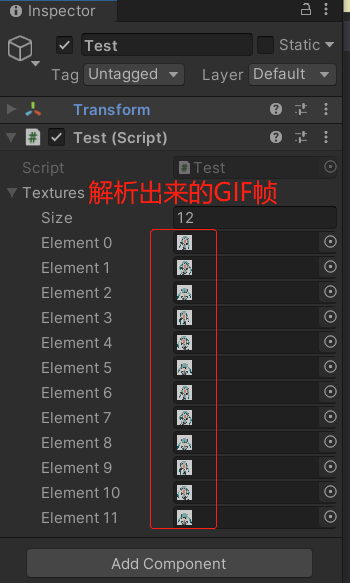
运行测试
标签: Unity3d
« 地形(Terrain)
|
常量和字段»
日历
最新文章
随机文章
热门文章
分类

存档
- 2026年7月(1)
- 2026年6月(17)
- 2026年5月(29)
- 2026年4月(7)
- 2026年3月(15)
- 2026年2月(3)
- 2026年1月(6)
- 2025年12月(1)
- 2025年11月(1)
- 2025年9月(3)
- 2025年7月(4)
- 2025年6月(5)
- 2025年5月(1)
- 2025年4月(5)
- 2025年3月(4)
- 2025年2月(3)
- 2025年1月(1)
- 2024年12月(5)
- 2024年11月(5)
- 2024年10月(5)
- 2024年9月(3)
- 2024年8月(3)
- 2024年7月(11)
- 2024年6月(3)
- 2024年5月(9)
- 2024年4月(10)
- 2024年3月(11)
- 2024年2月(24)
- 2024年1月(12)
- 2023年12月(3)
- 2023年11月(9)
- 2023年10月(7)
- 2023年9月(2)
- 2023年8月(7)
- 2023年7月(9)
- 2023年6月(6)
- 2023年5月(7)
- 2023年4月(11)
- 2023年3月(6)
- 2023年2月(11)
- 2023年1月(8)
- 2022年12月(2)
- 2022年11月(4)
- 2022年10月(10)
- 2022年9月(2)
- 2022年8月(13)
- 2022年7月(7)
- 2022年6月(11)
- 2022年5月(18)
- 2022年4月(29)
- 2022年3月(5)
- 2022年2月(6)
- 2022年1月(8)
- 2021年12月(5)
- 2021年11月(3)
- 2021年10月(4)
- 2021年9月(9)
- 2021年8月(14)
- 2021年7月(8)
- 2021年6月(5)
- 2021年5月(2)
- 2021年4月(3)
- 2021年3月(7)
- 2021年2月(2)
- 2021年1月(8)
- 2020年12月(7)
- 2020年11月(2)
- 2020年10月(6)
- 2020年9月(9)
- 2020年8月(10)
- 2020年7月(9)
- 2020年6月(18)
- 2020年5月(4)
- 2020年4月(25)
- 2020年3月(38)
- 2020年1月(21)
- 2019年12月(13)
- 2019年11月(29)
- 2019年10月(44)
- 2019年9月(17)
- 2019年8月(18)
- 2019年7月(25)
- 2019年6月(25)
- 2019年5月(17)
- 2019年4月(10)
- 2019年3月(36)
- 2019年2月(35)
- 2019年1月(28)
- 2018年12月(30)
- 2018年11月(22)
- 2018年10月(4)
- 2018年9月(7)
- 2018年8月(13)
- 2018年7月(13)
- 2018年6月(6)
- 2018年5月(5)
- 2018年4月(13)
- 2018年3月(5)
- 2018年2月(3)
- 2018年1月(8)
- 2017年12月(35)
- 2017年11月(17)
- 2017年10月(16)
- 2017年9月(17)
- 2017年8月(20)
- 2017年7月(34)
- 2017年6月(17)
- 2017年5月(15)
- 2017年4月(32)
- 2017年3月(8)
- 2017年2月(2)
- 2017年1月(5)
- 2016年12月(14)
- 2016年11月(26)
- 2016年10月(12)
- 2016年9月(25)
- 2016年8月(32)
- 2016年7月(14)
- 2016年6月(21)
- 2016年5月(17)
- 2016年4月(13)
- 2016年3月(8)
- 2016年2月(8)
- 2016年1月(18)
- 2015年12月(13)
- 2015年11月(15)
- 2015年10月(12)
- 2015年9月(18)
- 2015年8月(21)
- 2015年7月(35)
- 2015年6月(13)
- 2015年5月(9)
- 2015年4月(4)
- 2015年3月(5)
- 2015年2月(4)
- 2015年1月(13)
- 2014年12月(7)
- 2014年11月(5)
- 2014年10月(4)
- 2014年9月(8)
- 2014年8月(16)
- 2014年7月(26)
- 2014年6月(22)
- 2014年5月(28)
- 2014年4月(15)
友情链接
- Unity官网
- Unity圣典
- Unity在线手册
- Unity中文手册(圣典)
- Unity官方中文论坛
- Unity游戏蛮牛用户文档
- Unity下载存档
- Unity引擎源码下载
- Unity服务
- Unity Ads
- wiki.unity3d
- Visual Studio Code官网
- SenseAR开发文档
- MSDN
- C# 参考
- C# 编程指南
- .NET Framework类库
- .NET 文档
- .NET 开发
- WPF官方文档
- uLua
- xLua
- SharpZipLib
- Protobuf-net
- Protobuf.js
- OpenSSL
- OPEN CASCADE
- JSON
- MessagePack
- C在线工具
- 游戏蛮牛
- GreenVPN
- 聚合数据
- 热云
- 融云
- 腾讯云
- 腾讯开放平台
- 腾讯游戏服务
- 腾讯游戏开发者平台
- 腾讯课堂
- 微信开放平台
- 腾讯实时音视频
- 腾讯即时通信IM
- 微信公众平台技术文档
- 白鹭引擎官网
- 白鹭引擎开放平台
- 白鹭引擎开发文档
- FairyGUI编辑器
- PureMVC-TypeScript
- 讯飞开放平台
- 亲加通讯云
- Cygwin
- Mono开发者联盟
- Scut游戏服务器引擎
- KBEngine游戏服务器引擎
- Photon游戏服务器引擎
- 码云
- SharpSvn
- 腾讯bugly
- 4399原创平台
- 开源中国
- Firebase
- Firebase-Admob-Unity
- google-services-unity
- Firebase SDK for Unity
- Google-Firebase-SDK
- AppsFlyer SDK
- android-repository
- CQASO
- Facebook开发者平台
- gradle下载
- GradleBuildTool下载
- Android Developers
- Google中国开发者
- AndroidDevTools
- Android社区
- Android开发工具
- Google Play Games Services
- Google商店
- Google APIs for Android
- 金钱豹VPN
- TouchSense SDK
- MakeHuman
- Online RSA Key Converter
- Windows UWP应用
- Visual Studio For Unity
- Open CASCADE Technology
- 慕课网
- 阿里云服务器ECS
- 在线免费文字转语音系统
- AI Studio
- 网云穿
- 百度网盘开放平台
- 迅捷画图
- 菜鸟工具
- [CSDN] 程序员研修院
- 华为人脸识别
- 百度AR导航导览SDK
- 海康威视官网
- 海康开放平台
- 海康SDK下载
- git download
- Open CASCADE
- CascadeStudio
- OpenClaw中文社区
- three.js manual
- SVG官方文档
交流QQ群
-
Flash游戏设计: 86184192
Unity游戏设计: 171855449
游戏设计订阅号

捐赠 (用于支付服务器费用)
-
微信

支持宝

捐赠的朋友可与博主成为微信好友,点击下方【给我写信】给博主留言。


