
TcpClient
作者:追风剑情 发布于:2019-8-26 11:57 分类:C#
示例:聊天室
服务端代码
using System;
using System.Collections.Generic;
using System.Linq;
using System.Text;
using System.IO;
using System.Threading;
using System.Net;
using System.Net.Sockets;

namespace TestServer
{
    class Program
    {
        static ServerLobby defaultLobby;

        static void Main(string[] args)
        {
            TcpListener server = null;
            try
            {
                Int32 port = 13000;
                IPAddress localAddr = IPAddress.Parse("127.0.0.1");

                server = new TcpListener(localAddr, port);
                server.Start();

                Console.WriteLine("Server started");

                //建立默认大厅
                defaultLobby = new ServerLobby();

                while (true)
                {
                    Console.WriteLine("Waiting for a connection... ");

                    TcpClient client = server.AcceptTcpClient();
                    Console.WriteLine("Connected!");

                    //进入大厅
                    ServerPlayer player = new ServerPlayer(client);
                    defaultLobby.OnEnterServerPlayer(player);

                    ThreadPoolInfo();
                }
            }
            catch (SocketException e)
            {
                Console.WriteLine("SocketException: {0}", e);
            }
            finally
            {
                server.Stop();
            }

            Console.WriteLine("\nHit enter to continue...");
            Console.Read();
        }

        //显示线程池现状
        static void ThreadPoolInfo()
        {
            int a, b;
            ThreadPool.GetAvailableThreads(out a, out b);
            string message = string.Format("CurrentThreadId is : {0}\n" +
                "WorkerThreads is : {1}\nCompletionPortThreads is : {2}\n",
                 Thread.CurrentThread.ManagedThreadId, a.ToString(), b.ToString());

            Console.WriteLine(message);
        }
    }
}

// 大厅,管理所有ServerPlayer
public class ServerLobby
{
    private List<ServerPlayer> playerList = new List<ServerPlayer>();

    // 有玩家进入大厅
    public void OnEnterServerPlayer(ServerPlayer player)
    {
        player.OnEnterLobby(this);
        playerList.Add(player);
    }

    // 有玩家离开大厅
    public void OnLeaveServerPlayer(ServerPlayer player)
    {
        playerList.Remove(player);
        player.OnLeaveLobby();
    }

    // 向大厅中的所有玩家广播消息
    public void BroadcastMessage(string msg)
    {
        for (int i = 0; i < playerList.Count; i++)
        {
            if (playerList[i] == null)
                continue;
            playerList[i].SendMessage(msg);
        }
    }
}

public class ServerPlayer
{
    private TcpClient tcpClient;
    private NetworkStream stream;
    private byte[] receiveBuffer;
    private string clientEndPoint;
    private AsyncCallback mAsyncCallback;
    private ServerLobby mServerLobby;
    private string clientIP;

    public string IP { get { return clientIP; } }

    public ServerPlayer(TcpClient tcpClient)
    {
        this.tcpClient = tcpClient;
        receiveBuffer = new byte[tcpClient.ReceiveBufferSize];
        //显示客户端信息
        clientEndPoint = tcpClient.Client.RemoteEndPoint.ToString();
        clientIP = clientEndPoint;
        Console.WriteLine("Client connected : " + clientEndPoint);

        stream = tcpClient.GetStream();
        mAsyncCallback = new AsyncCallback(ReadCallback);
        stream.BeginRead(receiveBuffer, 0, receiveBuffer.Length, mAsyncCallback, stream);
    }

    void ReadCallback(IAsyncResult result)
    {
        NetworkStream stream = (NetworkStream)result.AsyncState;
        int length = -1;
        try
        {
            //1、TCP中断后length < 1
            //2、TCP中断后产生IOException
            length = stream.EndRead(result);
        }
        catch (IOException ex)
        {

        }
        finally
        {
            if (length < 1)//TCP中断了
            {
                Console.WriteLine("client disconnected : " + clientEndPoint);
                //离开大厅
                if (mServerLobby != null)
                    mServerLobby.OnLeaveServerPlayer(this);
            }
        }

        if (length < 1)
            return;


        //显示接收信息
        string message = Encoding.UTF8.GetString(receiveBuffer, 0, length);
        Console.WriteLine("Message: " + message);

        //向大厅中的所有玩家同步消息
        mServerLobby.BroadcastMessage("sync: " + message.Trim() + "\r\n");

        stream.BeginRead(receiveBuffer, 0, receiveBuffer.Length, mAsyncCallback, stream);
    }

    // 发消息
    public void SendMessage(string msg)
    {
        if (!tcpClient.Connected)
            return;

        byte[] bytes = System.Text.Encoding.UTF8.GetBytes(msg);
        stream.Write(bytes, 0, msg.Length);
    }

    // 本玩家进入大厅触发
    public void OnEnterLobby(ServerLobby lobby)
    {
        mServerLobby = lobby;
        //通知大厅中的其他玩家
        mServerLobby.BroadcastMessage(IP + " enter lobby\r\n");
    }

    // 本玩家离开大厅触发
    public void OnLeaveLobby()
    {
        //通知大厅中的其他玩家
        mServerLobby.BroadcastMessage(IP + " leave lobby\r\n");
        mServerLobby = null;
    }
}
客户端代码
MainWindow.xaml
<Window x:Class="TestClient.MainWindow"
        xmlns="http://schemas.microsoft.com/winfx/2006/xaml/presentation"
        xmlns:x="http://schemas.microsoft.com/winfx/2006/xaml"
        xmlns:d="http://schemas.microsoft.com/expression/blend/2008"
        xmlns:mc="http://schemas.openxmlformats.org/markup-compatibility/2006"
        xmlns:local="clr-namespace:TestClient"
        mc:Ignorable="d"
        Title="Client" Height="320" Width="300" ResizeMode="NoResize">
    <Grid>
        <TextBox Name="IPTextBox" HorizontalAlignment="Left" Height="23" Margin="9,10,0,0" TextWrapping="Wrap" Text="127.0.0.1:13000" VerticalAlignment="Top" Width="120"/>
        <Button Name="ConnectButton" Content="Connect" HorizontalAlignment="Left" Margin="136,11,0,0" VerticalAlignment="Top" Width="75" Click="ConnectButton_Click"/>
        <!--聊天内容区域-->
        <Border HorizontalAlignment="Center" VerticalAlignment="Center"
            Width="269" Height="190" CornerRadius="5"
            BorderBrush="Blue" BorderThickness="5" Margin="12,40,12.6,59.4">
            <TextBlock Name="ReceiveTextBlock" HorizontalAlignment="Left" Margin="3,3,3,3" TextWrapping="Wrap" VerticalAlignment="Top" Height="185" Width="269"/>
        </Border>
        <!--End-->
        <TextBox Name="InputTextBox" HorizontalAlignment="Left" Height="23" Margin="12,248,0,0" TextWrapping="Wrap" Text="TextBox" VerticalAlignment="Top" Width="185"/>
        <Button Name="SendButton" Content="Send" HorizontalAlignment="Left" Margin="206,250,0,0" VerticalAlignment="Top" Width="75" Click="SendButton_Click"/>
    </Grid>
</Window>
MainWindow.xaml.cs
using System;
using System.Collections.Generic;
using System.Linq;
using System.Text;
using System.Threading.Tasks;
using System.Windows;
using System.Windows.Controls;
using System.Windows.Data;
using System.Windows.Documents;
using System.Windows.Input;
using System.Windows.Media;
using System.Windows.Media.Imaging;
using System.Windows.Navigation;
using System.Windows.Shapes;
using System.IO;
using System.Threading;
using System.Net;
using System.Net.Sockets;
using System.Windows.Threading;//DispatcherTimer

//参考 https://www.cnblogs.com/legion/p/9100347.html
namespace TestClient
{
    /// <summary>
    /// MainWindow.xaml 的交互逻辑
    /// </summary>
    public partial class MainWindow : Window
    {
        public string ChatContent;
        private DispatcherTimer timer;

        byte[] recvData = new byte[1024 * 10];
        TcpClient client = new TcpClient();
        NetworkStream stream = null;

        public MainWindow()
        {
            InitializeComponent();

            timer = new DispatcherTimer();
            timer.Tick += new EventHandler(OnTick);
            timer.Interval = new TimeSpan(0, 0, 1);
            timer.Start();
        }

        private void OnTick(object sender, EventArgs e)
        {
            this.ReceiveTextBlock.Text = ChatContent;
        }

        private void ConnectButton_Click(object sender, RoutedEventArgs e)
        {
            string text = this.IPTextBox.Text;
            string[] arr = text.Split(new char[] { ':' });
            string IP = arr[0];
            int port = int.Parse(arr[1]);
            Connect(IP, port);
        }

        private void Connect(string IP, int port)
        {
            Console.WriteLine("IP={0}, port={1}", IP, port);
            Console.WriteLine("preparing to connect in main thread  " + Thread.CurrentThread.ManagedThreadId);
            client.BeginConnect(IP, port, ConnectCallBack, client);
        }

        private void SendButton_Click(object sender, RoutedEventArgs e)
        {
            string msg = this.InputTextBox.Text;
            this.InputTextBox.Text = string.Empty;
            this.SendMessage(msg);
        }

        private void ConnectCallBack(IAsyncResult result)
        {
            Console.WriteLine("well, i am in the connect thread..." + Thread.CurrentThread.ManagedThreadId);
            TcpClient client = result.AsyncState as TcpClient;
            try
            {
                client.EndConnect(result);
                stream = client.GetStream();
                ChatContent += "connect server successed!\r\n";
            }
            catch (Exception ex)
            {
                Console.WriteLine("well, seems an error occured...");
                Console.WriteLine("which is " + ex.ToString());
                return;
            }
            Console.WriteLine("Hooray, it worked.");
            client.Client.BeginReceive(recvData, 0, recvData.Length, SocketFlags.None, RecvCallBack, client);
        }

        public void RecvCallBack(IAsyncResult result)
        {
            Console.WriteLine("here in recv callback thread.." + Thread.CurrentThread.ManagedThreadId);
            int count = -1;
            try
            {
                count = client.Client.EndReceive(result);
            }
            catch (Exception ex)
            {
                Console.WriteLine("远程计算机关闭");
                return;
            }
            //an recv is done,display it and continue..
            string msg = Encoding.ASCII.GetString(recvData, 0, count);
            Console.WriteLine("your recv this time is:");
            Console.WriteLine(msg);
            ChatContent += msg;
            client.Client.BeginReceive(recvData, 0, recvData.Length, SocketFlags.None, RecvCallBack, client);
        }

        public void SendMessage(string msg)
        {
            if (stream == null)
                return;
            byte[] bytes = Encoding.ASCII.GetBytes(msg);
            stream.Write(bytes, 0, bytes.Length);
            stream.Flush();
        }
    }
}
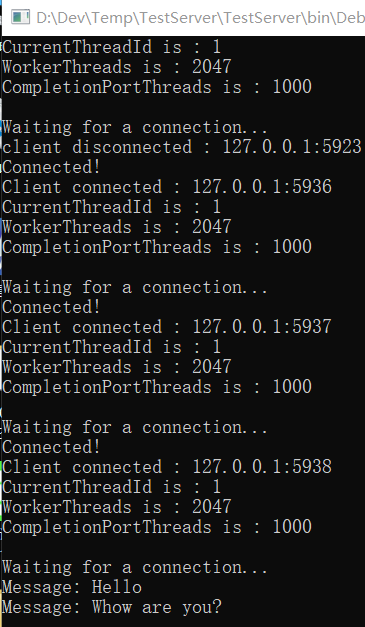
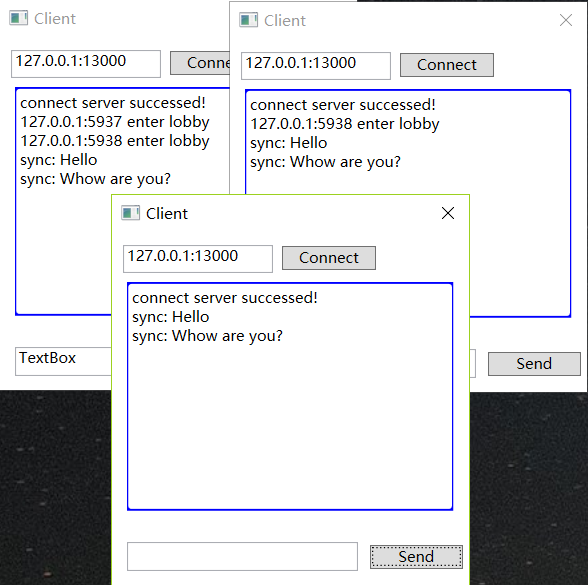
运行测试
标签: C#
« TCP解包与封包
|
WPF—数据双向绑定»
日历
最新文章
随机文章
热门文章
分类

存档
- 2026年7月(1)
- 2026年6月(17)
- 2026年5月(29)
- 2026年4月(7)
- 2026年3月(15)
- 2026年2月(3)
- 2026年1月(6)
- 2025年12月(1)
- 2025年11月(1)
- 2025年9月(3)
- 2025年7月(4)
- 2025年6月(5)
- 2025年5月(1)
- 2025年4月(5)
- 2025年3月(4)
- 2025年2月(3)
- 2025年1月(1)
- 2024年12月(5)
- 2024年11月(5)
- 2024年10月(5)
- 2024年9月(3)
- 2024年8月(3)
- 2024年7月(11)
- 2024年6月(3)
- 2024年5月(9)
- 2024年4月(10)
- 2024年3月(11)
- 2024年2月(24)
- 2024年1月(12)
- 2023年12月(3)
- 2023年11月(9)
- 2023年10月(7)
- 2023年9月(2)
- 2023年8月(7)
- 2023年7月(9)
- 2023年6月(6)
- 2023年5月(7)
- 2023年4月(11)
- 2023年3月(6)
- 2023年2月(11)
- 2023年1月(8)
- 2022年12月(2)
- 2022年11月(4)
- 2022年10月(10)
- 2022年9月(2)
- 2022年8月(13)
- 2022年7月(7)
- 2022年6月(11)
- 2022年5月(18)
- 2022年4月(29)
- 2022年3月(5)
- 2022年2月(6)
- 2022年1月(8)
- 2021年12月(5)
- 2021年11月(3)
- 2021年10月(4)
- 2021年9月(9)
- 2021年8月(14)
- 2021年7月(8)
- 2021年6月(5)
- 2021年5月(2)
- 2021年4月(3)
- 2021年3月(7)
- 2021年2月(2)
- 2021年1月(8)
- 2020年12月(7)
- 2020年11月(2)
- 2020年10月(6)
- 2020年9月(9)
- 2020年8月(10)
- 2020年7月(9)
- 2020年6月(18)
- 2020年5月(4)
- 2020年4月(25)
- 2020年3月(38)
- 2020年1月(21)
- 2019年12月(13)
- 2019年11月(29)
- 2019年10月(44)
- 2019年9月(17)
- 2019年8月(18)
- 2019年7月(25)
- 2019年6月(25)
- 2019年5月(17)
- 2019年4月(10)
- 2019年3月(36)
- 2019年2月(35)
- 2019年1月(28)
- 2018年12月(30)
- 2018年11月(22)
- 2018年10月(4)
- 2018年9月(7)
- 2018年8月(13)
- 2018年7月(13)
- 2018年6月(6)
- 2018年5月(5)
- 2018年4月(13)
- 2018年3月(5)
- 2018年2月(3)
- 2018年1月(8)
- 2017年12月(35)
- 2017年11月(17)
- 2017年10月(16)
- 2017年9月(17)
- 2017年8月(20)
- 2017年7月(34)
- 2017年6月(17)
- 2017年5月(15)
- 2017年4月(32)
- 2017年3月(8)
- 2017年2月(2)
- 2017年1月(5)
- 2016年12月(14)
- 2016年11月(26)
- 2016年10月(12)
- 2016年9月(25)
- 2016年8月(32)
- 2016年7月(14)
- 2016年6月(21)
- 2016年5月(17)
- 2016年4月(13)
- 2016年3月(8)
- 2016年2月(8)
- 2016年1月(18)
- 2015年12月(13)
- 2015年11月(15)
- 2015年10月(12)
- 2015年9月(18)
- 2015年8月(21)
- 2015年7月(35)
- 2015年6月(13)
- 2015年5月(9)
- 2015年4月(4)
- 2015年3月(5)
- 2015年2月(4)
- 2015年1月(13)
- 2014年12月(7)
- 2014年11月(5)
- 2014年10月(4)
- 2014年9月(8)
- 2014年8月(16)
- 2014年7月(26)
- 2014年6月(22)
- 2014年5月(28)
- 2014年4月(15)
友情链接
- Unity官网
- Unity圣典
- Unity在线手册
- Unity中文手册(圣典)
- Unity官方中文论坛
- Unity游戏蛮牛用户文档
- Unity下载存档
- Unity引擎源码下载
- Unity服务
- Unity Ads
- wiki.unity3d
- Visual Studio Code官网
- SenseAR开发文档
- MSDN
- C# 参考
- C# 编程指南
- .NET Framework类库
- .NET 文档
- .NET 开发
- WPF官方文档
- uLua
- xLua
- SharpZipLib
- Protobuf-net
- Protobuf.js
- OpenSSL
- OPEN CASCADE
- JSON
- MessagePack
- C在线工具
- 游戏蛮牛
- GreenVPN
- 聚合数据
- 热云
- 融云
- 腾讯云
- 腾讯开放平台
- 腾讯游戏服务
- 腾讯游戏开发者平台
- 腾讯课堂
- 微信开放平台
- 腾讯实时音视频
- 腾讯即时通信IM
- 微信公众平台技术文档
- 白鹭引擎官网
- 白鹭引擎开放平台
- 白鹭引擎开发文档
- FairyGUI编辑器
- PureMVC-TypeScript
- 讯飞开放平台
- 亲加通讯云
- Cygwin
- Mono开发者联盟
- Scut游戏服务器引擎
- KBEngine游戏服务器引擎
- Photon游戏服务器引擎
- 码云
- SharpSvn
- 腾讯bugly
- 4399原创平台
- 开源中国
- Firebase
- Firebase-Admob-Unity
- google-services-unity
- Firebase SDK for Unity
- Google-Firebase-SDK
- AppsFlyer SDK
- android-repository
- CQASO
- Facebook开发者平台
- gradle下载
- GradleBuildTool下载
- Android Developers
- Google中国开发者
- AndroidDevTools
- Android社区
- Android开发工具
- Google Play Games Services
- Google商店
- Google APIs for Android
- 金钱豹VPN
- TouchSense SDK
- MakeHuman
- Online RSA Key Converter
- Windows UWP应用
- Visual Studio For Unity
- Open CASCADE Technology
- 慕课网
- 阿里云服务器ECS
- 在线免费文字转语音系统
- AI Studio
- 网云穿
- 百度网盘开放平台
- 迅捷画图
- 菜鸟工具
- [CSDN] 程序员研修院
- 华为人脸识别
- 百度AR导航导览SDK
- 海康威视官网
- 海康开放平台
- 海康SDK下载
- git download
- Open CASCADE
- CascadeStudio
- OpenClaw中文社区
- three.js manual
- SVG官方文档
交流QQ群
-
Flash游戏设计: 86184192
Unity游戏设计: 171855449
游戏设计订阅号

捐赠 (用于支付服务器费用)
-
微信

支持宝

捐赠的朋友可与博主成为微信好友,点击下方【给我写信】给博主留言。


