参考 https://my.oschina.net/u/3744374/blog/1586307
一、下载pbc
https://github.com/cloudwu/pbc
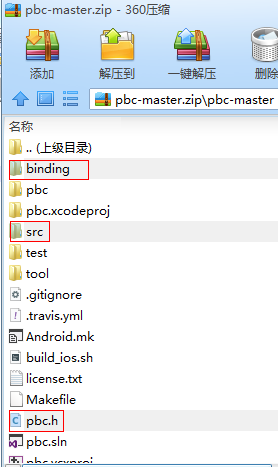
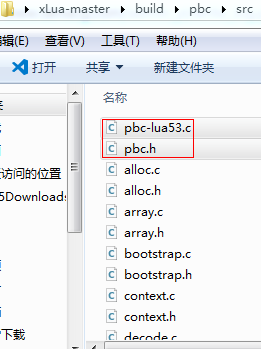
二、在xLua工程下新建目录xLua-master\build\pbc\src
三、拷贝以下文件到xLua-master\build\pbc\src
pbc-master\pbc.h
pbc-master\src下的所有文件
pbc-master\binding\lua53\pbc-lua53.c
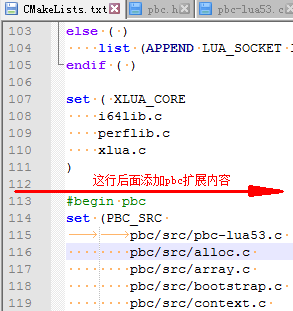
四、修改xLua-master\build\CMakeLists.txt
添加以下内容
#begin pbc
set (PBC_SRC
		pbc/src/pbc-lua53.c
        pbc/src/alloc.c
        pbc/src/array.c
        pbc/src/bootstrap.c
        pbc/src/context.c
        pbc/src/decode.c
        pbc/src/map.c
        pbc/src/pattern.c
        pbc/src/proto.c
        pbc/src/register.c
        pbc/src/rmessage.c
        pbc/src/stringpool.c
        pbc/src/varint.c
        pbc/src/wmessage.c
)

set_property(
        SOURCE ${PBC_SRC}
        APPEND
        PROPERTY COMPILE_DEFINITIONS
        LUA_LIB
)
list(APPEND THIRDPART_INC pbc/src)
set (THIRDPART_SRC  ${THIRDPART_SRC} ${PBC_SRC})
#end pbc
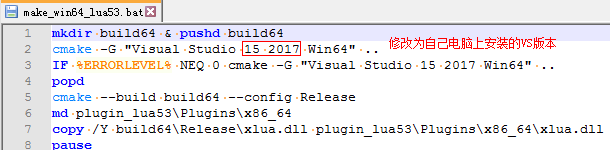
五、修改make_win64_lua53.bat
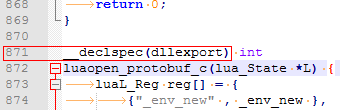
六、修改pbc-lua53.c第871行
添加__declspec(dllexport)
七、双击make_win64_lua53.bat重新编译xlua.dll
问题:如果编译时报错
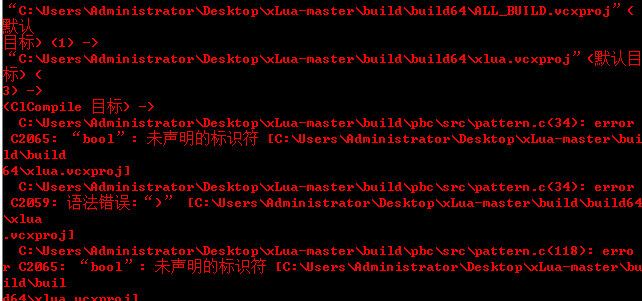
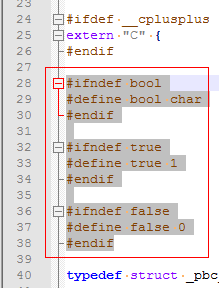
解决方法: 修改pbc.h
添加以下内容
#ifndef bool
#define bool char
#endif

#ifndef true
#define true 1
#endif

#ifndef false
#define false 0
#endif
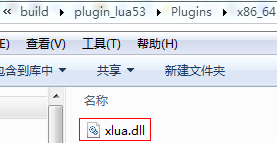
八、查看新编译的xlua.dll
写个批处理,通过VS安装目录下的dumpbin.exe工具查看xlua.dll里是否存在导出的luaopen_protobuf_c()接口
在VS的安装目录下搜索dumpbin.exe
set dumpbin="C:\Program Files (x86)\Microsoft Visual Studio\2017\Community\VC\Tools\MSVC\14.15.26726\bin\Hostx64\x64\dumpbin.exe"
%dumpbin% /exports xlua.dll
pause
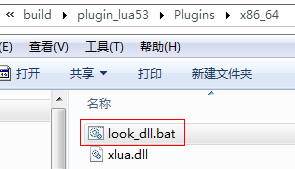
双击批处理
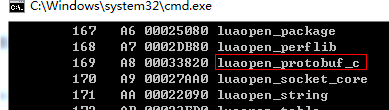
从输出可知luaopen_protobuf_c接口已经导出到xlua.dll中,可以在C#侧使用了。
九、修改C#侧
在LuaDLL.cs中添加以下内容
[DllImport(LUADLL, CallingConvention = CallingConvention.Cdecl)]
//对应pbc-lua53.c文件__declspec(dllexport) int luaopen_protobuf_c(lua_State *L)函数
public static extern int luaopen_protobuf_c(System.IntPtr L);

[MonoPInvokeCallback(typeof(LuaDLL.lua_CSFunction))]
public static int LoadProtobuf(System.IntPtr L)
{
      return luaopen_protobuf_c(L);
}
十、添加内建函数
LuaEnv luaenv = new LuaEnv();
//local c = require "protobuf.c" --执行XLua.LuaDLL.Lua.LoadProtobuf
luaenv.AddBuildin("protobuf.c", XLua.LuaDLL.Lua.LoadProtobuf);
十一、将pbc-master\binding\lua53\protobuf.lua拷到Unity工程下面
示例:
Unity工程截图
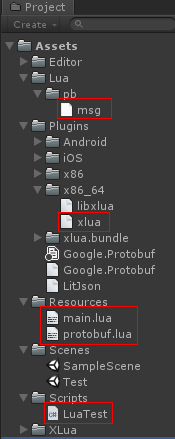
1、新建协议文件msg.proto
syntax = "proto3"; //版本号
package proto;  //包名

option csharp_namespace="Proto";

message StoreRequest {
	string name = 1;
	bool b = 2;
	double num1 = 3;
	float num2 = 4;
	int32 num3 = 5;
	repeated string myList=6;

	enum GenderType
	{
		None = 0;
		Male = 1;
		Female = 2;
	}

	GenderType gender = 7;

	map<string, int32> dic = 8;
}
编译msg.proto文件为msg.pb文件
参见 http://www.devacg.com/?post=903
2、新建main.lua文件
function Main()
    CS.UnityEngine.Debug.Log('Lua: Main()')

    --加载protobuf.lua
    local protobuf = require('protobuf')
    --注册协议文件
    protobuf.register_file(CS.UnityEngine.Application.dataPath .."/Lua/pb/msg.pb")
    --序列化
    --decode(package名称.message名称, 数据对象)
    local str = protobuf.encode("proto.StoreRequest", {
        name = "Alice",
        b = true,
        num1 = 100,
        num2 = 2000,
        num3 = 30000,
        gender = "Male",
        myList = {"aaa", "bbb", "ccc"},
        dic = {a=1, b=2, c=3}
    })

    CS.UnityEngine.Debug.Log(string.format("encode: %s",str))

    --反序列化
    CS.UnityEngine.Debug.Log("-------decode------")

    --decode(package名称.message名称, 序列化数据)
    local obj = protobuf.decode("proto.StoreRequest", str)

    --打印字段
    CS.UnityEngine.Debug.Log(string.format("name=%s", obj.name))
    CS.UnityEngine.Debug.Log(string.format("b=%s", obj.b))
    CS.UnityEngine.Debug.Log(string.format("num1=%s", obj.num1))
    CS.UnityEngine.Debug.Log(string.format("num2=%s", obj.num2))
    CS.UnityEngine.Debug.Log(string.format("num3=%s", obj.num3))
    CS.UnityEngine.Debug.Log(string.format("gender=%s", obj.gender))

    --打印字符串数组
    local s = ""
    for k, v in ipairs(obj.myList) do
        s = s..v..", "
    end
    CS.UnityEngine.Debug.Log(string.format("myList=%s", s))

    --打印字典
    --测试结果: 没有任何输出
    for k, v in pairs(obj.dic) do
        CS.UnityEngine.Debug.Log("dic k=%s, v=%s", k, v)
    end
end
3、新建LuaTest.cs文件
using System;
using System.Collections;
using System.Collections.Generic;
using UnityEngine;
using XLua;

public class LuaTest : MonoBehaviour
{
    [XLua.CSharpCallLua]
    public delegate void MainFunc();

    void Start()
    {
        //创建Lua虚拟机,建议创建一次重复使用。
        LuaEnv luaenv = new LuaEnv();
        luaenv.AddBuildin("protobuf.c", XLua.LuaDLL.Lua.LoadProtobuf);
        //自定义加载器
        luaenv.AddLoader((ref string filename) => {
            Debug.Log("Load lua file: " + filename);
            TextAsset luaAsset = null;
            if(filename == "protobuf"){
                 luaAsset = Resources.Load<TextAsset>("protobuf.lua");
                 return System.Text.Encoding.UTF8.GetBytes(luaAsset.text);
            }

             return null;
         });

        TextAsset asset = Resources.Load<TextAsset>("main.lua");
        //执行Lua代码
        luaenv.DoString(asset.text);

        //C#调用Lua层入口函数
        var Main = luaenv.Global.GetInPath<MainFunc>("Main");
        Main();
    }
}
4、运行测试
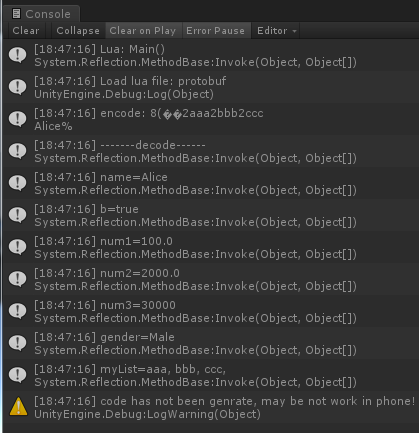
更多参考
protobuf