枚举(Enum)
post by:追风剑情 2019-11-1 15:56
示例一:定义枚举类型
using System;
using System.Collections.Generic;
using System.Linq;
using System.Text;
using System.Threading.Tasks;

namespace ConsoleApp2
{
    class Program
    {
        static void Main(string[] args)
        {
            byte x = (byte)Days.Fri;
            Console.WriteLine("x={0}", x);

            CarOptions car = CarOptions.SunRoof | CarOptions.Spoiler;
            //如果移除[Flags],将输出car=3
            Console.WriteLine("car={0}", car);

            //打印枚举元素
            string[] names = Enum.GetNames(typeof(Days));
            foreach (var s in names)
                Console.WriteLine(s);

            //判断有没定义某个枚举元素
            bool definedSun = Enum.IsDefined(typeof(Days), "Sun");
            bool definedSunX = Enum.IsDefined(typeof(Days), "SunX");
            Console.WriteLine("definedSun={0}, definedSunX={1}", definedSun, definedSunX);

            Console.Read();
        }
    }

    //定义枚举元素的类型为byte型,默认为int型
    //准许使用的枚举类型有 byte、sbyte、short、ushort、int、uint、long 或 ulong。
    //默认情况第1个元素的值为0,后面的元素值依次递增
    public enum Days : byte
    { Sat = 1, Sun, Mon, Tue, Wed, Thu, Fri }

    [Flags] //使用System.FlagsAttribute特性
    public enum CarOptions
    {
        SunRoof = 0x01,
        Spoiler = 0x02,
        FogLights = 0x04,
        TintedWindows = 0x08
    }
}
运行测试
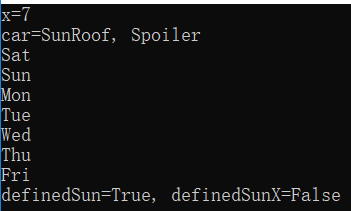
示例——枚举
internal enum Color : byte {
	White,
	Red,
	Green,
	Blue,
	Orange
}

//输出"System.Byte"
Console.WriteLine(Enum.GetUnderlyingType(typeof(Color)));
C#编译器将枚举类型视为基元类型。所以可以用许多熟悉的操作符(==,!=,<,><=,>=,+,-,^,&,|,~,++,--)来操作枚举类型的实例。所有这些操作符实际作用于每个枚举类型实例内部的 value_ 实例字段。此外,C#编译器允许将枚举类型的实例显式转型为不同的枚举类型。也可显示将枚举类型实例转型为数值类型。
示例——枚举
internal enum Color : byte {
	White,
	Red,
	Green,
	Blue,
	Orange
}

Color c = Color.Blue;
Console.WriteLine(c);		    // "Blue" (常规格式)
Console.WriteLine(c.ToString());    // "Blue" (常规格式)
Console.WriteLine(c.ToString("G")); // "Blue" (常规格式)
Console.WriteLine(c.ToString("D")); // "3" (十进制格式)
Console.WriteLine(c.ToString("X")); // "03" (十六进制格式)
//以下代码显示"Blue"
Console.WriteLine(Enum.Format(typeof(Color), 3, "G"));
示例——枚举
Color[] colors = (Color[]) Enum.GetValues(typeof(Color));
foreach (Color c in colors) {
	Console.WriteLine("{0,5:D}\t{0:G}", c);
}

public static TEnum[] GetEnumValues<TEnum>() where TEnum : struct {
	return (TEnum[])Enum.GetValues(typeof(TEnum));
}
示例——位标志
[Flags]
internal enum Actions {
	None = 0,
	Read = 0x001,
	Write = 0x0002,
	ReadWrite = Actions.Read | Actions.Write,
	Delete = 0x0004,
	Query = 0x0008,
	Sync = 0x0010
}

Actions actions = Actions.Read | Actions.Delete;
//输出"Read, Delete"
Console.WriteLine(actions.ToString());
//如果未使用[Flags]
Console.WriteLine(actions.ToString("F"));
评论:
发表评论: