手动为角色绑定IK动画
post by:追风剑情 2019-5-6 20:43
可在 Mecanim 中用于已正确配置的任何人形Avatar骨骼。
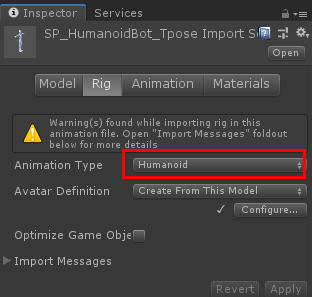
一、导入角色模型,并进行设置
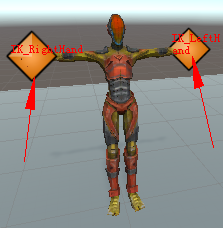
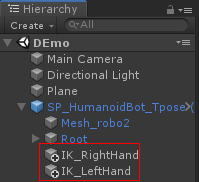
二、创建两个空对象IK_LeftHand、IK_RightHand用来对左右手部进行定位。
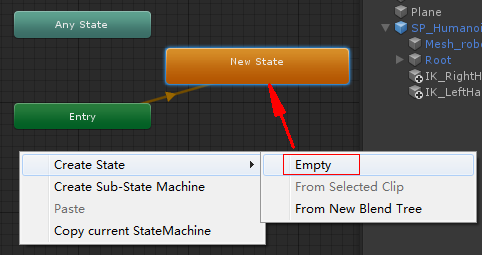
三、创建AnimatorController并创建一个空动画
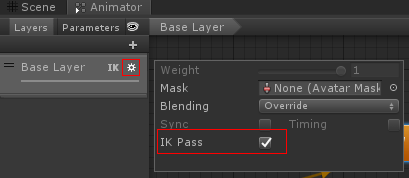
启用IK Pass
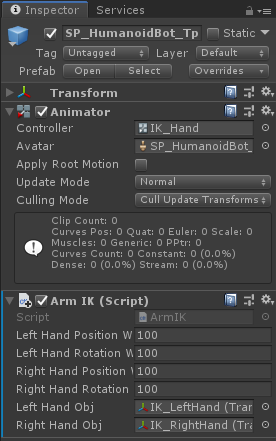
四、在场景中的模型对象上挂上ArmIK脚本
ArmIK.cs
using System.Collections;
using System.Collections.Generic;
using UnityEngine;

public class ArmIK : MonoBehaviour
{
    public float leftHandPositionWeight;
    public float leftHandRotationWeight;

    public float rightHandPositionWeight;
    public float rightHandRotationWeight;

    public Transform leftHandObj;
    public Transform rightHandObj;
    private Animator animator;

    void Start()
    {
        animator = GetComponent<Animator>();
    }

    private void OnAnimatorIK(int layerIndex)
    {
        Debug.Log("***** OnAnimatorIK");

        animator.SetIKPositionWeight(AvatarIKGoal.LeftHand, leftHandPositionWeight);
        animator.SetIKRotationWeight(AvatarIKGoal.LeftHand, leftHandRotationWeight);
        animator.SetIKPosition(AvatarIKGoal.LeftHand, leftHandObj.position);
        animator.SetIKRotation(AvatarIKGoal.LeftHand, leftHandObj.rotation);

        animator.SetIKPositionWeight(AvatarIKGoal.RightHand, rightHandPositionWeight);
        animator.SetIKRotationWeight(AvatarIKGoal.RightHand, rightHandRotationWeight);
        animator.SetIKPosition(AvatarIKGoal.RightHand, rightHandObj.position);
        animator.SetIKRotation(AvatarIKGoal.RightHand, rightHandObj.rotation);
    }
}
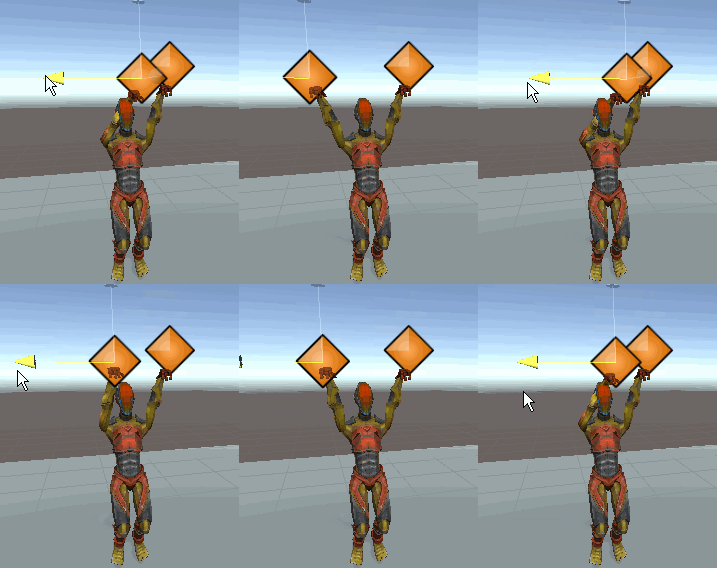
运行并拖动IK_LeftHand和IK_RightHand两个空对象观察手臂摆动效果

评论:
发表评论: