Photon SDK https://www.photonengine.com/zh-CN/PUN
Photon Server https://vibrantlink.com/
光子资源下载
https://vibrantlink.com/resource-links/
如何在PUN中设置中国区域
光子云与光子服务器差异
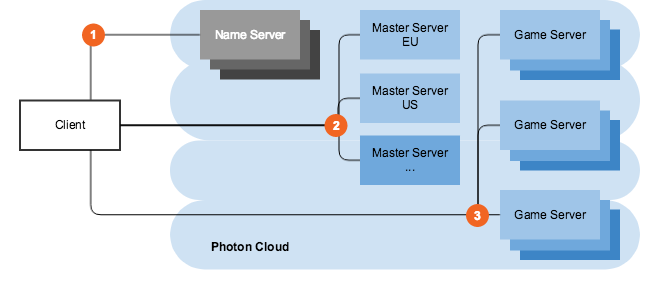
三类服务器
Master Server
此服务器是进行配对的地方,客户端可以在这里获得大厅中的房间列表。
Game Server
此服务器负责管理多个房间,以及处理房间中玩家的消息同步。
Name Server
此服务器用于获取特定区域的主服务器地址(IP)。
Photon Cloud后台管理
https://dashboard.photonengine.com
一、PhotonView
这是实现GameObject位置、旋转、缩放同步的关键类,需要挂在需要同步的GameObject上。PhotonView会在它的Awake()方法中注册自己PhotonNetwork.RegisterPhotonView(this);
二、消息驱动
PhotonNetwork类的静态构造方法中创建了一个隐藏的挂有PhotonHandler组件的GameObject,利用PhotonHandler组件的LateUpdate()方法实现消息驱动。
internal class PhotonHandler
{
     // line 127
     protected void LateUpdate() {
         // line 132
         // 驱动所有的PhotonView执行序列化
         PhotonNetwork.RunViewUpdate();
         //...
     }
}
三、序列化与数据同步
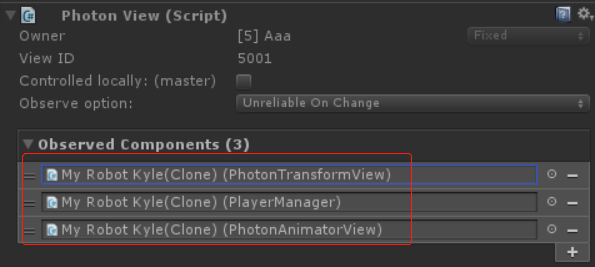
拖到Observed Components下的组件会被序列化,并进行数据同步。这些组件必须实现IPunObservable接口。
参见PhotonView类中的下面两个方法:
public void SerializeView(PhotonStream stream, PhotonMessageInfo info)
public void DeserializeView(PhotonStream stream, PhotonMessageInfo info)
Controlled locally: (master) = true(代表玩家自己),对应PhotonView的IsMine属性。
PhotonNetwork.IsMasterClient: 判断是否为主客户端
photonView.ViewID: 物体在房间里的唯一ID
当ViewID<PhotonNetwork.MAX_VIEW_IDS时,认为是场景对象,可通过CreatorActorNr==0或者IsSceneView属性判断。
photonView.OwnerActorNr: 对应玩家在房间里的ID
关系OwnerActorNr=ViewID/PhotonNetwork.MAX_VIEW_IDS
player.ActorNumber: 玩家在房间里的ID
如果photonView.OwnerActorNr==player.ActorNumber说明这个photoView是玩家自己的(即,本地客户端的)。
PhotonNetwork.SerializationRate=30;//设置数据同步频率为1000/30≈33ms同步一次数据。
PhotonNetwork.ServerTimestamp;//服务器时间(单位:毫秒)
PhotonNetwork.Time;//服务器时间(单位:秒)
四、监听所有网络事件回调
using System.Collections;
using System.Collections.Generic;
using UnityEngine;
using UnityEngine.UI;
using Photon.Realtime;
using Photon.Pun;

/// <summary>
/// 监听所有网络事件回调
/// </summary>
public class ConnectAndJoinRoom : MonoBehaviour, IInRoomCallbacks, IConnectionCallbacks, IMatchmakingCallbacks, ILobbyCallbacks, IOnEventCallback, IWebRpcCallback
{
    void Awake()
    {
        PhotonNetwork.AddCallbackTarget(this);
    }

    void Start()
    {
        if (!PhotonNetwork.IsConnected)
            PhotonNetwork.ConnectUsingSettings();
    }

    void Update()
    {
        if (PhotonNetwork.NetworkingClient != null)
            PhotonNetwork.NetworkingClient.Service();
    }

    #region IInRoomCallbacks
    public void OnPlayerEnteredRoom(Player newPlayer) { }
    public void OnPlayerLeftRoom(Player otherPlayer) { }
    public void OnRoomPropertiesUpdate(ExitGames.Client.Photon.Hashtable propertiesThatChanged) { }
    public void OnPlayerPropertiesUpdate(Player targetPlayer, ExitGames.Client.Photon.Hashtable changedProps) { }
    public void OnMasterClientSwitched(Player newMasterClient) { }
    #endregion

    #region IConnectionCallbacks
    public void OnConnected() { }
    public void OnConnectedToMaster() { }
    public void OnDisconnected(DisconnectCause cause) { }
    public void OnRegionListReceived(RegionHandler regionHandler) { }
    public void OnCustomAuthenticationResponse(Dictionary<string, object> data) { }
    public void OnCustomAuthenticationFailed(string debugMessage) { }
    #endregion

    #region IMatchmakingCallbacks
    public void OnFriendListUpdate(List<FriendInfo> friendList) { }
    public void OnCreatedRoom() { }
    public void OnCreateRoomFailed(short returnCode, string message) { }
    public void OnJoinedRoom() { }
    public void OnJoinRoomFailed(short returnCode, string message) { }
    public void OnJoinRandomFailed(short returnCode, string message) { }
    public void OnLeftRoom() { }
    #endregion

    #region ILobbyCallbacks
    public void OnJoinedLobby() { }
    public void OnLeftLobby() { }
    public void OnRoomListUpdate(List<RoomInfo> roomList) { }
    public void OnLobbyStatisticsUpdate(List<TypedLobbyInfo> lobbyStatistics) { }
    #endregion

    #region IOnEventCallback
    public void OnEvent(ExitGames.Client.Photon.EventData photonEvent) { }
    #endregion

    #region IWebRpcCallback
    public void OnWebRpcResponse(ExitGames.Client.Photon.OperationResponse response) { }
    #endregion
}
通常在OnConnectedToMaster回调中创建并加入房间,加入房间成功后会收到OnJoinedRoom回调。
RoomOptions options = new RoomOptions();
PhotonNetwork.JoinOrCreateRoom("MyRoomName", options, TypedLobby.Default);
向房间中的其他玩家发送事件,其他玩家通过OnEvent回调接收事件。
byte code = 199;//自定义事件类型[0-199]
//发送的内容存放到Hashtable,用byte作key
ExitGames.Client.Photon.Hashtable table = new ExitGames.Client.Photon.Hashtable();
table[(byte)0] = 100;
table[(byte)1] = 200;
RaiseEventOptions eventOptions = RaiseEventOptions.Default;
SendOptions sendOptions = SendOptions.SendReliable;
PhotonNetwork.RaiseEvent(code, table, eventOptions, sendOptions);
五、PunRPC特性
[Photon.Pun.PunRPC]
private void RPCFun()
{
}
调用方式photonView.RPC("RPCFun", RpcTarget.All);
光子服务器(Photon Server)
https://vibrantlink.com/photonserver/
下载 https://www.photonengine.com/zh-CN/sdks#serverserver
下载时记着先选标签


双击安装后
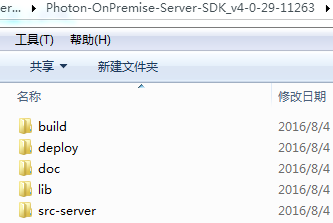
运行deploy\bin_Win64\PhotonControl.exe
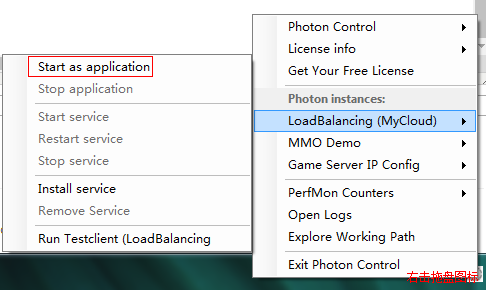
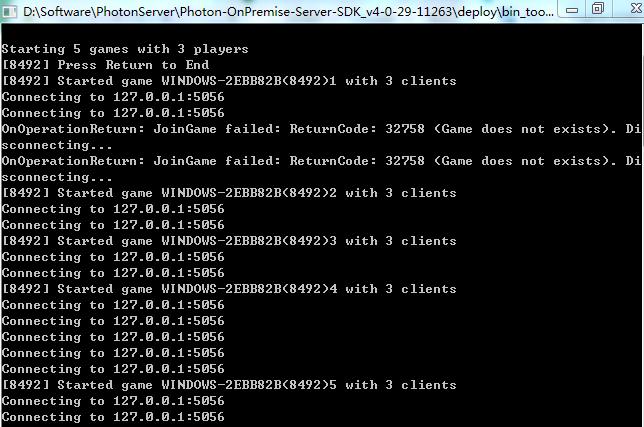
运行测试客户端 Run Testclient (LoadBalancing)
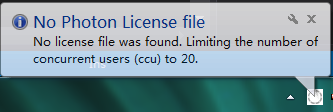
在您应用许可证文件之前,Photon Server将限制为20个并发连接。
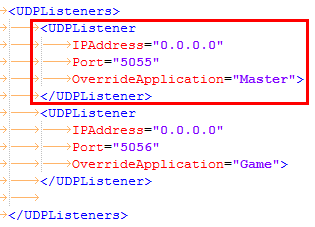
Photon Server配置文件deploy\bin_Win64\PhotonServer.config
配置Photon Server的IP和Port
Unity工程中配置PhotonServerSettings
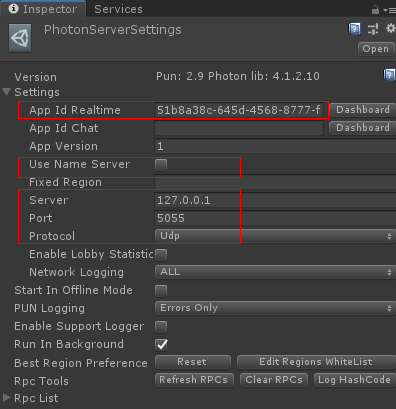
当使用自己部署的Photon Server时,不要勾选Use Name Server,填好Master Server的IP和Port。
读取配置PhotonNetwork.PhotonServerSettings
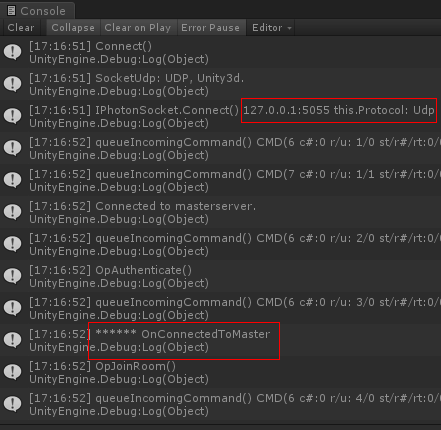
运行Unity工程测试
Windows 10启动Photon Server报错
9600: 09:59:47.940 - CounterPublisher:4 - PhotonRunning() failed. Exception:
System.TypeInitializationException: “Photon.CounterPublisher.SystemCounter”的类型初始值设定项引发异常。 ---> System.InvalidOperationException: 无法加载计数器名称数据,因为从注册表读取的索引“”无效。
在 System.Diagnostics.PerformanceCounterLib.GetStringTable(Boolean isHelp)
在 System.Diagnostics.PerformanceCounterLib.get_NameTable()
在 System.Diagnostics.PerformanceCounterLib.get_CategoryTable()
在 System.Diagnostics.PerformanceCounterLib.CategoryExists(String machine, String category)
在 System.Diagnostics.PerformanceCounterCategory.Exists(String categoryName, String machineName)
在 ExitGames.Diagnostics.Counter.PerformanceCounterReader.Initialize() 位置 c:\(Work)\(EG)\exitgames-libs\src\Core\Diagnostics\Counter\PerformanceCounterReader.cs:行号 134
在 Photon.CounterPublisher.SystemCounter..cctor() 位置 d:\dev\photon-socketserver-sdk_cloud\src-server\CounterPublisher\SystemCounter.cs:行号 36
--- 内部异常堆栈跟踪的结尾 ---
分析原因:Photon Server的计数器被Windows禁用了。
解决方案
参见 http://www.cnblogs.com/xiezunxu/articles/7797880.html
在cmd中输入perfmon,可查看windows禁用了哪些计数器。
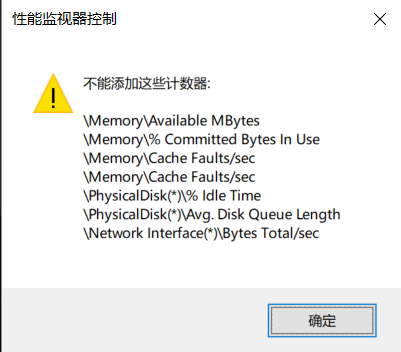
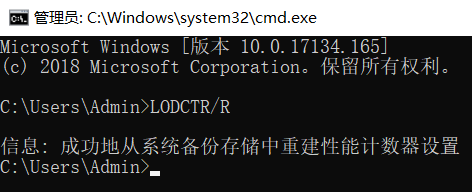
在cmd中输入LODCTR/R,从系统备份存储中重建性能计数器设置。
为了让局域网内的其他玩家能够访问服务器,需要设置成Set Local IP
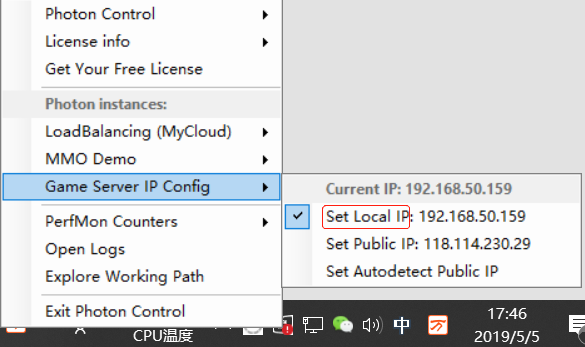
注意:如果没显示本机的局域网IP,检查下电脑有没连上局域网。连上局域网后重启电脑和Photon Server
Photon Voice
如果需要语音功能,需从Unity Asset Store下载语音插件
数字信号处理(Digital Signal Processing, DSP)
回声消除器(Acoustic Echo Canceller,AEC),可以消除各种延迟的回声。
背景噪音抑制(Automatic Noise Suppression, ANS),自动消除杂音。
自动增益补偿(Automatic Gain Control, AGC),自动调节麦克风收音量,避免发言者与麦克风的距离改变时,声音忽大忽小。
语音活动检测(Voice Activity Detection, VAD),在噪声环境中检测语音存在与否。
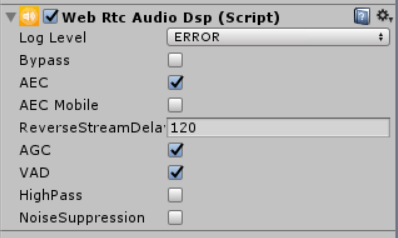
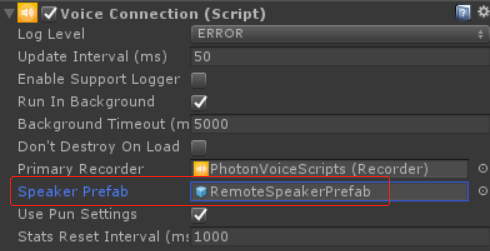
每个进入房间的玩家会实例化一个RemoteSpeakerPrefab对象