HTC Vive Focus(HTC的VR一体机)
VIVE Wave SDK下载
https://developer.vive.com/resources/vive-wave/download/latest/
Wave Unity SDK文档
https://hub.vive.com/zh-CN/profile/documents
Import Package到Unity工程
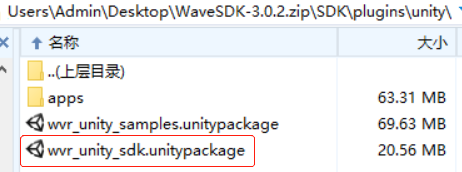
VIVE Wave XR插件 (需要Unity2019.4.3+版本)
VIVE Wave XR插件 - 入门
1、配置 {工程目录}\Packages\manifest.json
{
  "scopedRegistries": [
    {
      "name": "VIVE",
      "url": "https://npm-registry.vive.com",
      "scopes": [
        "com.htc.upm"
      ]
    }
  ],
  "dependencies": {
    ......
  }
}
2、安装 VIVE Wave XR Plugin
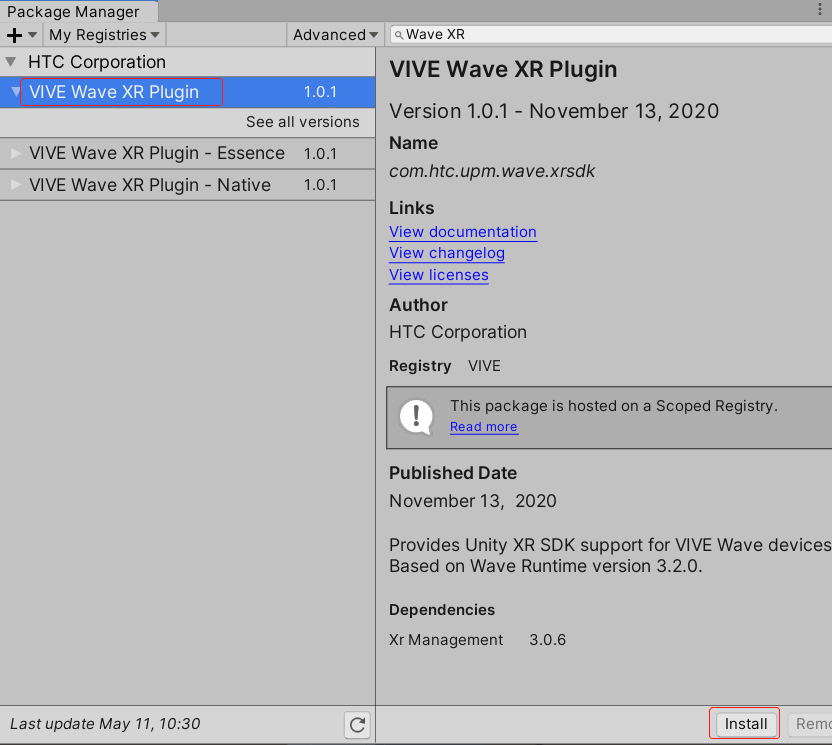
安装方式二
从官网下载 com.htc.upm.wave.xrsdk-4.5.0-r.3.tgz
在Package Manager中点击+号,选择 Add package from tarball...,导入下载好的xx.tgz包,导入后可在Project面板的Packages目录下看到此包。

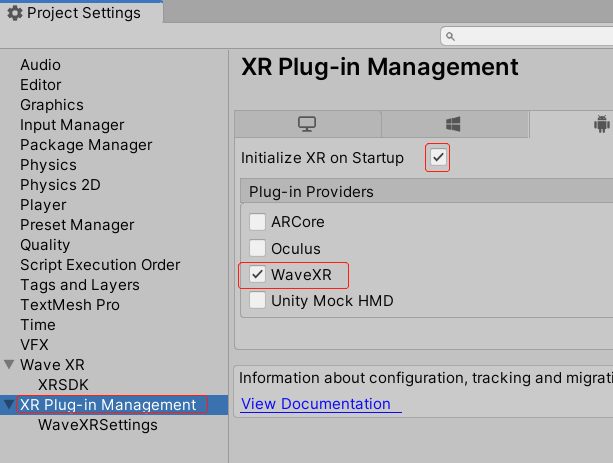
2、设置 XR Plug-in Manager
3、设置渲染模式
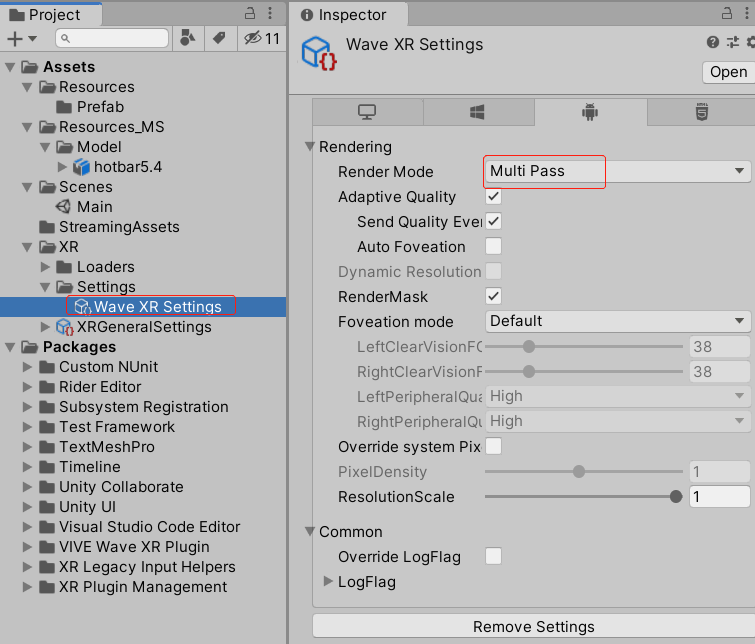
为了使 SinglePass(默认) 正常运行,您的Wave XR应用程序需要使用OpenGLES 3.2运行。
现在,您可以开始开发可以在VIVE Wave设备上运行的XR内容。
4、安装其他Wave软件包
VIVE Wave XR Plugin - Essence
VIVE Wave XR Plugin - Native
安装这些软件包以访问VIVE Wave平台专有的API和功能。有关更多信息,请检查 Wave Packages。
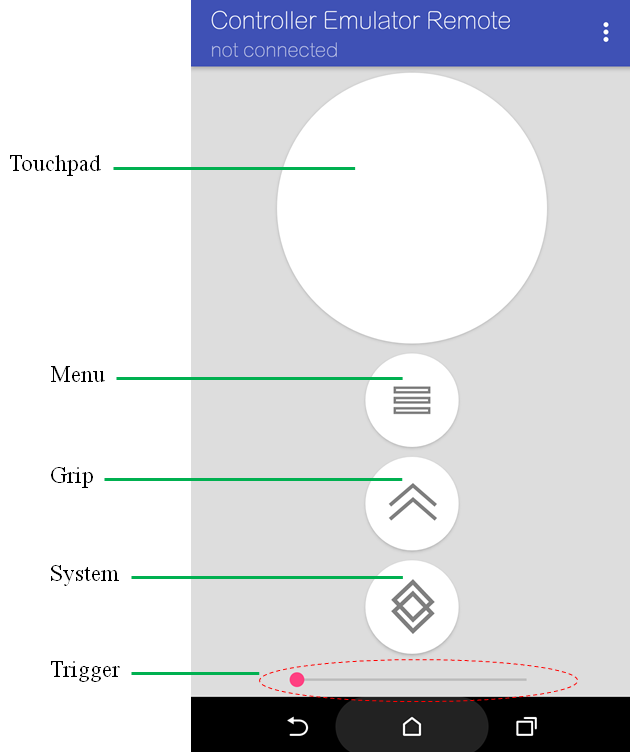
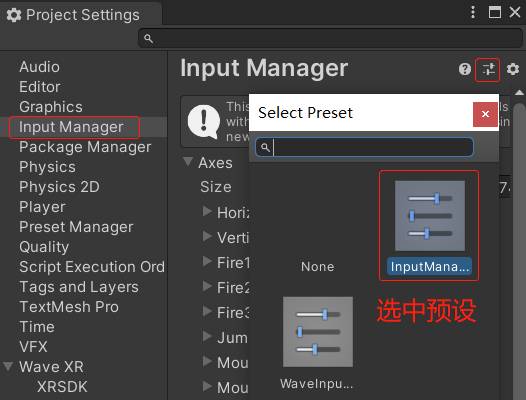
下载按键预设 InputManager.preset
VIVE Focus向电脑投屏
https://www.vive.com/cn/forum/3497?1
电脑需要连接第三方硬件 Miracast 才能启用无线投屏。
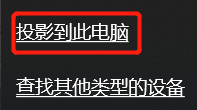
点击电脑下方的这个图标(笔机本win10)

如果找不到这个图标,可在设置面板里搜索“投影设置”

选择
类职责说明
WaveVR_Init
负责监听所有WVR_EventType事件
WaveVR_ControllerLoader
负责加载控制器模型
WaveVR_PoseTrackerManager
负责管理WaveVR_DevicePoseTracker、WaveVR_ControllerPoseTracker
WaveVR_DevicePoseTracker
头显姿态追踪器
WaveVR_ControllerPoseTracker
控制器姿态追踪器
WaveVR_Beam
负责生成控制器的射线
WaveVR_ControllerPointer
负责生成控制器射线的端点
UniversalControllerActions
负责处理控制器显示状态
WaveVR_Camera
处理Camera的OnPreRender()、OnRenderObject()事件回调
WaveVR_Distortion
当运行在UNITY_EDITOR时,负责控制画面渲染。
监听控制器按键
using System.Collections;
using System.Collections.Generic;
using UnityEngine;
using UnityEngine.UI;
using wvr;

/// <summary>
/// 监听用户的控制器操作
/// </summary>
public class UserControllerListener : MonoBehaviour {

    public WVR_DeviceType deviceType = WVR_DeviceType.WVR_DeviceType_Controller_Right;

    private void Awake()
    {
        WaveVR_ControllerListener.Device device = WaveVR_ControllerListener.Instance.Input(deviceType);
        device.PressUpListenersMenu += OnPressUpListenersMenu;
    }

    private void OnPressUpListenersMenu()
    {
        //TODO:: 处理菜单按键事件
    }
}
支持的按键事件
public delegate void ButtonEventHandler();
// Listeners of press
public event ButtonEventHandler PressDownListenersMenu;
public event ButtonEventHandler PressDownListenersGrip;
public event ButtonEventHandler PressDownListenersTouchpad;
public event ButtonEventHandler PressDownListenersTrigger;
public event ButtonEventHandler PressUpListenersMenu;
public event ButtonEventHandler PressUpListenersGrip;
public event ButtonEventHandler PressUpListenersTouchpad;
public event ButtonEventHandler PressUpListenersTrigger;
// Listeners of touch
public event ButtonEventHandler TouchDownListenersTouchpad;
public event ButtonEventHandler TouchDownListenersTrigger;
public event ButtonEventHandler TouchUpListenersTouchpad;
public event ButtonEventHandler TouchUpListenersTrigger;
Wave VR Plugin 4.x.x
using UnityEngine;
using UnityEngine.Video;
using Wave.Native;
using Wave.Essence;
/// <summary>
/// 监听用户的控制器操作
/// </summary>
public class UserControllerListener : MonoBehaviour
{
    [SerializeField]
    private VideoPlayer videoPlayer;
    private bool binaryValue = false;
    private bool preMenuPress = false;

    private void Update()
    {
        //按手柄上的菜单键控制视频 "暂停/播放"
        binaryValue = WXRDevice.KeyDown(XR_Device.Dominant, XR_BinaryButton.menuButton);
        //避免重复处理KeyDown
        if (preMenuPress != binaryValue)
        {
            preMenuPress = binaryValue;
            if (preMenuPress)
            {
                if (videoPlayer.isPlaying)
                    videoPlayer.Pause();
                else
                    videoPlayer.Play();
            }
        }
    }

    private void DEBUG(string msg)
    {
        //无法打印 "Unity" tag
        Log.d("Unity360", msg, true);
    }
}
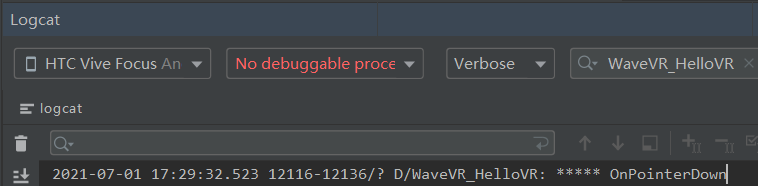
1、打印日志
使用WaveSDK中的日志类,需要引入 using WVR_Log;,才能在运行时看见日志。
Log.d(LOG_TAG, "***** message ******", true); //可以定义TAG
查看日志
2、与3D模型事件交互
using UnityEngine;
using UnityEngine.EventSystems;
using WVR_Log;
/// <summary>
/// 3D模型事件交互
/// 创建一个Sphere模型,并将此脚本挂上
/// </summary>
public class SphereEventTest : MonoBehaviour,
	IPointerEnterHandler,
	IPointerExitHandler,
	IPointerDownHandler,
	IPointerUpHandler
{
    private const string LOG_TAG = "SphereEventTest";

    public void OnPointerDown(PointerEventData eventData)
    {
        Log.d(LOG_TAG, "***** OnPointerDown", true);
        GetComponent<MeshRenderer>().material.SetColor("_Color", Color.yellow);
        StartCoroutine(DelayCheckDevicePress());
    }

    public void OnPointerUp(PointerEventData eventData)
    {
        StartCoroutine(DelayCheckDevicePress());
    }

    public void OnPointerEnter(PointerEventData eventData)
    {
        Log.d(LOG_TAG, "***** OnPointerEnter", true);
        GetComponent<MeshRenderer>().material.SetColor("_Color", Color.red);
    }

    public void OnPointerExit(PointerEventData eventData)
    {
        Log.d(LOG_TAG, "***** OnPointerExit", true);
        GetComponent<MeshRenderer>().material.SetColor("_Color", Color.green);
    }

    IEnumerator DelayCheckDevicePress()
    {
        yield return null;//延迟到下一帧,再执行下面的逻辑
        //因为GetPress()内部采用延迟检测,所以我们延迟一帧检测按键,这样才准确。
        var device = WaveVR_ControllerListener.Instance.Input(WVR_DeviceType.WVR_DeviceType_Controller_Right);
        //是否按下了扳机键
        bool isPressedTrigger = device.GetPress(WVR_InputId.WVR_InputId_Alias1_Trigger);
        //是否按下了触摸板
        bool isPressedTouchpad = device.GetPress(WVR_InputId.WVR_InputId_Alias1_Touchpad);

        if (isPressedTrigger)
        {

        }
        else if (isPressedTouchpad)
        {

        }
    }
}
3、示例:登录界面
using System.Text;
using UnityEngine;
using UnityEngine.UI;
using UnityEngine.SceneManagement;
using wvr;
/// <summary>
/// 登录界面
/// </summary>
public class LoginUI : EventBehaviour
{
	private const string LOG_TAG = "LoginUI";
	//账号输入框
	[SerializeField]
	private InputField _accountInputField;
	//密码输入框
	[SerializeField]
	private InputField _passwordInputField;
	private string _inputPassword;
	private bool _isInputPassword = false;
	private string _inputContent = null;
	private bool _keyboardInitialized = false;
	private WaveVR_IMEManager.IMEParameter _imeParameter = null;
	private float _lastPressDownMenuTime;


	protected override void OnAwake()
	{
		var device = WaveVR_ControllerListener.Instance.Input(WVR_DeviceType.WVR_DeviceType_Controller_Right);
		device.PressDownListenersMenu += OnPressDownListenersMenu;
	}

	//按下-控制器菜单键
	private void OnPressDownListenersMenu()
	{
		//DEBUG(LOG_TAG, "****** OnPressDownListenersMenu");
		//双击控制器菜单键退出应用
		if (Time.realtimeSinceStartup - _lastPressDownMenuTime < 0.3f)
			Application.Quit();
		_lastPressDownMenuTime = Time.realtimeSinceStartup;
	}

	//初始化虚拟键盘
	private void InitializeKeyboards()
	{
		var pmInstance = WaveVR_IMEManager.instance;
		_keyboardInitialized = pmInstance.isInitialized();
		if (_keyboardInitialized)
			DEBUG(LOG_TAG, "InitializeKeyboards: done");
		else
			DEBUG(LOG_TAG, "InitializeKeyboards: failed");
		_imeParameter = InitParameter();
	}

	//初始化虚拟键盘参数
	private WaveVR_IMEManager.IMEParameter InitParameter()
	{
		int MODE_FLAG_FIX_MOTION = 0x02;
		//int MODE_FLAG_AUTO_FIT_CAMERA = 0x04;
		int id = 0;
		int type = MODE_FLAG_FIX_MOTION;
		int mode = 2;

		string exist = "";
		int cursor = 0;
		int selectStart = 0;
		int selectEnd = 0;
		double[] pos = new double[] { 0, 0, -1.05 };
		double[] rot = new double[] { 1.0, 0.0, 0.0, 0.0 };
		int width = 800;
		int height = 800;
		int shadow = 100;
		string locale = "en_US";
		string title = "IME Title";
		int extraInt = 0;
		string extraString = "";
		int buttonId = 16;//System:0 , Menu:1 , Grip:2, Touchpad:16, Trigger:17
		var parameter = new WaveVR_IMEManager.IMEParameter(id, type, mode, exist, cursor, selectStart, selectEnd, pos,
							 rot, width, height, shadow, locale, title, extraInt, extraString, buttonId);
		//IMEParameter(int id, int type, int mode, double[] pos, double[] rot, int width, int height,
		//int shadow, string locale, string title, int buttonId)
		return parameter;
	}

	//虚拟键盘输入完成回调
	public void InputDoneCallback(WaveVR_IMEManager.InputResult results)
	{
		DEBUG(LOG_TAG, "inputDoneCallback:" + results.InputContent);
		_inputContent = results.InputContent;

		//Log.i(LOG_TAG, "InputDoneCallback() state = " + getKeyboardState());
		//Note: directly update input field text will exception
		// use LastUpdate to update Input field text
		//UpdateInputField(_inputContent);
	}

	//更新InputField显示
	public void UpdateInputField(string str)
	{
		//DEBUG(LOG_TAG, "UpdateTargetText:" + str);
		if (str == null)
			str = string.Empty;

		if (_isInputPassword)
		{
			_inputPassword = str;
			if (string.IsNullOrEmpty(str))
				_passwordInputField.text = str;
			else
			{
				//显示*号
				StringBuilder sb = new StringBuilder();
				for (int i = 0; i < str.Length; i++)
					sb.Append("*");
				_passwordInputField.text = sb.ToString();
			}
		}
		else
			_accountInputField.text = str;
	}

	void LateUpdate()
	{
		UpdateInputField(_inputContent);
	}

	//点击-账号输入框
	public void OnClickAccountInputField()
	{
		_isInputPassword = false;
		_accountInputField.shouldHideMobileInput = false;
		if (!_keyboardInitialized)
			InitializeKeyboards();
		var pmInstance = WaveVR_IMEManager.instance;
		pmInstance.showKeyboard(_imeParameter, InputDoneCallback);
	}

	//点击-密码输入框
	public void OnClickPasswordInputField()
	{
		_isInputPassword = true;
		_passwordInputField.shouldHideMobileInput = false;
		if (!_keyboardInitialized)
			InitializeKeyboards();
		var pmInstance = WaveVR_IMEManager.instance;
		pmInstance.showKeyboard(_imeParameter, InputDoneCallback);
	}

	//点击-登录按钮
	public void OnClickLogin()
	{
		SceneManager.LoadSceneAsync("FOXCONN_Industrial");
	}
}