UnityEditorInternal.ReorderableList
post by:追风剑情 2019-3-25 18:45
可手动拖动更改列表排序
示例
using System.Collections;
using System.Collections.Generic;
using UnityEngine;
using UnityEditor;
using UnityEditorInternal;

public class TestEditorWindow : EditorWindow
{
    private static TestEditorWindow instance;

    private ReorderableList reorderableList;

    [MenuItem("Window/Test Window")]
    public static void ShowWindow()
    {
        instance = GetWindow<TestEditorWindow>(false, "Test Window", true);
        instance.InitializeLists();
    }

    private void InitializeLists()
    {
        List<string> list = new List<string>();
        list.Add("test item a");
        list.Add("test item b");
        list.Add("test item c");
        list.Add("test item d");

        reorderableList = new ReorderableList(list, list.GetType());
        reorderableList.onAddCallback += OnAddCallback;
        reorderableList.onRemoveCallback += OnRemoveCallback;
        reorderableList.onSelectCallback += OnSelectCallback;
        reorderableList.drawHeaderCallback += DrawHeaderCallback;
    }

    private void OnAddCallback(ReorderableList list)
    {
        list.list.Add("new string");
    }

    private void OnRemoveCallback(ReorderableList list)
    {
        if (list.index == -1)
            return;
        //默认情况移除当前项后会自动选中下一项
        list.list.RemoveAt(list.index);
        list.index = -1;//不选中任何一项
    }

    private void OnSelectCallback(ReorderableList list)
    {
        Debug.Log("select index=" + list.index);
    }

    private void DrawHeaderCallback(Rect rect)
    {
        EditorGUI.LabelField(rect, "Header");
    }

    private void OnGUI()
    {
        if (reorderableList == null)
            return;
        //根据rect在指定位置显示列表
        reorderableList.DoList(new Rect(10, 20, 100, 500));
        //在默认位置显示列表
        //reorderableList.DoLayoutList();
    }
}
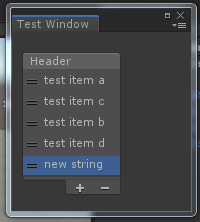
运行测试
评论:
发表评论: