NSBundle类
post by:追风剑情 2019-3-6 12:07
当创建一个应用时,系统存储了应用相关联的所有数据(其中包括图片、本地化字符串、图标等),将这些内容放入一个称为应用包(application bundle)的包中,为了访问应用中的这些资源,需要熟悉NSBundle类。
示例
#import <Foundation/Foundation.h>

int main(int argc, const char * argv[]) {
    @autoreleasepool {
        // mainBundle方法给出了应用包所在的目录
        // 这个方法在OS X和iOS应用中都适用
        NSBundle *mainBundle = [NSBundle mainBundle];
        NSString *bundlePath = mainBundle.bundlePath;

        NSLog(@"bundle path=%@", bundlePath);

        // 第一个参数为文件名,第二个参数为扩展名
        NSString *filePath = [mainBundle pathForResource: @"testfile"
                ofType: @""];

        NSLog(@"file path=%@", filePath);

        // 读取文件内容
        NSString *instructions = [NSString stringWithContentsOfFile: filePath encoding: NSUTF8StringEncoding error: NULL];

        NSLog(@"file content:");
        NSLog(@"%@", instructions);

        // 获取在应用包的图片目录中所有以png为文件后缀名的PNG图片
        // 这个方法返回路径名的数组。如果PNG并未存储在应用的子目录中,
        // 可以指定@""作为inDirectory:参数值。
        NSArray *birds = [mainBundle pathsForResourcesOfType: @"png" inDirectory: @"birdImages"];

        NSLog(@"%@", birds);
    }
    return 0;
}
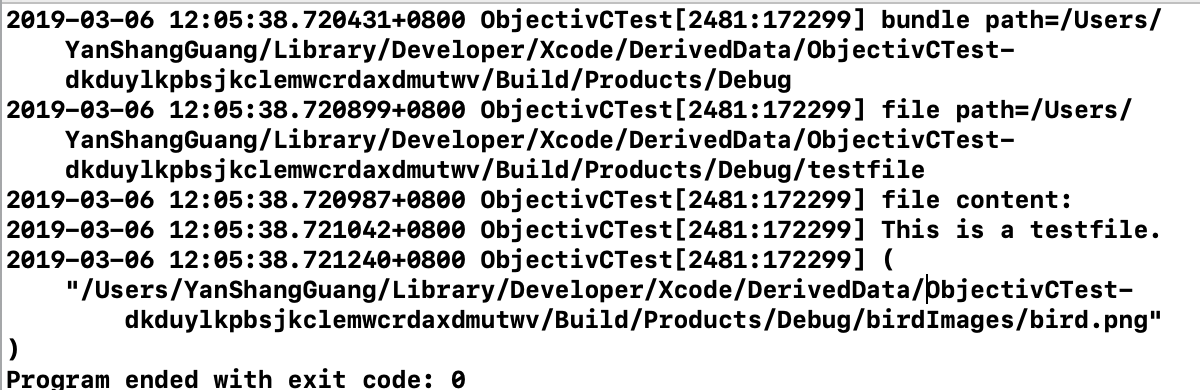
运行测试
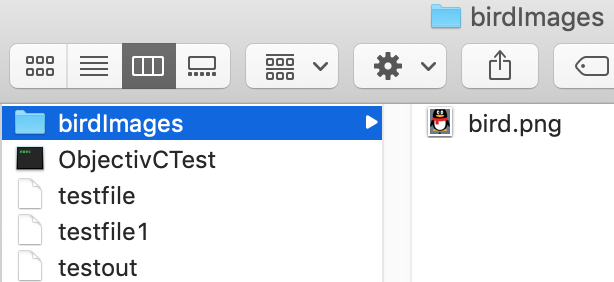
图片目录如图
评论:
发表评论: