NSFileHandle类
post by:追风剑情 2019-3-6 10:17
利用NSFileHandle类提供的方法,可以更有效地处理文件。
NSFileHandle类并没有提供创建文件的功能。
| 常用的NSFileHandle类方法 | |
| 方法 | 描述 |
| +(id) fileHandleForReadingAtPath: path | 打开一个文件准备读取 |
| +(id) fileHandleForWritingAtPath: path | 打开一个文件准备写入 |
| +(id) fileHandleForUpdatingAtPath: path | 打开一个文件准备更新(读取或写入) |
| -(NSData *) availableData | 从设备或者通道返回可用的数据 |
| -(NSData *) readDataToEndOfFile | 读取其余的数据直到文件的末尾(最多UINT_MAX字节) |
| -(NSData *) readDataOfLength: (NSUInteger) bytes | 从文件中读取指定字节的内容 |
| -(void) writeData: data | 将data写入文件 |
| -(unsigned long long) offsetInFile | 获取当前文件的偏移量 |
| -(void) seekToFileOffset: offset | 设置当前文件的偏移量 |
| -(unsigned long long) seekToEndOfFile | 将当前文件的偏移量定位到文件的尾 |
| -(void) truncateFileAtOffset: offset | 将文件的长度设置为offset字节(如果需要,可以填充内容) |
| -(void) closeFile | 关闭文件 |
示例
#import <Foundation/Foundation.h>

int main(int argc, const char * argv[]) {
    @autoreleasepool {
        NSFileHandle *inFile, *outFile;
        NSData *buffer;

        // 打开文件testfile并读取
        inFile = [NSFileHandle fileHandleForReadingAtPath: @"testfile"];
        if (inFile == nil) {
            NSLog(@"Open of testfile for reading failed");
            return 1;
        }

        // 定位到文件的第10个字节
        //[inFile seekToFileOffset: 10];
        // 跳过文件中当前位置之后的128字节
        //[inFile seekToFileOffset: [inFile offsetInFile] + 128];
        // 要在文件中向回移动5个整数所占的字节数
        //[inFile seekToFileOffset: [inFile offsetInFile] - 5 * sizeof(int)];

        // 如果需要,首先创建输出文件
        [[NSFileManager defaultManager] createFileAtPath:
         @"testout" contents: nil attributes: nil];

        // 打开outfile文件进行写入
        outFile = [NSFileHandle fileHandleForWritingAtPath: @"testout"];
        if (outFile == nil) {
            NSLog(@"Open of testout for writing failed");
            return 2;
        }

        // 因为它可能包含数据,截断输出文件
        [outFile truncateFileAtOffset: 0];

        // 从inFile中读取数据,将它写到outFile
        buffer = [inFile readDataToEndOfFile];
        NSLog(@"buffer length=%lu", [buffer length]);

        [outFile writeData: buffer];

        // 关闭这两个文件
        [inFile closeFile];
        [outFile closeFile];

        // 验证文件的内容
        NSLog(@"%@", [NSString stringWithContentsOfFile: @"testout"
            encoding: NSUTF8StringEncoding error: NULL]);
    }
    return 0;
}
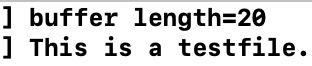
运行测试
评论:
发表评论: