加载AssetBundle
post by:追风剑情 2014-7-23 0:11
一、放几个资源在Assets/StreamingAssets/下
如图:
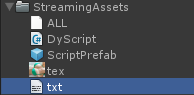
二、DyScript.cs挂在ScriptPrefab.prefab上,然后把DyScript、ScriptPrefab、txt、tex打包成一个AssetBundle取名为ALL.assetbundle
三、新建个脚本并挂在场景中的任意一个物体上,脚本代码下如:
using UnityEngine;
using System;
using System.Collections;

public class WWWLoadTest : MonoBehaviour {

	int version = 1;

	void Start ()
	{
		StartCoroutine("LoadAssetBundle");
	}

	IEnumerator LoadAssetBundle()
	{
		while (!Caching.ready)
			yield return null;

		string url = streamingAssetsPath + "ALL.assetbundle";
		Debug.Log (url);
		using(WWW www = WWW.LoadFromCacheOrDownload (url, version)){
			yield return www;
			if (www.error != null)
				throw new Exception("WWW download had an error:" + www.error);
			AssetBundle bundle = www.assetBundle;

			Texture2D tex = bundle.Load("tex") as Texture2D;
			Debug.Log("tex="+tex);
			GameObject prefab = bundle.Load("ScriptPrefab") as GameObject;
			Debug.Log("prefab="+prefab);
			TextAsset txt = bundle.Load("txt", typeof(TextAsset)) as TextAsset;
			Debug.Log("txt="+txt.text);
			//DyScript dyScript = prefab.GetComponent<DyScript>();
			//dyScript.Trace();
			Component dyScript = prefab.GetComponent("DyScript");
			Debug.Log("dyScript="+dyScript);

			bundle.Unload(false);
		}
	}

	string streamingAssetsPath
	{
		get {
			string path = "";
			switch(Application.platform)
			{
			case RuntimePlatform.WindowsEditor:
			case RuntimePlatform.WindowsPlayer:
				path = "file://" + Application.streamingAssetsPath + "/";
				break;
			case RuntimePlatform.Android:
				path = "jar:file://" + Application.streamingAssetsPath + "!/assets/";
				//发现在Unity2018中只需要这写就行了
				//path = Application.streamingAssetsPath + "/";
				break;
			case RuntimePlatform.IPhonePlayer:
				path = Application.streamingAssetsPath + "/Raw/";
				break;
			default:
				path = Application.streamingAssetsPath + "/";
				break;
			}
			return path;
		}
	}
}
三、运行脚本,输出日志:
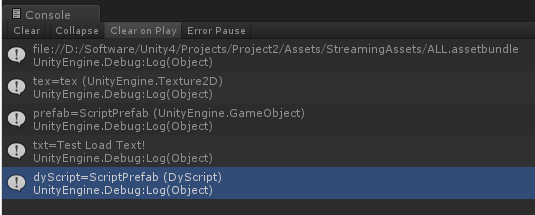
从日志可知,已经成功从AssetBundle中提取出了tex.png, ScriptPrefab.prefab, DyScript.cs, txt
四、从目录下删除资源,此时目录如图:

五、再次运行脚本,输出日志:
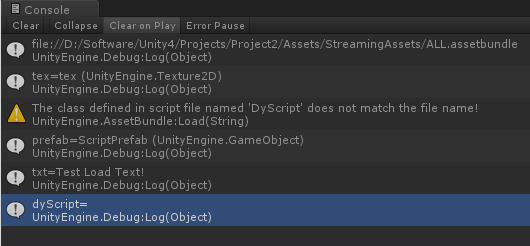
从日志可知,tex.png, ScriptPrefab.prefab, txt成功提取,但挂在ScriptPrefab上的脚本DyScript.cs已经丢失。
结论:脚本文件不会被编译进AssetBundle
示例一:从文件加载AssetBundle (Unity 2017)
using System.Collections;
using System.Collections.Generic;
using System.IO;
using UnityEngine;

public class Test : MonoBehaviour
{
    private const long MB = 1024 * 1024;

    AssetBundleCreateRequest createRequest = null;
    AssetBundleRequest assetRequest = null;

    // 从文件加载AssetBundle
    private IEnumerator LoadAssetBundleFromFile(string filePath, string assetName)
    {
        yield return new WaitForEndOfFrame();

        FileInfo fileInfo = new FileInfo(filePath);
        Debug.LogFormat("file size: {0} MB", fileInfo.Length / MB);

        createRequest = AssetBundle.LoadFromFileAsync(filePath);
        while (!createRequest.isDone)
            yield return createRequest;

        AssetBundle ab = createRequest.assetBundle;
        if (ab != null)
        {
            assetRequest = ab.LoadAssetAsync(assetName);
            yield return assetRequest;
            Object asset = assetRequest.asset;
            ab.Unload(false);

            //TODO:: 回调
            //OnLoadCompleted(asset)
        }
        else
        {
            Debug.LogErrorFormat("AssetBundle为空");
        }

        createRequest = null;
        assetRequest = null;
    }
}
评论:
发表评论: