UGUI——Canvas Scaler
post by:追风剑情 2019-1-14 17:29
官方文档 https://docs.unity3d.com/Manual/script-CanvasScaler.html
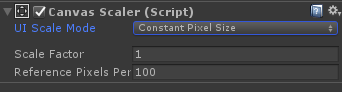
UI缩放模式(UI Scale Mode)
Constant Pixel Size
保持像素尺寸,忽略屏幕尺寸。
● Scale Factor: 对Canvas下的UI整体缩放
● Reference Pixels Per Unit: 每单位像素量(sprite默认每单位像素量为100)
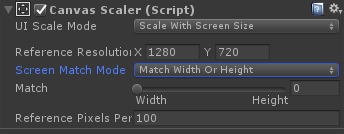
Scale With Screen Size
根据屏幕宽度缩放UI尺寸。
● Reference Resolution: 参考分辨率(一般设为1280x720或者1920x1080)
● Screen Match Mode: 屏幕匹配模式
Match Width or Height: 匹配屏幕宽度或者高度(通过Match值调节匹配权重)
Expand: 横向或纵向展开画布区域,所以画布的大小永远不会小于参考
Shrink: 在水平或垂直方向上收缩画布区域,所以画布的大小永远不会比参考大
Reference Pixels Per Unit: 如果精灵具有‘Pixels Per Unit’设置,则精灵中的一个像素将覆盖UI中的一个单位
UGUI中的代码实现,通过读代码更能够直观理解其原理。
/// <summary>
/// Handles canvas scaling that scales with the screen size.
/// 处理随屏幕大小缩放的画布缩放。
/// </summary>
protected virtual void HandleScaleWithScreenSize()
{
	Vector2 screenSize = new Vector2(Screen.width, Screen.height);

	// Multiple display support only when not the main display. For display 0 the reported
	// resolution is always the desktops resolution since its part of the display API,
	// so we use the standard none multiple display method. (case 741751)
	int displayIndex = m_Canvas.targetDisplay;
	if (displayIndex > 0 && displayIndex < Display.displays.Length)
	{
		Display disp = Display.displays[displayIndex];
		screenSize = new Vector2(disp.renderingWidth, disp.renderingHeight);
	}

	float scaleFactor = 0;
	switch (m_ScreenMatchMode)
	{
		case ScreenMatchMode.MatchWidthOrHeight:
		{
			// We take the log of the relative width and height before taking the average.
			// Then we transform it back in the original space.
			// the reason to transform in and out of logarithmic space is to have better behavior.
			// If one axis has twice resolution and the other has half, it should even out if widthOrHeight value is at 0.5.
			// In normal space the average would be (0.5 + 2) / 2 = 1.25
			// In logarithmic space the average is (-1 + 1) / 2 = 0

			//取平均值前取相对宽度和高度的对数。
			//然后我们将其转换回原始空间。
			//在对数空间内外变换的原因是为了有更好的行为。
			//如果一个轴的分辨率是两倍,而另一个轴的分辨率是一半,则宽度或高度值应为0.5。
			//在正常空间中,平均值为(0.5+2)/2=1.25
			//在对数空间中,平均值为(-1+1)/2=0

			float logWidth = Mathf.Log(screenSize.x / m_ReferenceResolution.x, kLogBase);
			float logHeight = Mathf.Log(screenSize.y / m_ReferenceResolution.y, kLogBase);
			float logWeightedAverage = Mathf.Lerp(logWidth, logHeight, m_MatchWidthOrHeight);
			scaleFactor = Mathf.Pow(kLogBase, logWeightedAverage);
			break;
		}
		case ScreenMatchMode.Expand:
		{
			scaleFactor = Mathf.Min(screenSize.x / m_ReferenceResolution.x, screenSize.y / m_ReferenceResolution.y);
			break;
		}
		case ScreenMatchMode.Shrink:
		{
			scaleFactor = Mathf.Max(screenSize.x / m_ReferenceResolution.x, screenSize.y / m_ReferenceResolution.y);
			break;
		}
	}

	SetScaleFactor(scaleFactor);
	SetReferencePixelsPerUnit(m_ReferencePixelsPerUnit);
}
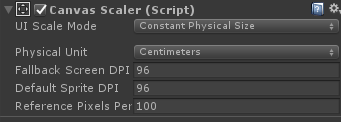
Constant Physical Size
保持UI的物理尺寸,忽略屏幕尺寸和分辨率。
● Physical Unit: 用于指定位置和大小的物理单位。
Centimeters(厘米)、Millimeters(毫米)、Inches(英寸)、Points(点)
Picas(12磅因的活字)
https://docs.unity3d.com/ScriptReference/UI.CanvasScaler.Unit.html
● Fallback Screen DPI: 如果屏幕DPI未知,则用此值替代。
● Default Sprite DPI: 每英寸像素用于有‘Pixels Per Unit’设置的精灵,与 ‘Reference Pixels Per Unit’相匹配。
● Reference Pixels Per Unit: 如果sprite有'Pixels Per Unit'设置,则它的DPI将匹配‘Default Sprite DPI’设置。
UGUI中的代码实现,通过读代码更能够直观理解其原理。
///<summary>
///Handles canvas scaling for a constant physical size.
///处理恒定物理大小的画布缩放。
///</summary>
protected virtual void HandleConstantPhysicalSize()
{
	//DPI(Dots per lnch, 每英寸点数),
	//每英寸打印多少个点,DPI越大,说明精度越高.
	float currentDpi = Screen.dpi;
	float dpi = (currentDpi == 0 ? m_FallbackScreenDPI : currentDpi);
	float targetDPI = 1;
	switch (m_PhysicalUnit)
	{
		case Unit.Centimeters: targetDPI = 2.54f; break; //1英寸=2.54厘米
		case Unit.Millimeters: targetDPI = 25.4f; break; //1英寸=25.4毫米
		case Unit.Inches:      targetDPI =     1; break; //1英寸=1英寸
		case Unit.Points:      targetDPI =    72; break; //1英寸=72点
		case Unit.Picas:       targetDPI =     6; break; //1英寸=6 Pica
	}

	SetScaleFactor(dpi / targetDPI);
	SetReferencePixelsPerUnit(m_ReferencePixelsPerUnit * targetDPI / m_DefaultSpriteDPI);
}
评论:
发表评论: