EditorApplication.projectWindowItemOnGUI
post by:追风剑情 2018-12-11 10:30
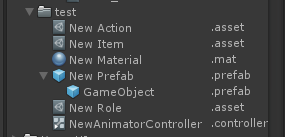
示例: 按住alt键显示资源后缀名
参考原文 https://www.cnblogs.com/Yellow0-0River/p/6513192.html
using UnityEditor;
using UnityEngine;
using System.IO;
using System.Reflection;
using System.Text;
using System;

[InitializeOnLoad]
public class AssetExporter
 {
    static AssetExporter()
    {
        EditorApplication.projectWindowItemOnGUI += ProjectWindowItemOnGUI;
    }

    static void ProjectWindowItemOnGUI(string guid, Rect selectionRect)
    {
        if (Event.current.alt) {
            EditorWindow window = EditorWindow.focusedWindow;
            if (window == null || window.titleContent.text != "Project")
                return;

            Type window_type = window.GetType();
            FieldInfo field = window_type.GetField("m_ViewMode", BindingFlags.Instance | BindingFlags.NonPublic);
            int mode = (int)field.GetValue(window); //0:单列模式 1:两列模式
            if (mode != 0)
                return;

            string asset_path = AssetDatabase.GUIDToAssetPath(guid);
            Object asset = AssetDatabase.LoadAssetAtPath<Object>(asset_path);
            if (asset == null || AssetDatabase.IsSubAsset(asset) || AssetDatabase.IsValidFolder(asset_path))
                return;

            string extension = Path.GetExtension(asset_path);
            selectionRect.x += selectionRect.width - 60f;
            GUI.Label(selectionRect, extension, EditorStyles.wordWrappedLabel);
            EditorApplication.RepaintProjectWindow();
        }
    }

    // 判断资源是否为目录
    public static bool IsDirectory(Object asset)
    {
        if (asset == null)
            return false;
        return asset is DefaultAsset && !AssetDatabase.IsForeignAsset(asset);
    }
}
效果
评论:
发表评论: