参考文章 http://www.manew.com/thread-50914-1-1.html
[官方文档] GPU实例化
当场景中有大量使用相同材质和网格的物体时,通过GPU Instancing可以大幅降低Draw Call数量。
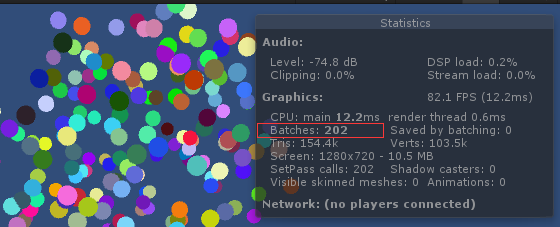
示例:创建200个小球,看看开启和不开启GPU Instancing时的draw call数量
下面是一个支持GPU Instancing的简单Shader
// Upgrade NOTE: upgraded instancing buffer 'MyProperties' to new syntax.

Shader "Unlit/Sphere"
{
	Properties
	{
		_Color("Color", Color) = (1,1,1,1)
	}
	SubShader
	{
		Tags { "RenderType"="Opaque" "LightMode"="ForwardBase" }
		LOD 100

		Pass
		{
			CGPROGRAM
			#pragma target 3.0
			#pragma vertex vert
			#pragma fragment frag
			#pragma fragmentoption ARB_precision_hint_fastest
			#pragma multi_compile_fwdbase
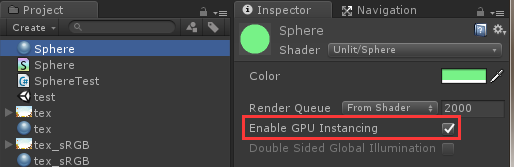
			//加上这句后,材质球会多出一个Enable GPU Instancing勾选项
			#pragma multi_compile_instancing

			#include "UnityCG.cginc"

			struct appdata
			{
				float4 vertex : POSITION;
				UNITY_VERTEX_INPUT_INSTANCE_ID
			};

			struct v2f
			{
				float4 vertex : SV_POSITION;
				//只有当你需要在Fragment Shader中访问每个Instance独有的属性时才需要写这个宏。
				UNITY_VERTEX_INPUT_INSTANCE_ID
			};

			//float4 _Color; //传统的声明方式不再需要了

			//新的声明方式,支持GPU Instancing
			UNITY_INSTANCING_BUFFER_START(MyProperties)
            UNITY_DEFINE_INSTANCED_PROP(float4, _Color)
			#define _Color_arr MyProperties //这句代码是Unity自动插入的
            UNITY_INSTANCING_BUFFER_END(MyProperties)

			v2f vert (appdata v)
			{
				v2f o;
				//这个宏让Instance ID在Shader函数里能够被访问到
				UNITY_SETUP_INSTANCE_ID(v);
				//把Instance ID从输入结构拷贝至输出结构中。
				//只有当你需要在Fragment Shader中访问每个Instance独有的属性时才需要写这个宏。
				UNITY_TRANSFER_INSTANCE_ID(v,o);
				o.vertex = UnityObjectToClipPos(v.vertex);
				return o;
			}

			fixed4 frag (v2f i) : SV_Target
			{
				//这个宏让Instance ID在Shader函数里能够被访问到
				//要想访问独有属性必须调用这个宏
				UNITY_SETUP_INSTANCE_ID(i);
				//访问每个Instance独有的属性
				fixed4 col = UNITY_ACCESS_INSTANCED_PROP(_Color_arr, _Color);
				return col;
			}
			ENDCG
		}
	}
}
下面是一个用来生成小球的脚本
using System.Collections;
using System.Collections.Generic;
using UnityEngine;

public class SphereTest : MonoBehaviour {

    public int count = 200;
    public int radius = 10;
    public GameObject sphere;

    public List<MeshRenderer> renders = new List<MeshRenderer>();

	void Start () {
        CloneSphere();
        SetSphereColor();
	}

    private void CloneSphere()
    {
        for (int i=0; i<count; i++) {
            GameObject go = Instantiate(sphere);
            MeshRenderer mr = go.GetComponent<MeshRenderer>();
            renders.Add(mr);
            go.transform.localPosition = Random.insideUnitSphere * radius;
        }
    }

    private void SetSphereColor()
    {
        for (int i = 0; i < renders.Count; i++)
        {
            //SetColor(renders[i]);
            SetColorPropertyBlock(renders[i]);
        }
    }

    private void SetColor(MeshRenderer mr)
    {
        //这种方式会导致创建新的Material
        mr.material.color = new Color(Random.value, Random.value, Random.value);
    }

    private void SetColorPropertyBlock(MeshRenderer mr)
    {
        //这种方式不会创建新的Material
        MaterialPropertyBlock properties = new MaterialPropertyBlock();
        properties.SetColor(
            "_Color", new Color(Random.value, Random.value, Random.value)
        );
        mr.SetPropertyBlock(properties);
    }
}
启用GPU Instancing的运行截图

关闭GPU Instancing的运行截图
使用Instancing的限制
下列情况不能使用Instancing:
(1) 使用Lightmap的物体
(2) 受不同Light Probe / Reflection Probe影响的物体
(3) 使用包含多个Pass的Shader的物体,只有第一个Pass可以Instancing
(4) 前向渲染时,受多个光源影响的物体只有Base Pass可以instancing,Add Passes不行
(5) 另外,由于Constant Buffer的尺寸限制,一个Instanced Draw Call能画的物体数量是有上限的(参见UnityInstancing.cginc中的UNITY_MAX_INSTANCE_COUNT)
最后需要再次强调的是,Instancing在Shader上有额外的开销,并不是总能提高帧率。永远要以实际Profiling的结果为准!
在UnityInstancing.cginc文件中可找到UNITY_MAX_INSTANCE_COUNT的定义
// The maximum number of instances a single instanced draw call can draw.
// You can define your custom value before including this file.
#ifndef UNITY_MAX_INSTANCE_COUNT
	#define UNITY_MAX_INSTANCE_COUNT 500
#endif
#if (defined(SHADER_API_GLES3) || defined(SHADER_API_GLCORE) || defined(SHADER_API_METAL)) && !defined(UNITY_MAX_INSTANCE_COUNT_GL_SAME)
	// Many devices have max UBO size of 16kb
	#define UNITY_INSTANCED_ARRAY_SIZE (UNITY_MAX_INSTANCE_COUNT / 4)
#else
	// On desktop, this assumes max UBO size of 64kb
	#define UNITY_INSTANCED_ARRAY_SIZE UNITY_MAX_INSTANCE_COUNT
#endif
在UnityInstancing.cginc文件中可找到UNITY_VERTEX_INPUT_INSTANCE_ID的定义
// Used in vertex shader input / output struct.
#define UNITY_VERTEX_INPUT_INSTANCE_ID uint instanceID : SV_InstanceID;
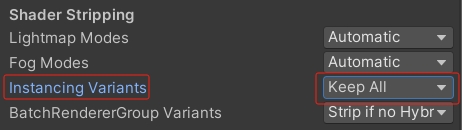
默认情况下,如果您的场景中没有启用GPU实例化的游戏对象,则Unity会删除实例化着色器变体。要覆盖剥离行为,请设置:
Edit->Project Settings->Graphics->Shader Stripping->Instancing Variants->Keep All。