C#将Excel表导出为json文件
post by:追风剑情 2018-5-26 12:07
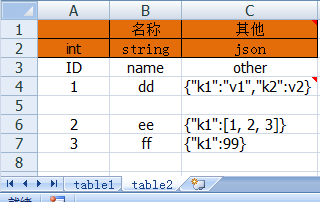
示例:Excel表导出为json文件
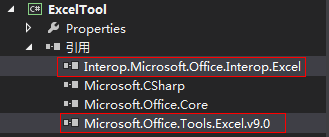
需要引用两个文件
using System;
using System.Collections.Generic;
using System.ComponentModel;
using System.Data;
using System.Drawing;
using System.Linq;
using System.Text;
using System.Threading.Tasks;
using System.Windows.Forms;
using System.Diagnostics;
using System.IO;
//文档 https://docs.microsoft.com/zh-cn/previous-versions/7fzyhc74%28v%3dvs.110%29
//引用 C:\Windows\assembly\Microsoft.Office.Tools.Excel.v9.0.dll
//引用COM Interop.Microsoft.Office.Interop.Excel.dll
using Excel = Microsoft.Office.Interop.Excel;

namespace ExcelTool
{
    public partial class MainForm : Form
    {
        private string configPath;

        public MainForm()
        {
            InitializeComponent();
            Init();
        }

        private void Init()
        {
            this.AllowDrop = true; //允许文件拖入窗口
            this.Load += MainForm_Load;
            this.DragEnter += MainForm_DragEnter;
            this.btnBrowser.MouseUp += btnBrowser_MouseUp;
            this.btnExportJson.MouseUp += btnExportJson_MouseUp;
        }

        private void MainForm_Load(object sender, EventArgs e)
        {
            Console.WriteLine("MainForm_Load");
        }

        private void MainForm_DragEnter(object sender, DragEventArgs e)
        {
            //获取拖进来的文件路径
            configPath = ((System.Array)e.Data.GetData(DataFormats.FileDrop)).GetValue(0).ToString();
            this.textBoxPath.Text = configPath;
        }

        private void btnBrowser_MouseUp(object sender, MouseEventArgs e)
        {
            ShowOpenFileDialog();
            this.textBoxPath.Text = configPath;
        }

        private void btnExportJson_MouseUp(object sender, MouseEventArgs e)
        {
            if (string.IsNullOrWhiteSpace(configPath))
            {
                MessageBox.Show("请先选择要导出的excel文件", "提示");
                return;
            }
            ExportJson();
        }

        private void ShowOpenFileDialog()
        {
            //打开选择文件对话框
            OpenFileDialog file = new OpenFileDialog();
            file.Filter = "Excel(*.xlsx)|*.xlsx|Excel(*.xls)|*.xls";
            file.InitialDirectory = Environment.GetFolderPath(Environment.SpecialFolder.Desktop);
            file.Multiselect = false;
            if (file.ShowDialog() == DialogResult.Cancel)
                return;
            //判断文件后缀
            var path = file.FileName;
            string fileSuffix = System.IO.Path.GetExtension(path);
            if (string.IsNullOrEmpty(fileSuffix))
                return;
            switch (fileSuffix)
            {
                case ".xls": //Excel 97-2003

                    break;
                case ".xlsx": //Excel 2007-更高

                    break;
            }
            configPath = path;
        }

        private void ExportJson()
        {

            //创建应用
            Excel.Application xlApp = (Excel.Application)(new Excel.ApplicationClass());
            if (xlApp == null)
            {
                MessageBox.Show("不能访问Excel");
                return;
            }
            //判断使用的Excel版本
            if (Convert.ToDouble(xlApp.Version) < 12)
            {
                //Excel 97-2003
            }
            else
            {
                //Excel 2007-更高
            }
            xlApp.Visible = false;
            xlApp.UserControl = true;
            object missing = System.Reflection.Missing.Value;
            //以只读方式打开文件
            Excel.Workbook wb = xlApp.Application.Workbooks.Open(configPath, missing, true, missing, missing, missing, missing, missing, missing, true, missing, missing, missing, missing, missing);
            //获取所有工作表
            Excel.Sheets sheets = wb.Worksheets;
            Excel.Worksheet worksheet;
            for (int i = 1; i <= sheets.Count; i++)
            {
                worksheet = (Excel.Worksheet)sheets[i];
                //构造json
                string json = BuildJson(worksheet);
                //保存文件
                SaveJson(worksheet.Name, json);
            }

            xlApp.Quit();
            xlApp = null;
            //关掉excel进程
            Process[] procs = Process.GetProcessesByName("excel");
            foreach (Process pro in procs)
            {
                pro.Kill();
            }
            GC.Collect();

            MessageBox.Show("导出成功");
        }

        private void SaveJson(string fileName, string jsonStr)
        {
            string path = string.Format("{0}/{1}.txt", Path.GetDirectoryName(configPath), fileName);
            File.WriteAllText(path, jsonStr);
        }

        private string BuildJson(Excel.Worksheet sheet)
        {
            if (null == sheet)
                return "";
            //获取行数、列数
            int usedRowCount = sheet.UsedRange.Cells.Rows.Count;
            int usedColumnCount = sheet.UsedRange.Cells.Columns.Count;

            string[] COLUMN_LETTER = new string[]{
                "A", "B", "C", "D", "E", "F", "G", "H", "I", "J", "K", "L", "M", "N",
            "O", "P", "Q", "R", "S", "T", "U", "V", "W", "X", "Y", "Z"};

            string C = COLUMN_LETTER[usedColumnCount - 1];

            //获取数据类型定义区(即,第二行)
            Excel.Range typeRange = sheet.Cells.get_Range("A2", C + "2");
            object[,] typeValue2 = (object[,])typeRange.Value2;

            //获取key定义区(即,第三行)
            Excel.Range keyRange = sheet.Cells.get_Range("A3", C + "3");
            object[,] keyValue2 = (object[,])keyRange.Value2;

            //获取数据区(即,排除标题行)
            Excel.Range dataRange = sheet.Cells.get_Range("A4", C + usedRowCount);
            object[,] value2 = (object[,])dataRange.Value2;

            StringBuilder sb = new StringBuilder();
            sb.AppendLine("[");
            string type, k, v;
            for (int i = 1; i <= dataRange.Rows.Count; i++)
            {
                //遍历时跳过ID为空的行
                if (null == value2[i, 1])
                    continue;
                v = value2[i, 1].ToString();
                if (string.IsNullOrWhiteSpace(v))
                    continue;

                //构造json串
                sb.Append("{");
                for (int j = 1; j <= dataRange.Columns.Count; j++)
                {
                    k = keyValue2[1, j].ToString();
                    if (value2[i, j] == null)
                        v = "";
                    else
                        v = value2[i, j].ToString();

                    type = typeValue2[1, j].ToString();
                    switch(type)
                    {
                        case "int":
                            sb.AppendFormat("\"{0}\":{1}", k, v);
                            break;
                        case "int[]":
                            sb.Append(ParseIntArray(k, v));
                            break;
                        case "json":
                            sb.Append(ParseJson(k, v));
                            break;
                        case "string":
                            sb.AppendFormat("\"{0}\":\"{1}\"", k, v);
                            break;
                        case "string[]":
                            sb.Append(ParseStringArray(k, v));
                            break;

                    }
                    if (j < dataRange.Columns.Count)
                        sb.Append(",");
                }
                sb.Append("}");
                if (i < dataRange.Rows.Count)
                    sb.AppendLine(",");
            }
            sb.AppendLine();
            sb.Append("]");

            return sb.ToString();
        }

        private string ParseIntArray(string k, string v)
        {
            string format = "\"{0}\":[{1}]";
            if (string.IsNullOrWhiteSpace(v))
            {
                return string.Format(format, k, "");
            }
            return string.Format("\"{0}\":[{1}]", k, v);
        }

        private string ParseStringArray(string k, string v)
        {
            string format = "\"{0}\":[{1}]";
            if (string.IsNullOrWhiteSpace(v)) {
                return string.Format(format, k, "");
            }
            StringBuilder sb = new StringBuilder();
            string[] strArr = v.Split(',');
            int len = strArr.Length;
            for (int i=0; i<len; i++)
            {
                sb.AppendFormat("\"{0}\"", strArr[i]);
                if (i < len - 1)
                    sb.Append(",");
            }
            return string.Format(format, k, sb.ToString());
        }

        private string ParseJson(string k, string v)
        {
            if (string.IsNullOrWhiteSpace(v))
                return string.Format("\"{0}\":{{}}", k);
            return string.Format("\"{0}\":{1}", k, v);
        }
    }
}
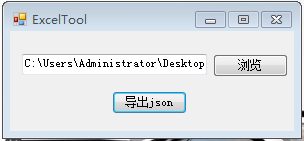
运行效果
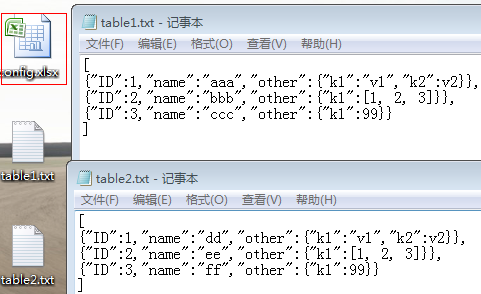
导出文件截图
报错一

解决方法
设置嵌入互操作类型为False
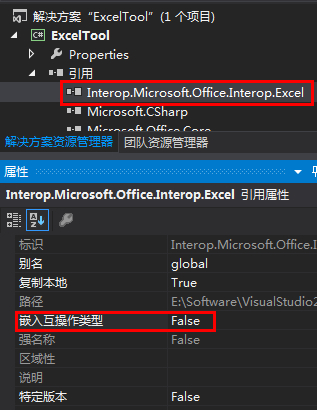
如果在C:\Windows下没找到Microsoft.Office.Interop.Excel.dll还可用用NuGet安装
通过NuGet安装Microsoft.Office.Interop.Excel
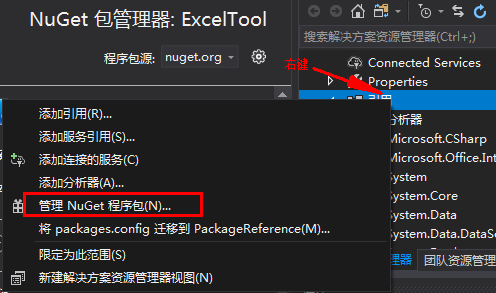
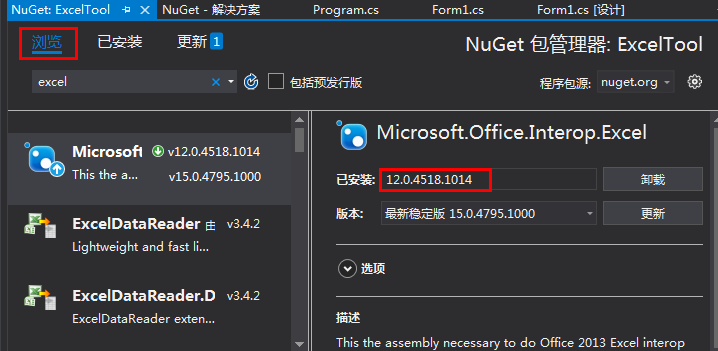
注意:如果选择的版本与电脑上安装的Excel版本不匹配,运行时会报错,此时只需重新安装下其他版本方可解决。我电脑上安装的是Excel2010,这里我安装的Microsoft.Office.Interop.Excel版本为12,经亲测完美运行。
评论:
发表评论: