DataGridView显示数据库数据
post by:追风剑情 2018-5-5 21:06
示例代码
数据库辅助类
using System;
using System.Collections.Generic;
using System.Linq;
using System.Text;
using System.Threading.Tasks;
using System.Data.SQLite;

namespace Test7
{
    public class SqliteHelper
    {
        private SQLiteConnection dbConnection;
        private SQLiteCommand dbCommand;
        private SQLiteDataReader dataReader;

        /// <summary>
        /// 连接数据库
        /// </summary>
        /// <param name="connectionString">例如: "data source=mydb.db"</param>
        public bool Connect(string db_path)
        {
            try
            {
                //如果db文件不存在,会自动创建一个新的db文件
                string connectionString = string.Format("data source={0}", db_path);
                dbConnection = new SQLiteConnection(connectionString);
                dbConnection.Open();
                return true;
            }
            catch (Exception e)
            {
                Log(e.ToString());
            }
            return false;
        }

        //执行SQL: 查
        public SQLiteDataReader ExecuteQuery(string sql)
        {
            try
            {
                dbCommand = dbConnection.CreateCommand();
                dbCommand.CommandText = sql;
                dataReader = dbCommand.ExecuteReader();
            }
            catch (Exception e)
            {
                Log(e.Message);
            }

            return dataReader;
        }

        //执行SQL:增、删、改操作
        public int ExecuteNonQuery(string sql)
        {
            int result_code = -1;
            try
            {
                dbCommand = dbConnection.CreateCommand();
                dbCommand.CommandText = sql;
                result_code = dbCommand.ExecuteNonQuery();
            }
            catch (Exception e)
            {
                Log(e.Message);
            }

            return result_code;
        }

        public void Close()
        {
            if (dbCommand != null)
            {
                dbCommand.Cancel();
            }
            dbCommand = null;

            if (dataReader != null)
            {
                dataReader.Close();
            }
            dataReader = null;

            if (dbConnection != null)
            {
                dbConnection.Close();
            }
            dbConnection = null;
        }

        static void Log(string s)
        {
            Console.WriteLine("SqliteHelper: {0}", s);
        }
    }
}
-------
using System;
using System.Collections.Generic;
using System.ComponentModel;
using System.Data;
using System.Drawing;
using System.Linq;
using System.Text;
using System.IO;
using System.Threading.Tasks;
using System.Windows.Forms;
using System.Data.SQLite;

namespace Test7
{
    public partial class Form1 : Form
    {
        private SqliteHelper db;

        public Form1()
        {
            InitializeComponent();
            Init();
        }

        private void Init()
        {
            bool success = ConnectDB();
            if (!success)
                return;
            //CreateTable();
            /*
            InsertRecord(0, "阿宝1", 1, 0);
            InsertRecord(1, "阿宝2", 0, 1);
            InsertRecord(0, "阿宝3", 1, 2);
            InsertRecord(1, "阿宝4", 0, 3);
            InsertRecord(1, "阿宝5", 1, 4);
            InsertRecord(0, "阿宝6", 1, 5);
            */
            RefreshDataGridView();
        }

        private bool ConnectDB()
        {
            string db_path = Environment.CurrentDirectory + "\\info.db";
            Console.WriteLine(db_path);

            db = new SqliteHelper();
            bool success = db.Connect(db_path);
            if (!success){
                MessageBox.Show("连接数据库失败!");
            }
            Console.WriteLine("Connect: {0}", success);
            return success;
        }

        private void CreateTable()
        {
            string sql = "CREATE TABLE IF NOT EXISTS user_info(row_id INTEGER PRIMARY KEY AUTOINCREMENT, sex INT, name TEXT, married INT, city INT, reg_date CURRENT_TIMESTAMP)";
            int result_code = db.ExecuteNonQuery(sql);
            Console.WriteLine("Create table>> result_code={0}", result_code);
        }

        private void InsertRecord(int sex, string name, int married, int city)
        {
            string sql = string.Format(
                "INSERT INTO user_info(sex, name, married, city, reg_date) VALUES({0}, '{1}', {2}, {3}, CURRENT_TIMESTAMP)",
                sex, name, married, city);
            int result_code = db.ExecuteNonQuery(sql);
            Console.WriteLine("Inert value>> result_code={0}", result_code);
        }

        private void RefreshDataGridView()
        {
            //设置列标题居中显示
            this.dataGridView1.ColumnHeadersDefaultCellStyle.Alignment = DataGridViewContentAlignment.MiddleCenter;
            //禁用自动增加编辑行
            this.dataGridView1.AllowUserToAddRows = false;

            string sql_query = "SELECT * FROM 'user_info'";
            SQLiteDataReader reader = db.ExecuteQuery(sql_query);
            DataGridViewComboBoxCell comboxCell;
            while (reader.Read())
            {
                //逐行读取数据库中记录
                int row_id = reader.GetInt32(reader.GetOrdinal("row_id"));
                int sex = reader.GetInt32(reader.GetOrdinal("sex"));
                string name = reader.GetString(reader.GetOrdinal("name"));
                int city = reader.GetInt32(reader.GetOrdinal("city"));
                bool married = reader.GetBoolean(reader.GetOrdinal("married"));
                string reg_date = reader.GetString(reader.GetOrdinal("reg_date"));
                //将数据插入DataGridView控件中
                int index = this.dataGridView1.Rows.Add();
                this.dataGridView1.Rows[index].Cells["row_id"].Value = row_id;
                this.dataGridView1.Rows[index].Cells["sex"].Value = sex;
                this.dataGridView1.Rows[index].Cells["name"].Value = name;
                this.dataGridView1.Rows[index].Cells["married"].Value = married;
                comboxCell = this.dataGridView1.Rows[index].Cells["city"] as DataGridViewComboBoxCell;
                comboxCell.Value = comboxCell.Items[city];
                this.dataGridView1.Rows[index].Cells["link"].Value = "http://www.baidu.com";
                this.dataGridView1.Rows[index].Cells["reg_date"].Value = reg_date;
            }
        }
    }
}
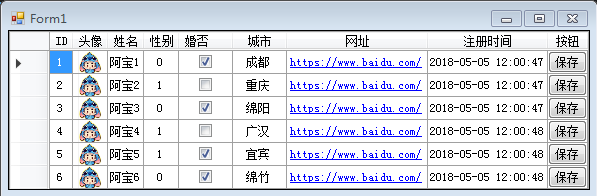
运行测试
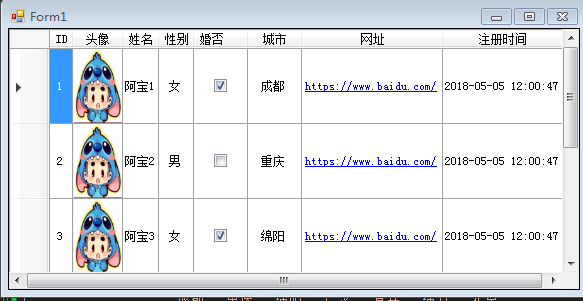
示例:采用数据绑定方式
using System;
using System.Collections.Generic;
using System.ComponentModel;
using System.Data;
using System.Drawing;
using System.Linq;
using System.Text;
using System.IO;
using System.Threading.Tasks;
using System.Windows.Forms;
using System.Data.SQLite;

namespace Test7
{
    public partial class Form1 : Form
    {
        private SqliteHelper db;

        public Form1()
        {
            InitializeComponent();
            Init();
        }

        private void Init()
        {
            bool success = ConnectDB();
            if (!success)
                return;
            //CreateTable();
            /*
            InsertRecord(0, "阿宝1", 1, 0);
            InsertRecord(1, "阿宝2", 0, 1);
            InsertRecord(0, "阿宝3", 1, 2);
            InsertRecord(1, "阿宝4", 0, 3);
            InsertRecord(1, "阿宝5", 1, 4);
            InsertRecord(0, "阿宝6", 1, 5);
            */
            RefreshDataGridView();
        }

        private bool ConnectDB()
        {
            string db_path = Environment.CurrentDirectory + "\\info.db";
            Console.WriteLine(db_path);

            db = new SqliteHelper();
            bool success = db.Connect(db_path);
            if (!success){
                MessageBox.Show("连接数据库失败!");
            }
            Console.WriteLine("Connect: {0}", success);
            return success;
        }

        private void CreateTable()
        {
            string sql = "CREATE TABLE IF NOT EXISTS user_info(row_id INTEGER PRIMARY KEY AUTOINCREMENT, sex INT, name TEXT, married INT, city INT, reg_date CURRENT_TIMESTAMP)";
            int result_code = db.ExecuteNonQuery(sql);
            Console.WriteLine("Create table>> result_code={0}", result_code);
        }

        private void InsertRecord(int sex, string name, int married, int city)
        {
            string sql = string.Format(
                "INSERT INTO user_info(sex, name, married, city, reg_date) VALUES({0}, '{1}', {2}, {3}, CURRENT_TIMESTAMP)",
                sex, name, married, city);
            int result_code = db.ExecuteNonQuery(sql);
            Console.WriteLine("Inert value>> result_code={0}", result_code);
        }

        private void RefreshDataGridView()
        {
            //设置列标题居中显示
            this.dataGridView1.ColumnHeadersDefaultCellStyle.Alignment = DataGridViewContentAlignment.MiddleCenter;
            //禁用自动增加编辑行
            this.dataGridView1.AllowUserToAddRows = false;

            string sql_query = "SELECT * FROM 'user_info'";
            SQLiteDataReader reader = db.ExecuteQuery(sql_query);
            List<UserInfo> dataSource = new List<UserInfo>();
            while (reader.Read())
            {
                //逐行读取数据库中记录
                int row_id = reader.GetInt32(reader.GetOrdinal("row_id"));
                int sex = reader.GetInt32(reader.GetOrdinal("sex"));
                string name = reader.GetString(reader.GetOrdinal("name"));
                int city = reader.GetInt32(reader.GetOrdinal("city"));
                bool married = reader.GetBoolean(reader.GetOrdinal("married"));
                string reg_date = reader.GetString(reader.GetOrdinal("reg_date"));

                UserInfo userInfo = new UserInfo()
                {
                    row_id = row_id,
                    sex = sex,
                    name = name,
                    city = city,
                    married = married,
                    reg_date = reg_date
                };
                dataSource.Add(userInfo);
            }

            //绑定数据源
            this.dataGridView1.DataSource = dataSource;
        }
    }

    /// <summary>
    /// DataSource
    /// DataGridView.DataSource只能绑定属性(即seter;geter)
    /// DataPropertyName要与属性名对应
    /// </summary>
    public class UserInfo
    {
        public int row_id { get; set; }
        public int sex;
        public string name { get; set; }
        public int city;
        public bool married { get; set; }
        public string link{
            get { return "http://www.baidu.com"; }
        }

        public string reg_date { get; set; }

        public string sex_value
        {
            get
            {
                return sex == 0 ? "女" : "男";
            }
        }

        public string city_value
        {
            get
            {
                string[] city_names = new string[]{
                    "成都","重庆","绵阳","广汉","宜宾","绵竹","北京"
                };
                return city_names[city];
            }
        }
    }
}
评论:
发表评论: