自动生成图集
post by:追风剑情 2018-1-30 11:04
示例代码
using UnityEngine;
using UnityEditor;
using System.IO;
using System.Collections;
using System.Collections.Generic;

public class MenuEditor {

    [MenuItem("Tools/Generate Atlas")]
    public static void GenerateAtlas()
    {
        Object activeObject = Selection.activeObject;
        string name = activeObject.name;

        Texture2D texture = new Texture2D(2048, 2048, TextureFormat.RGBA32, false, true);
        Object[] objs = Selection.GetFiltered(typeof(Texture2D), SelectionMode.DeepAssets);
        if (null == objs)
            return;

        Texture2D[] texArr = new Texture2D[objs.Length];
        for (int i = 0; i < objs.Length; i++)
        {
            texArr[i] = objs[i] as Texture2D;
            SetTextureReadable(texArr[i], true);
        }

        GameObject go = null;
        UIAtlas uiatlas = null;
        go = Resources.LoadAssetAtPath<GameObject>(string.Format("Assets/{0}.prefab", name));
        if (null != go) {
            uiatlas = go.GetComponent<UIAtlas>();//获取已存在的atlas
        }

        //注意: PackTextures()返回的是UV坐标,以图片左上角为(0,0)点(从上到下,从左到右),实际生成的texture中的sprite是从从左到右,下到上排列的。
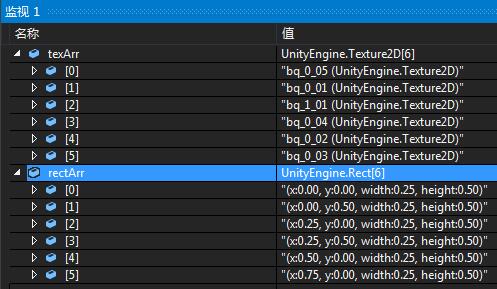
        Rect[] rectArr = texture.PackTextures(texArr, 0, 2048);

        List<UISpriteData> spriteList = new List<UISpriteData>();
        for (int i = 0; i < texArr.Length; i++)
        {
            Rect rect = rectArr[i];
            //sprite在图集中的UV坐标
            float uv_x = rect.x;
            float uv_y = 1 - rect.y + rect.height;//反转Y坐标
            float uv_w = rect.width;
            float uv_h = rect.height;
            //sprite在图集中的像素坐标
            int pixel_x = (int)(uv_x * texture.width);
            int pixel_y = (int)(uv_y * texture.height);
            int pixel_w = (int)(uv_w * texture.width);
            int pixel_h = (int)(uv_h * texture.height);

            UISpriteData sd = new UISpriteData();
            sd.name = texArr[i].name;
            sd.SetRect(pixel_x, pixel_y, pixel_w, pixel_h);
            spriteList.Add(sd);

            if(null != uiatlas){
                UISpriteData old_sd = uiatlas.GetSprite(sd.name);
                if(null != old_sd){
                    sd.CopyBorderFrom(old_sd);//保留原来设置的九宫缩放信息
                }
            }
        }

        Material mat = new Material(Shader.Find("Unlit/Transparent Colored"));

        go = new GameObject("atlas");
        uiatlas = go.AddComponent<UIAtlas>();
        uiatlas.spriteList = spriteList;
        uiatlas.spriteMaterial = mat;
        uiatlas.MarkSpriteListAsChanged();

        //这里的保存路径根据实际情况修改吧
        SavePNG(string.Format("Assets/{0}.png", name), texture);
        AssetDatabase.CreateAsset(mat, string.Format("Assets/{0}.mat", name));
        PrefabUtility.CreatePrefab(string.Format("Assets/{0}.prefab", name), go);
        GameObject.DestroyImmediate(go);
        GameObject.DestroyImmediate(texture);

        AssetDatabase.SaveAssets();
        AssetDatabase.Refresh(ImportAssetOptions.ForceUpdate);
        //等上面的资源保存后再设值才生效
        mat.mainTexture = Resources.LoadAssetAtPath<Texture>(string.Format("Assets/{0}.png", name));
    }

    static void SetTextureReadable(Texture2D tex, bool readable)
    {
        string texPath = AssetDatabase.GetAssetPath(tex);
        AssetImporter importer = AssetImporter.GetAtPath(texPath);
        TextureImporter texImporter = importer as TextureImporter;
        texImporter.textureType = TextureImporterType.Advanced;
        texImporter.textureFormat = TextureImporterFormat.RGBA32;
        texImporter.isReadable = readable;
        AssetDatabase.ImportAsset(texPath);
    }

    //保存Texture
    static void SavePNG(string filePath, Texture2D texture)
    {
        if (null == texture)
            return;

        try
        {
            string dir = Path.GetDirectoryName(filePath);
            if (!Directory.Exists(dir))
                Directory.CreateDirectory(dir);
            //texture必须为ARGB32,RGBA32,或者是Alpha8且可读,否则这句会报错.
            byte[] pngData = texture.EncodeToPNG();
            File.WriteAllBytes(filePath, pngData);
        }
        catch (System.Exception ex)
        {
            Debug.Log(ex.StackTrace);
        }
    }
}
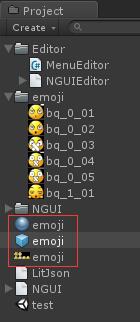
工程截图
评论:
发表评论: