PopupWindowContent
post by:追风剑情 2017-12-26 16:44
自定义弹出菜单
PopupExample.cs
using UnityEngine;
using UnityEditor;
using System.Collections;

public class PopupExample : PopupWindowContent
{
    bool toggle1 = true;
    bool toggle2 = true;
    bool toggle3 = true;

    public override Vector2 GetWindowSize()
    {
        return new Vector2(200, 150);
    }

    public override void OnGUI(Rect rect)
    {
        GUILayout.Label("Popup Options Example", EditorStyles.boldLabel);
        toggle1 = EditorGUILayout.Toggle("Toggle 1", toggle1);
        toggle2 = EditorGUILayout.Toggle("Toggle 2", toggle2);
        toggle3 = EditorGUILayout.Toggle("Toggle 3", toggle3);
    }

    public override void OnOpen()
    {
        Debug.Log("Popup opened: " + this);
    }

    public override void OnClose()
    {
        Debug.Log("Popup closed: " + this);
    }
}
EditorWindowWithPopup.cs
using UnityEngine;
using UnityEditor;
using System.Collections;

public class EditorWindowWithPopup : EditorWindow
{
    // Add menu item
    [MenuItem("Example/Popup Example")]
    static void Init()
    {
        EditorWindow window = EditorWindow.CreateInstance<EditorWindowWithPopup>();
        //弹出窗口(支持拖动停靠)
        window.Show();
        //弹出的窗口没标题栏,因此不可拖动
        //window.ShowPopup();
        //弹出窗口(不支持拖动停靠)
        //window.ShowAuxWindow();
        //与ShowAuxWindow()效果一样,只是点击此窗口以外的位置时,此窗口不会关闭。
        //window.ShowUtility();
        //在指定位置弹出指定大小的窗口(支持拖动停靠)
        //window.ShowAsDropDown(new Rect(20, 20, 100, 100), new Vector2(100, 100));
        //需要与EditorWindow.GetWindow()配合,作为另一个窗口的Tab页显示
        //window.ShowTab();

    }

    Rect buttonRect;
    void OnGUI()
    {
        {
            GUILayout.Label("Editor window with Popup example", EditorStyles.boldLabel);
            if (GUILayout.Button("Popup Options", GUILayout.Width(200)))
            {
                PopupWindow.Show(buttonRect, new PopupExample());
            }
            if (Event.current.type == EventType.Repaint) buttonRect = GUILayoutUtility.GetLastRect();
        }
    }
}
效果
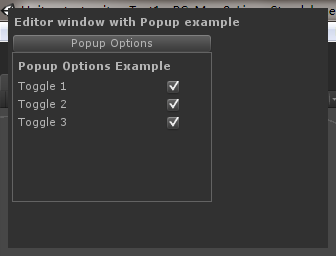
window.ShowPopup()
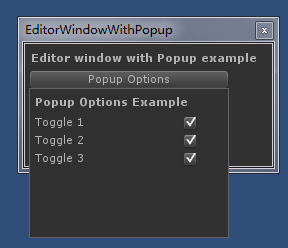
window.ShowAuxWindow()
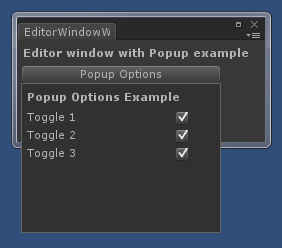
window.Show()
评论:
发表评论: