定时器(Timer)
post by:追风剑情 2017-12-1 15:46
示例
using System;
using System.Threading;

//System.Threading.Timer让一个线程池线程定时调用一个方法(执行后台任务)
//System.Windows.Forms.Timer可以保证设置计时器的线程就是执行回调方法的线程
//System.Threading.DispatcherTimer这个类是System.Windows.Forms.Timer在Silverlight和WPF应用程序中的等价物
//Windows.UI.Xaml.DispatcherTimer这个类是System.Windows.Forms.Timer在Windows Store应用中的等价物

/**
System.Timers.Timer这个计时器本质上是System.Threading.Timer的包装类。
计时器到期(触发)会导致CLR将事件放到线程池队列中。System.Timers.Timer类派生自System.ComponentModel.Component类,
允许在Visual Studio中将这些计时器对象放到设计平面(design surface)上。另外,它还公开了属性和事件,使它在Visual Studio
的设计器中更容易使用。(注意:不建议使用此Timer)
**/

namespace Test7
{
    class Program
    {
        private static Timer s_timer;
        static void Main(string[] args)
        {
            Console.WriteLine("Checking status every 2 seconds");

            //此定义器的回调方法会在线程池调用
            //dueTime: Timeout.Infinite 防止启动计时器
            //period:  Timeout.Infinite 仅回调一次
            s_timer = new Timer(Status, null, Timeout.Infinite, Timeout.Infinite);
            s_timer.Change(0, Timeout.Infinite);
            Console.Read();
        }

        //这个方法的签名必须和TimerCallback委托匹配
        private static void Status(Object state)
        {
            //这个方法由一个线程池线程执行
            Console.WriteLine("In Status at {0}", DateTime.Now);
            Thread.Sleep(1000);
            //返回前让Timer在2秒后再次触发
            s_timer.Change(2000, Timeout.Infinite);
            //这个方法返回后,线程回归池中,等待下一个工作项
        }
    }
}
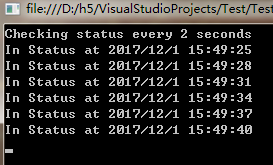
测试
this.Dispatcher.Invoke(() =>
{
   //要在WPF UI线程中执行的逻辑放这里
});
评论:
发表评论: