利用NDC坐标实现画面渐隐效果
post by:追风剑情 2017-9-15 18:47
NDC坐标:把裁剪空间中的坐标归一化后得到的坐标。取值范围[-1,1]
示例:让屏幕画面渐隐
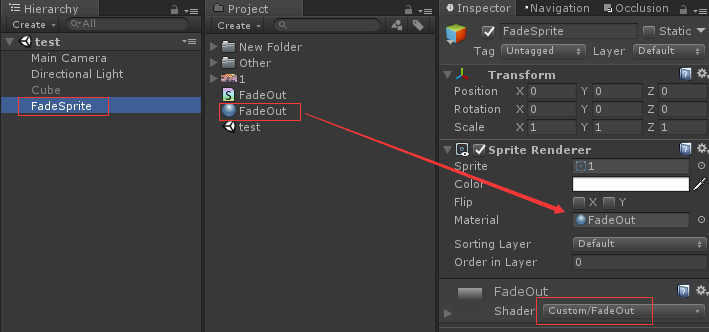
工程如图
FadeOut.shader代码
Shader "Custom/FadeOut"
{
	Properties
	{
		//材质面板中隐藏_MainTex
		[PerRendererData] _MainTex ("Texture", 2D) = "white" {}
		[MaterialToggle] PixelSnap ("Pixel snap", Float) = 0
	}
	SubShader
	{
		Tags
                {
                   "Queue"="Transparent"
                   "IgnoreProjector"="True"
                   "RenderType"="Transparent"
		   //默认预览样式Plane
                   "PreviewType"="Plane"
		   //支持Sprite
                   "CanUseSpriteAtlas"="True"
                }
		LOD 100

		Cull Off
                Lighting Off
                ZWrite Off
                Fog { Mode Off }
                Blend SrcAlpha OneMinusSrcAlpha

		Pass
		{
			CGPROGRAM
			#pragma vertex vert
			#pragma fragment frag
			// make fog work
			#pragma multi_compile_fog

			#pragma multi_compile PIXELSNAP_ON
			#include "UnityCG.cginc"

			struct appdata
			{
				float4 vertex : POSITION;
				float2 uv : TEXCOORD0;
			};

			struct v2f
			{
				float2 uv : TEXCOORD0;
				UNITY_FOG_COORDS(1)
				float4 vertex : SV_POSITION;
				//NDC坐标
				float2 ndc_uv : TEXCOORD1;
			};

			sampler2D _MainTex;
			float4 _MainTex_ST;

			v2f vert (appdata v)
			{
				v2f o;
				o.vertex = UnityObjectToClipPos(v.vertex);
				o.uv = TRANSFORM_TEX(v.uv, _MainTex);
				UNITY_TRANSFER_FOG(o,o.vertex);

				//NDC坐标=裁剪空间坐标/w
				o.ndc_uv = v.vertex.xy / v.vertex.w;

				#ifdef PIXELSNAP_ON
                                o.vertex = UnityPixelSnap (o.vertex);
                                #endif
				return o;
			}

			fixed4 frag (v2f i) : SV_Target
			{
				//ndc的z坐标取值范围[-1,1]——OpenGL
				//ndc的z坐标取值范围[0, 1]——DirectX
				//ndc的x,y坐标取值范围[0,1]
				//alpha取值范围[0,1]
				float a = i.ndc_uv.y;

				// sample the texture
				fixed4 col = tex2D(_MainTex, i.uv);
				col.a = a;
				// apply fog
				UNITY_APPLY_FOG(i.fogCoord, col);
				return col;
			}
			ENDCG
		}
	}
}
使用FadeOut.shader前的效果

使用FadeOut.shader后的效果

参考 http://blog.csdn.net/manwithrose/article/details/23704625
评论:
发表评论: