运动模糊(一)
post by:追风剑情 2017-5-9 11:47
一、创建Shader
Shader "Custom/MotionBlur"
{
	Properties
	{
		_MainTex ("Texture", 2D) = "white" {}
		//混合图像时使用的混合系数
		_BlurAmount ("Blur Amount", Float) = 1.0
	}
	SubShader
	{
		Tags { "RenderType"="Opaque" }
		LOD 100

		ZTest Always Cull Off ZWrite Off

		CGINCLUDE
		#include "UnityCG.cginc"

		sampler2D _MainTex;
		float4 _MainTex_ST;
		float _BlurAmount;

		struct v2f {
			float4 pos : SV_POSITION;
			half2 uv : TEXCOORD0;
		};

		v2f vert(appdata_img v){
			v2f o;
			o.pos = mul(UNITY_MATRIX_MVP, v.vertex);
			o.uv = v.texcoord;
			return o;
		}

		//RGB通道版本的Shader对当前图像进行采样,并将其A通道的值设置为_BlurAmount,以便在后
		//面混合时可以使用它的透明通道进行混合。
		fixed4 fragRGB (v2f i) : SV_Target
		{
			return fixed4(tex2D(_MainTex, i.uv).rgb, _BlurAmount);
		}

		//A通道版本的代码就更简单了,直接返回采样结果。
		//实际上,这个版本只是为了维护渲染纹理的透明通道值,不让其受混合时使用的透明度值的影响。
		half4 fragA (v2f i) : SV_Target
		{
			return tex2D(_MainTex, i.uv);
		}
		ENDCG

		//之所以要把A通道和RGB通道分开,是因为在更新RGB时我们需要设置它的A通道来混合图像,
		//但又不希望A通道的值写入渲染纹理中。

		Pass
		{
			//用于更新渲染纹理的RGB通道

			Blend SrcAlpha OneMinusSrcAlpha

			ColorMask RGB //只输出RGB通道

			CGPROGRAM
			#pragma vertex vert
			#pragma fragment fragRGB
			ENDCG
		}

		Pass
		{
			//用于更新渲染纹理的A通道

			Blend One Zero

			ColorMask A //只输出A通道

			CGPROGRAM
			#pragma vertex vert
			#pragma fragment fragA
			ENDCG
		}
	}
	FallBack Off
}
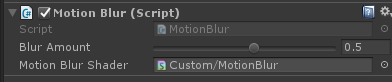
二、创建脚本,并挂到摄像机上
using UnityEngine;
/// <summary>
/// 运动模糊
/// 原理: 不断把当前的渲染图像叠加到之前的渲染图像中,从而产生一种运动轨迹的视觉效果。
/// </summary>
public class MotionBlur : PostEffectsBase
{
    //模糊参数:值越大拖尾效果越明显
    //为了防止拖尾效果完全替代当前帧的渲染结果,我们把它的值截取在0.0~0.9范围内
    [Range(0.0f, 0.9f)]
    public float blurAmount = 0.5f;
    public Shader motionBlurShader;
    private Material motionBlurMaterial = null;
    public Material material
    {
        get
        {
            motionBlurMaterial = CheckShaderAndCreateMaterial(motionBlurShader, motionBlurMaterial);
            return motionBlurMaterial;
        }
    }

    //保存之前图片叠加结果
    private RenderTexture accumulationTexture;

    void OnDisable()
    {
        //该脚本不运行时立即销毁,因为我们不希望在下一次应用运动模糊时重新叠加图像。
        DestroyImmediate(accumulationTexture);
    }

    void OnRenderImage(RenderTexture src, RenderTexture dest)
    {
        if (material != null)
        {
            if(accumulationTexture == null || accumulationTexture.width != src.width || accumulationTexture.height != src.height)
            {
                DestroyImmediate(accumulationTexture);
                accumulationTexture = new RenderTexture(src.width, src.height, 0);
                accumulationTexture.hideFlags = HideFlags.HideAndDontSave;//不显示在Hierarchy中,也不保存在场景中。
                Graphics.Blit(src, accumulationTexture);
            }
            //渲染纹理恢复操作
            //恢复操作:发生在渲染到纹理,纹理又没有被提前清空或销毁的情况下。
            accumulationTexture.MarkRestoreExpected();
            material.SetFloat("_BlurAmount", 1.0f - blurAmount);

            Graphics.Blit(src, accumulationTexture, material);//叠加图像
            Graphics.Blit(accumulationTexture, dest);//渲染到屏幕上
        }
        else
        {
            Graphics.Blit(src, dest);
        }
    }
}
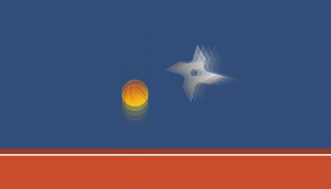
运行效果
评论:
发表评论: