自定义皮肤
post by:追风剑情 2017-3-2 11:26
1、创建自定义按钮皮肤ButtonLeftTabSkin.exml
<?xml version="1.0" encoding="utf-8" ?>
<e:Skin class="ButtonLeftTabSkin" states="up,down,disabled" minHeight="50" minWidth="100" xmlns:e="http://ns.egret.com/eui">
    <e:Image scale9Grid="1,3,8,8" alpha.disabled="0.5"
             source="btn_tab_up_png"
             source.down="btn_tab_down_png" scaleX="-1" anchorOffsetX="107" right="0" top="0" bottom="0" left="0" fillMode="scale"/>
    <e:Label id="labelDisplay" top="8" bottom="8" left="8" right="8"
             size="20"
             textColor="0xFFFFFF" verticalAlign="middle" textAlign="center"/>
    <e:Image id="iconDisplay" horizontalCenter="0" verticalCenter="0"/>
</e:Skin>
2、创建界面并使用自定义皮肤
<?xml version="1.0" encoding="utf-8"?>
<e:Skin class="ranking" width="1280" height="720" xmlns:e="http://ns.egret.com/eui">
<e:Group anchorOffsetX="0" anchorOffsetY="0" verticalCenter="0" horizontalCenter="0">
    <e:Component id="panel" skinName="PanelMainSkin"/>
    <e:Group anchorOffsetY="-68" anchorOffsetX="-145">
        <e:layout>
            <e:HorizontalLayout gap="10" verticalAlign="middle"/>
        </e:layout>
        <e:Button skinName="skins.ButtonLeftTabSkin" label="等级"/>
        <e:Button skinName="skins.ButtonLeftTabSkin" label="功勋"/>
    </e:Group>
</e:Group>
</e:Skin>
3、在default.thm.json中配置自定义皮肤
{
  "skins": {
     "ButtonLeftTabSkin": "resource/eui_skins/ButtonLeftTabSkin.exml"
  },
  "autoGenerateExmlsList": true,
  "exmls": [
  ]
}
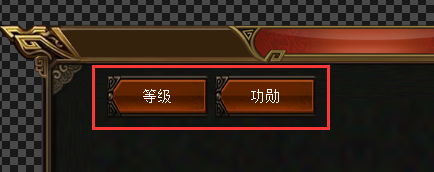
预览效果
评论:
发表评论: