边缘检测(一)
post by:追风剑情 2016-11-19 0:45
一、创建脚本(需挂在摄像机上)
using UnityEngine;
using System.Collections;
/// <summary>
/// 边缘检测
/// 把该脚本拖曳到摄像机上。
/// 把边缘检测的Shader拖到edgeDetectShader上。
/// </summary>
public class EdgeDetection : PostEffectsBase {

	//调整描边强度
	[Range(0.0f, 1.0f)]
	public float edgesOnly = 0.0f;
	//描边颜色
	public Color edgeColor = Color.black;
	//背景颜色
	public Color backgroundColor = Color.white;

	public Shader edgeDetectShader;

	private Material edgeDetectMaterial = null;
	public Material material {
		get {
			edgeDetectMaterial = CheckShaderAndCreateMaterial(edgeDetectShader, edgeDetectMaterial);
			return edgeDetectMaterial;
		}
	}

	void OnRenderImage(RenderTexture src, RenderTexture dest) {
		if(material != null){
			material.SetFloat("_EdgeOnly", edgesOnly);
			material.SetColor("_EdgeColor", edgeColor);
			material.SetColor("_BackgroundColor", backgroundColor);

			Graphics.Blit(src, dest, material);
		}else{
			Graphics.Blit(src, dest);
		}
	}
}
二、创建Shader
//屏幕后处理效果——边缘检测(实现描边效果)
//需要注意的是,本Shader实现的边缘检测仅仅利用了屏幕颜色信息,
//而在实际应用中,物体的纹理、阴影等信息均会影响边缘检测的结果,
//使得结果包含许多非预期的描边。为了得到更加准确的边缘信息,我们往往
//会在屏幕的深度纹理和法线纹理上进行边缘检测。
Shader "Custom/Chapter12-EdgeDetection" {
	Properties {
		_MainTex ("Base (RGB)", 2D) = "white" {}
		//边缘线强度
		_EdgeOnly ("Edge Only", float) = 1.0
		//边缘颜色
		_EdgeColor ("Edge Color", Color) = (0, 0, 0, 1)
		//背景颜色
		_BackgroundColor ("Background Color", Color) = (1, 1, 1, 1)

		//说明:
		//当_EdgeOnly值为0时,边缘将会叠加在原渲染图像上;
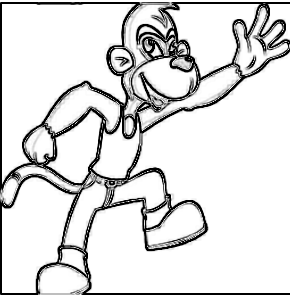
		//当_EdgeOnly值为1时,则会只显示边缘,不显示原渲染图像。
		//其中,背景颜色由_BackgroundColor指定,边缘颜色由_EdgeColor指定。
	}
	SubShader {
		Pass {
			Tags { "LightMode"="ForwardBase" }

			ZTest Always Cull Off ZWrite Off

			CGPROGRAM
			#pragma vertex vert
			#pragma fragment fragSobel
			#include "UnityCG.cginc"

			sampler2D _MainTex;
			//xxx_TexelSize是Unity为我们提供的访问xxx纹理对应的每个纹素的大小。
			//例如,一张512x512大小的纹理,该值大约为0.001953(即1/512)。
			//由于卷积需要对相领区域内的纹理进行采样,因此我们需要利用_MainTex_TexelSize来计算各个
			//相邻区域的纹理坐标。
			half4 _MainTex_TexelSize;
			fixed _EdgeOnly;
			fixed4 _EdgeColor;
			fixed4 _BackgroundColor;

			struct v2f {
				float4 pos : SV_POSITION;
				half4 uv[5] : TEXCOORD0;
			};

			v2f vert(appdata_img v) {
				v2f o;
				UNITY_INITIALIZE_OUTPUT(v2f, o);//初始化参数
				o.pos = mul(UNITY_MATRIX_MVP, v.vertex);

				half2 uv = v.texcoord;

				//我们在v2f结构体中定义了一个维数为9的纹理数组,对应了使用Sobel算子采样时需要的9
				//个领域纹理坐标。通过把计算采样纹理坐标的代码从片元着色器中转移到顶点着色器中,可以减少
				//运算,提高性能。由于从顶点着色器到片元着色器的插值是线性的,因此这样的转移并不会影响
				//纹理坐标的计算结果。
				o.uv[0].xy = uv + _MainTex_TexelSize.xy * half2(-1, -1);
				o.uv[0].zw = uv + _MainTex_TexelSize.xy * half2( 0, -1);
				o.uv[1].xy = uv + _MainTex_TexelSize.xy * half2( 1, -1);
				o.uv[1].zw = uv + _MainTex_TexelSize.xy * half2(-1,  0);
				o.uv[2].xy = uv + _MainTex_TexelSize.xy * half2( 0,  0);
				o.uv[2].zw = uv + _MainTex_TexelSize.xy * half2( 1,  0);
				o.uv[3].xy = uv + _MainTex_TexelSize.xy * half2(-1,  1);
				o.uv[3].zw = uv + _MainTex_TexelSize.xy * half2( 0,  1);
				o.uv[4].xy = uv + _MainTex_TexelSize.xy * half2( 1,  1);

				return o;
			}

			//计算亮度值
			fixed luminance(fixed4 color) {
				return 0.2125 * color.r + 0.7154 * color.g + 0.0721 * color.b;
			}

			//计算当前像素的梯度值
			//Sobel函数将利用Sobel算子对原图进行边缘检测。
			half Sobel(v2f i) {
				//定义水平方向使用的卷积核Gx
				const half Gx[9] = {-1, -2, -1,
									 0,  0,  0,
									 1,  2,  1};
				//定义竖直方向使用的卷积核Gy
				const half Gy[9] = {-1, 0, 1,
									-2, 0, 2,
									-1, 0, 1};
				half texColor;
				half edgeX = 0;
				half edgeY = 0;
				int n = 0;
				//依次对9个像素进行采样,计算它们的亮度值,再与卷积核Gx和Gy中对应的权重相乘后,
				//叠加到各自的梯度值上。
				for (uint it = 0; it < 9; it++) {
					if(it%2 == 0){
						texColor = luminance(tex2D(_MainTex, i.uv[n].xy));
					}else{
						texColor = luminance(tex2D(_MainTex, i.uv[n].zw));
						n++;
					}
					edgeX += texColor * Gx[it];
					edgeY += texColor * Gy[it];
				}
				//最后,我们从1中减去水平方向和竖直方向的梯度值的绝对值,得到edge。
				//edge值越小,表明该位置越可能是一个边缘点。至此,边缘检测过程结束。
				half edge = 1 - abs(edgeX) - abs(edgeY);

				return edge;
			}

			//Unity5.x中返回的语义用SV_Target
			//使用Sobel算子进行边缘检测,实现搭边效果。
			fixed4 fragSobel(v2f i) : COLOR {
				//调用Sobel函数计算当前像素的梯度值
				half edge = Sobel(i);
				//计算背景为原图下的颜色值
				fixed4 withEdgeColor = lerp(_EdgeColor, tex2D(_MainTex, i.uv[2].xy), edge);
				//计算背景为纯色下的颜色值
				fixed4 onlyEdgeColor = lerp(_EdgeColor, _BackgroundColor, edge);
				//利用_EdgeOnly在两者之间插值得到最终的像素值。
				return lerp(withEdgeColor, onlyEdgeColor, _EdgeOnly);
			}
			ENDCG
		}
	}
	FallBack Off
}
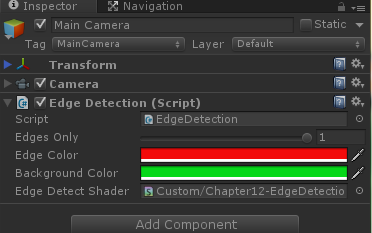
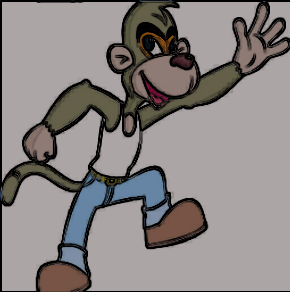
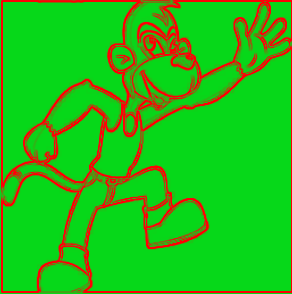
运行效果
edgesOnly = 0
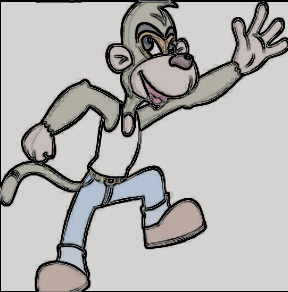
edgesOnly = 0.5
edgesOnly = 1
评论:
发表评论: