LitJson
post by:追风剑情 2016-8-12 13:39
LitJson的使用
示例
using UnityEngine;
using System;
using System.IO;
using System.Collections;
using LitJson;

public class UITest : MonoBehaviour {

	void Start () {
        //创建测试对象
        A a = new A();
        a.name = "aaaaaa";
        a.age = 16;

        //写文件
        Json.WriteFile<A>(a, @"a.json");

        //读文件并解析
        A a1 = Json.ReadFile<A>(@"a.json");
        Debug.Log("name="+a1.name+", age="+a1.age);

        //读文件并解析
        JsonData data = Json.ReadFile(@"a.json");
        Debug.Log("name=" + data["name"] + ", age=" + data["age"]);
	}
}

public class A
{
    public string name;
    public int age;
}

public class Json
{
    //读*.json文件
    public static JsonData ReadFile(string path)
    {
        StreamReader sr = File.OpenText(path);
        string json = sr.ReadToEnd();
        sr.Close();
        JsonData data = JsonMapper.ToObject(json);
        return data;
    }

    public static T ReadFile<T>(string path)
    {
        StreamReader sr = File.OpenText(path);
        string json = sr.ReadToEnd();
        sr.Close();
        T data = JsonMapper.ToObject<T>(json);
        return data;
    }

    //写*.json文件
    public static void WriteFile(string json, string path)
    {
        StreamWriter sw = File.CreateText(path);
        sw.Write(json);
        sw.Flush();
        sw.Close();
    }

    public static void WriteFile<T>(T data, string path)
    {
        string json = JsonMapper.ToJson(data);
        StreamWriter sw = File.CreateText(path);
        sw.Write(json);
        sw.Flush();
        sw.Close();
    }
}
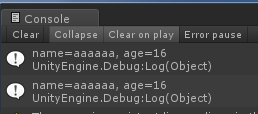
运行测试
JSON.NET
Json.NET是用于.NET的流行的高性能JSON框架
优点和特点
● 灵活的JSON序列化程序,用于在.NET对象和JSON之间进行转换
● LINQ to JSON用于手动读取和写入JSON
● 高性能:比.NET的内置JSON序列化器快
● 编写缩进的,易于阅读的JSON
● 将JSON与XML相互转换
● 支持.NET Standard 2.0,.NET 2,.NET 3.5,.NET 4,.NET 4.5,Silverlight,Windows Phone和Windows 8 Store
当您正在读取或编写的JSON紧密映射到.NET类时,Json.NET中的JSON序列化器是一个不错的选择。
LINQ to JSON适用于仅对从JSON获取值感兴趣,没有要序列化或反序列化的类,或者JSON与您的类完全不同并且需要手动从中读取和写入的情况对象。
评论:
发表评论: