捕获日志——Application.RegisterLogCallback()
post by:追风剑情 2016-8-11 11:25
using UnityEngine;
using System;
using System.Collections;

public class UITest : MonoBehaviour {

    string log;
    string stack;
    string type;

	void Start () {
        //引发一个异常
        //或者使用Debug.Log()、Debug.LogWarning()、Debug.LogException()、Debug.LogError()触发LogHandler()
        throw new Exception("引发异常");
	}

    void OnEnable()
    {
        //注册委托
        Application.RegisterLogCallback(LogHandler);
    }

    void OnDisable()
    {
        //取消委托
        Application.RegisterLogCallback(null);
    }

    void OnGUI()
    {
        GUI.Label(new Rect(0, 0, 500, 1000), "LogType: " + type+"\nLog: "+log+"\nStack: "+stack);
    }

    private void LogHandler(string log, string stack, LogType type)
    {
        //此方法中Unity禁用了Debug.Log()、Debug.LogWarning()、
        //Debug.LogException()、Debug.LogError()输出API,避免引起无限递归。

        this.log = log;
        this.stack = stack;
        this.type = type.ToString();
    }
}
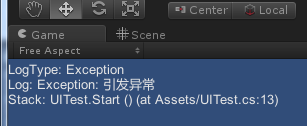
运行测试
Unity定义的日志级别
namespace UnityEngine
{
    public enum LogType
    {
        Error = 0,
        Assert = 1,
        Warning = 2,
        Log = 3,
        Exception = 4,
    }
}
评论:
发表评论: