形状Drawable
post by:追风剑情 2016-7-27 16:51
线
<?xml version="1.0" encoding="utf-8"?>
<shape xmlns:android="http://schemas.android.com/apk/res/android"
    android:shape="line">
    <!-- 引用虚线的view需要添加属性android:layerType,值设为"software",否则显示不了虚线。 -->
    <!-- 定义线条颜色和粗细 -->
    <stroke
        android:width="2dp"
        android:color="#ffff00"
        android:dashWidth="4dp"
        android:dashGap="4dp"/>
	<size android:height="40dp" />
</shape>
矩形
<?xml version="1.0" encoding="utf-8"?>
<shape xmlns:android="http://schemas.android.com/apk/res/android"
    android:shape="rectangle">
    <solid android:color="#2F90BD"/>
    <!-- 定义虚线轮廓线 -->
	<stroke
	    android:width="2dp"
	    android:color="#00ff00"
	    android:dashWidth="20dp"
        android:dashGap="4dp"
    />
	<!-- 定义圆角 -->
	<corners android:radius="15dp"/>
	<!-- 定义内补丁 -->
	<padding
		android:left="10dp"
		android:top="10dp"
		android:right="10dp"
		android:bottom="10dp"
	/>
</shape>
椭圆
<?xml version="1.0" encoding="utf-8"?>
<shape xmlns:android="http://schemas.android.com/apk/res/android"
    android:shape="oval" >
    <!-- 定义椭圆颜色 -->
    <solid android:color="#2F90BD"/>
    <!-- 定义虚线轮廓线 -->
	<stroke
	    android:width="2dp"
	    android:color="#00ff00"
	    android:dashWidth="4dp"
        android:dashGap="4dp"
    />
	<!-- padding设置内间距 -->
    <padding
        android:bottom="4dp"
        android:left="4dp"
        android:right="4dp"
        android:top="4dp" />
    <!-- size设置形状的大小 -->
    <size
        android:width="60dp"
        android:height="40dp" />
</shape>
环
<?xml version="1.0" encoding="utf-8"?>
<shape xmlns:android="http://schemas.android.com/apk/res/android"
    android:shape="ring"
    android:innerRadiusRatio="3"
    android:thicknessRatio="9"
    android:useLevel="false" >
    <!-- 环的厚度=环的直径/thicknessRatio -->
    <!-- 内环半径=环的直径/innerRadiusRatio -->

	<!-- 定义颜色 -->
    <solid android:color="#2F90BD"/>
    <!-- 定义轮廓线 -->
	<stroke
	    android:width="1dp"
	    android:color="#ffffff"
    />
	<!-- 定义渐变 -->
	<gradient
        android:endColor="#2F90BD"
        android:startColor="#FFFFFF"
        android:type="sweep" />
</shape>
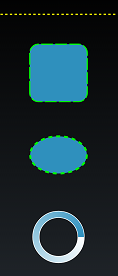
运行测试
评论:
发表评论: