渐变Drawable
post by:追风剑情 2016-7-26 16:53
GradientDrawable允许设计复杂的渐变填充。每种渐变定义两种或三种颜色之间的线性、辐射或扫描方式的平滑过渡。渐变Drawable是使用<gradient>标记并作为形状Drawable定义中的子节点定义的。每个渐变Drawable都要求至少有一个startColor和endColor属性,并且支持一个可选的middleColor属性。通过使用type属性,可以把渐变定义为以下列出的某种类型:
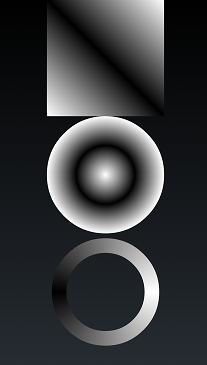
线性:这是默认的渐变类型,它显示了按照angle属性定义的角度从startColor到endColor的直接颜色过渡。
辐射: 从形状的外边界到中心绘制从startColor到endColor的圆形渐变。它要求使用gradientRadius属性指定以像素计算的渐变过渡的半径。另外,它还支持使用centerX和centerY移动渐变中心的位置。
由于渐变的半径是使用像素定义的,因此不能为不同的像素密度动态缩放。因此,为了最小化条带,可能需要为不同的屏幕分辨率指定不同的渐变半径。
线性:这是默认的渐变类型,它显示了按照angle属性定义的角度从startColor到endColor的直接颜色过渡。
辐射: 从形状的外边界到中心绘制从startColor到endColor的圆形渐变。它要求使用gradientRadius属性指定以像素计算的渐变过渡的半径。另外,它还支持使用centerX和centerY移动渐变中心的位置。
由于渐变的半径是使用像素定义的,因此不能为不同的像素密度动态缩放。因此,为了最小化条带,可能需要为不同的屏幕分辨率指定不同的渐变半径。
扫描: 绘制一个扫描渐变,它将沿着父形状(通常是一个圆环)的外边界从startColor到endColor进行过渡。
示例
shape_gradient_rectangle.xml
<?xml version="1.0" encoding="utf-8"?>
<!-- 线性渐变的矩形 -->
<shape xmlns:android="http://schemas.android.com/apk/res/android"
    android:shape="rectangle"
    android:useLevel="false">
    <gradient
    	android:startColor="#ffffff"
    	android:endColor="#ffffff"
    	android:centerColor="#000000"
    	android:useLevel="false"
    	android:type="linear"
    	android:angle="45"
    />
</shape>
shape_gradient_oval.xml
<?xml version="1.0" encoding="utf-8"?>
<!-- 辐射渐变的椭圆 -->
<shape xmlns:android="http://schemas.android.com/apk/res/android"
    android:shape="oval"
    android:useLevel="false">
    <gradient
    	android:startColor="#ffffff"
    	android:endColor="#ffffff"
    	android:centerColor="#000000"
    	android:useLevel="false"
    	android:type="radial"
    	android:gradientRadius="300"
    />
</shape>
shape_gradient_ring.xml
<?xml version="1.0" encoding="utf-8"?>
<!-- 扫描渐变的圆环 -->
<shape xmlns:android="http://schemas.android.com/apk/res/android"
    android:shape="ring"
    android:useLevel="false"
    android:innerRadiusRatio="3"
    android:thicknessRatio="8">
    <gradient
    	android:startColor="#ffffff"
    	android:endColor="#ffffff"
    	android:centerColor="#000000"
    	android:useLevel="false"
    	android:type="sweep"
    />
</shape>
fragment_shap_gradient.xml
<LinearLayout xmlns:android="http://schemas.android.com/apk/res/android"
    xmlns:tools="http://schemas.android.com/tools"
    android:layout_width="match_parent"
    android:layout_height="match_parent"
    android:gravity="center_horizontal"
    android:orientation="vertical" >

    <ImageView
	    android:id="@+id/shap1"
	    android:layout_width="200dp"
	    android:layout_height="200dp"
	    android:src="@drawable/shape_gradient_rectangle"
	    android:contentDescription="@string/app_name" />

    <ImageView
	    android:id="@+id/shap2"
	    android:layout_width="200dp"
	    android:layout_height="200dp"
	    android:src="@drawable/shape_gradient_oval"
	    android:contentDescription="@string/app_name" />

    <ImageView
	    android:id="@+id/shap3"
	    android:layout_width="200dp"
	    android:layout_height="200dp"
	    android:src="@drawable/shape_gradient_ring"
	    android:contentDescription="@string/app_name" />
</LinearLayout>
活动代码
package com.test.androidtest;

import android.app.Activity;
import android.os.Bundle;

public class ShapGradientActivity extends Activity {

	@Override
	protected void onCreate(Bundle savedInstanceState) {
		super.onCreate(savedInstanceState);
		setContentView(R.layout.fragment_shap_gradient);
	}
}
运行测试
评论:
发表评论: