创建复合组件
post by:追风剑情 2016-5-13 14:26
一、创建复合组件toggle_text.xml
<?xml version="1.0" encoding="utf-8"?>
<merge xmlns:android="http://schemas.android.com/apk/res/android"
    android:layout_width="match_parent"
    android:layout_height="match_parent"
    android:orientation="horizontal" >

    <ToggleButton
        android:id="@+id/toggle_button"
        android:layout_width="wrap_content"
    	android:layout_height="wrap_content"
    	android:text="ToggleButton" />
    <EditText
        android:id="@+id/edit_text"
        android:layout_width="0dp"
    	android:layout_height="wrap_content"
    	android:layout_weight="1">
    	<requestFocus />
    </EditText>

</merge>
二、创建复合组件类
package com.test.androidtest;

import android.content.Context;
import android.util.AttributeSet;
import android.view.LayoutInflater;
import android.view.View;
import android.widget.CompoundButton;
import android.widget.CompoundButton.OnCheckedChangeListener;
import android.widget.EditText;
import android.widget.LinearLayout;
import android.widget.ToggleButton;

public class ToggleText extends LinearLayout implements OnCheckedChangeListener{

	EditText mTextView;

	public ToggleText(Context context, AttributeSet attrs) {
		super(context, attrs);
		//使用LayoutInflater系统服务来扩展刚刚创建的布局。
		LayoutInflater inflater = (LayoutInflater)context.getSystemService(Context.LAYOUT_INFLATER_SERVICE);
		//注意:为了扩展布局,将其作为父ViewGroup传进。
		View view = inflater.inflate(R.layout.toggle_text, this);

		mTextView = (EditText)view.findViewById(R.id.edit_text);
		ToggleButton toggle = (ToggleButton)view.findViewById(R.id.toggle_button);
		toggle.setChecked(true);
		toggle.setOnCheckedChangeListener(this);
	}

	@Override
	public void onCheckedChanged(CompoundButton buttonView, boolean isChecked) {
		//切换按钮会改变mTextView的启用状态。
		mTextView.setEnabled(isChecked);
	}
}
三、创建活动
XML
<?xml version="1.0" encoding="utf-8"?>
<LinearLayout xmlns:android="http://schemas.android.com/apk/res/android"
    android:layout_width="match_parent"
    android:layout_height="match_parent"
    android:orientation="vertical" >

	<com.test.androidtest.ToggleText
	    android:id="@+id/toggleText"
	    android:layout_width="wrap_content"
	    android:layout_height="wrap_content" />
</LinearLayout>
代码
package com.test.androidtest;

import android.app.Activity;
import android.os.Bundle;

public class ToggleTextActivity extends Activity {

	@Override
	protected void onCreate(Bundle savedInstanceState) {
		super.onCreate(savedInstanceState);
		setContentView(R.layout.activity_toggle_text);
	}
}
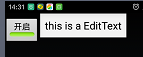
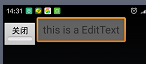
运行测试
评论:
发表评论: