protobuf-net
post by:追风剑情 2016-5-10 17:37
C#对象的序列化与反序列化
从网上下载protobuf-net.dll并放入Assets\Plugins目录下。
示例一
Test.cs
using UnityEngine;
using System;
using System.IO;
using System.Collections;
using ProtoBuf;

public class Test : MonoBehaviour {

	void Start () {
        Student student = new Student();
        student.Id = 100;
        student.Name = "令狐冲";
        student.Age = 17;
        student.Sex = 1;

        //把对象序列化,并存放到本地文件。
        string path = Application.persistentDataPath + "/student.bin";
        using (Stream file = File.Create(path))
        {
            Serializer.Serialize<Student>(file, student);
            file.Close();
        }

        //把数据从文件中读取出来,并反序列化。
        using (Stream file = File.OpenRead(path))
        {
            Student student1 = Serializer.Deserialize<Student>(file);
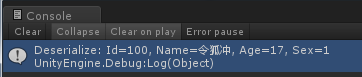
            Debug.Log("Deserialize: " + student1.ToString());
        }
	}
}
Student.cs
using ProtoBuf;

[ProtoContract]
public class Student {

    [ProtoMember(1)]
    public int Id
    {
        get;
        set;
    }

    [ProtoMember(2)]
    public string Name
    {
        get;
        set;
    }

    [ProtoMember(3)]
    public int Age
    {
        get;
        set;
    }

    [ProtoMember(4)]
    public int Sex
    {
        get;
        set;
    }

    public override string ToString()
    {
        return string.Format("Id={0}, Name={1}, Age={2}, Sex={3}", Id, Name, Age, Sex);
    }
}
运行测试
评论:
发表评论: