Debug.DrawLine()
post by:追风剑情 2016-3-3 15:26
一、创建脚本
using UnityEngine;
using System.Collections;

public class DebugTest : MonoBehaviour {

    public Transform cube0;
    public Transform cube1;

    void Update()
    {
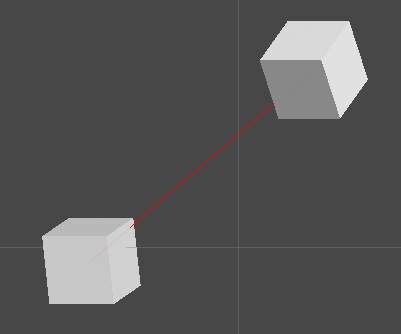
        Debug.DrawLine(cube0.position, cube1.position, Color.red);
    }
}
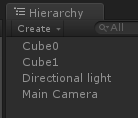
二、创建两个Cube
在Scene窗口中看到的效果
绘制Bounds
/// <summary>
/// 在场景中绘制Bounds线框
/// </summary>
/// <param name="bounds"></param>
private void DrawBounds(Bounds bounds)
{
	#region 场景中绘制辅助线框
	Vector3 start = bounds.min;
	Vector3 end = bounds.min;

	//绘制下方矩形
	end.x += bounds.size.x;
	Debug.DrawLine(start, end, Color.yellow, 30); //前

	start = end;
	end.z += bounds.size.z;
	Debug.DrawLine(start, end, Color.yellow, 30);//右

	start = end;
	end.x -= bounds.size.x;
	Debug.DrawLine(start, end, Color.yellow, 30);//后

	start = end;
	end.z -= bounds.size.z;
	Debug.DrawLine(start, end, Color.yellow, 30);//左

	//绘制前方矩形
	start = end;
	end.y += bounds.size.y;
	Debug.DrawLine(start, end, Color.yellow, 30);//左

	start = end;
	end.x += bounds.size.x;
	Debug.DrawLine(start, end, Color.yellow, 30);//上

	start = end;
	end.y -= bounds.size.y;
	Debug.DrawLine(start, end, Color.yellow, 30);//右

	//绘制右方矩形
	end = start;
	end.z += bounds.size.z;
	Debug.DrawLine(start, end, Color.yellow, 30);//上

	start = end;
	end.y -= bounds.size.y;
	Debug.DrawLine(start, end, Color.yellow, 30);//右

	//绘制后方矩形
	end = start;
	end.x -= bounds.size.x;
	Debug.DrawLine(start, end, Color.yellow, 30);//上

	start = end;
	end.y -= bounds.size.y;
	Debug.DrawLine(start, end, Color.yellow, 30);//右

	//绘制左方矩形
	end = start;
	end.z -= bounds.size.z;
	Debug.DrawLine(start, end, Color.yellow, 30);//上
	#endregion
}

评论:
发表评论: