NGUI绘制饼状图
post by:追风剑情 2016-1-18 19:22
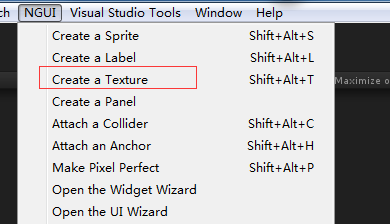
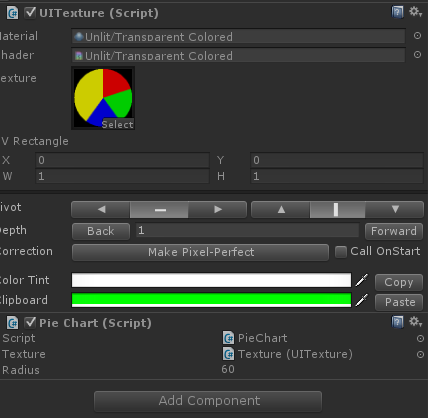
using UnityEngine;
using System.Collections;
/// <summary>
/// 饼状图
/// </summary>
public class PieChart : MonoBehaviour {

    public UITexture texture;
    public int radius = 10;
	// Use this for initialization
	void Start () {
        if (texture == null)
        {
            texture = GetComponent<UITexture>();
            if (texture == null)
            {
                Debug.LogWarning("PieChart UITexture=null");
                return;
            }
        }

        texture.uvRect = new Rect(0f, 0f, 1f, 1f);

        //---测试数据
        int[] d = new int[] { 120, 120, 120, 240 };//比例 1:1:1:2
        Color[] colors = new Color[] {
            new Color(1f, 0f, 0f), //红
            new Color(0f, 1f, 0f), //绿
            new Color(0f, 0f, 1f), //蓝
            new Color(1f, 1f, 0f)  //黄
        };

        SetPieChart(d, colors);
        //---end
	}

    public void SetPieChart(int[] d, Color[] colors)
    {
        //数据转角度值: 按比例放缩数据值,使d[]元素之和不超过360
        int total=0;
        for (int i = 0; i < d.Length; i++)
            total += d[i];
        for (int i = 0; i < d.Length; i++)
            d[i] = d[i] * 360 / total;

        total=0;
        for (int i = 0; i < d.Length; i++)
        {
            int tmp = d[i];
            d[i] += total;
            total += tmp;
        }

        //进行降序排序
        if (d.Length >= 2) {
            for (int i = 0; i < d.Length; i++) {
                for (int j = 1; j < d.Length; j++) {
                    if (d[j - 1] > d[j]) {
                        int tmp = d[j];
                        d[j] = d[j - 1];
                        d[j - 1] = tmp;

                        Color c = colors[j];
                        colors[j] = colors[j - 1];
                        colors[j - 1] = c;
                    }
                }
            }
        }

        texture.mainTexture = GeneratePieChart(d, colors);
    }

    // 创建饼状图Texture2D
    private Texture2D GeneratePieChart(int[] drawAngles, Color[] drawColors)
    {
        int widthHeight = radius * 2;
        Texture2D proceduralTexture = new Texture2D(widthHeight, widthHeight);
        //贴图中心点坐标
        Vector2 centerPosition = new Vector2(radius, radius);
        Vector2 currentPosition = Vector2.zero;
        Vector2 startAngle = new Vector2(0.0f, 1.0f);
        Vector2 currentAngle;
        Color transparentColor = new Color(0f, 0f, 0f, 0f);

        for (int x = 0; x < widthHeight; x++) {
            for (int y = 0; y < widthHeight; y++) {
                currentPosition.Set(x, y);
                currentAngle = currentPosition - centerPosition;
                currentAngle.Normalize();
                //计算当前坐标与中心点坐标距离
                float pixelDistance = Vector2.Distance(currentPosition, centerPosition);
                if (pixelDistance <= radius) {
                    float angle = Vector2.Angle(startAngle, currentAngle);//计算夹角
                    if (x < radius) {//当前坐标落在第三、四象限
                        angle = 360 - angle;
                    }

                    //根据坐标所在角度区间绘制不同颜色的像素
                    for (int i = 0; i < drawAngles.Length; i++) {
                        if (angle <= drawAngles[i]) {
                            Color pixelColor = drawColors[i];
                            proceduralTexture.SetPixel(x, y, pixelColor);
                            break;
                        }
                    }
                } else {
                    //非饼状区域设为透明像素
                    proceduralTexture.SetPixel(x, y, transparentColor);
                }
            }
        }
        //应用新像素值
        proceduralTexture.Apply();
        return proceduralTexture;
    }
}
运行效果
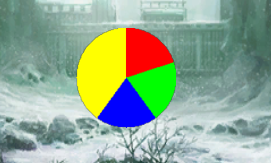
评论:
发表评论: