获取相机在屏幕上的渲染区域
post by:追风剑情 2015-11-27 19:20
示例: 让物体在屏幕上居中显示
创建一个Cube,并在其上挂上脚本UIAnchorCenter.cs
using UnityEngine;

/// <summary>
/// 物体居中显示脚本
/// </summary>
public class UIAnchorCenter : MonoBehaviour {

	void Start () {
        //获取相机在屏幕上的渲染区域
        Rect pixelRect = Camera.main.pixelRect;
        Debug.Log(pixelRect.ToString());
        //计算中心点
        float cx = (pixelRect.xMin + pixelRect.xMax) * 0.5f;
        float cy = (pixelRect.yMin + pixelRect.yMax) * 0.5f;

        //创建中心点坐标
        Vector3 v = new Vector3(cx, cy, 0f);
        v.z = Camera.main.WorldToScreenPoint(transform.position).z;//z坐标保持不变
        v = Camera.main.ScreenToWorldPoint(v);

        //设置物体居中显示
        transform.position = v;
	}
}
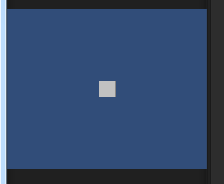
运行前效果

运行后效果
评论:
发表评论: