碎片——Fragment
post by:追风剑情 2015-10-11 15:43
一、创建碎片1
视图
<?xml version="1.0" encoding="utf-8"?>
<LinearLayout xmlns:android="http://schemas.android.com/apk/res/android"
    android:layout_width="fill_parent"
    android:layout_height="fill_parent"
    android:orientation="vertical"
    android:background="#00FF00" >

	<TextView
	    android:layout_width="fill_parent"
	    android:layout_height="wrap_content"
	    android:text="This is fragment #1"
	    android:textColor="#000000"
	    android:textSize="25sp"/>
</LinearLayout>
代码
package com.example.androidtest;

import android.app.Fragment;
import android.os.Bundle;
import android.view.LayoutInflater;
import android.view.View;
import android.view.ViewGroup;

public class Fragment1 extends Fragment{
	@Override
	public View onCreateView(LayoutInflater inflater,
						ViewGroup container,
						Bundle savedInstanceState)
	{
		return inflater.inflate(R.layout.fragment1, container, false);
	}
}
二、创建碎片2
视图
<?xml version="1.0" encoding="utf-8"?>
<LinearLayout xmlns:android="http://schemas.android.com/apk/res/android"
    android:layout_width="fill_parent"
    android:layout_height="fill_parent"
    android:orientation="vertical"
    android:background="#FFFE00" >

	<TextView
	    android:layout_width="fill_parent"
	    android:layout_height="wrap_content"
	    android:text="This is fragment #2"
	    android:textColor="#000000"
	    android:textSize="25sp"/>
</LinearLayout>
代码
package com.example.androidtest;

import android.app.Fragment;
import android.os.Bundle;
import android.view.LayoutInflater;
import android.view.View;
import android.view.ViewGroup;

public class Fragment2 extends Fragment {
	@Override
	public View onCreateView(LayoutInflater inflater,
						ViewGroup container,
						Bundle savedInstanceState)
	{
		return inflater.inflate(R.layout.fragment2, container, false);
	}
}
三、创建活动
视图
<LinearLayout xmlns:android="http://schemas.android.com/apk/res/android"
    xmlns:tools="http://schemas.android.com/tools"
    android:layout_width="fill_parent"
    android:layout_height="fill_parent"
    android:orientation="horizontal"
    tools:context="${relativePackage}.${activityClass}" >

    <fragment
        android:name="com.example.androidtest.Fragment1"
        android:id="@+id/fragment1"
        android:layout_weight="1"
        android:layout_width="0px"
        android:layout_height="match_parent" />

     <fragment
        android:name="com.example.androidtest.Fragment2"
        android:id="@+id/fragment2"
        android:layout_weight="1"
        android:layout_width="0px"
        android:layout_height="match_parent" />

</LinearLayout>
代码
package com.example.androidtest;

import android.app.Activity;
import android.os.Bundle;

public class FragmentsActivity extends Activity {

	@Override
	protected void onCreate(Bundle savedInstanceState) {
		super.onCreate(savedInstanceState);
		setContentView(R.layout.activity_fragments);
	}
}
运行效果
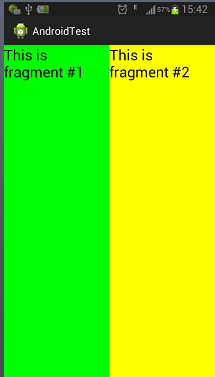
注意: 除了Fragment基类,碎片还可以继承Fragment类的几个子类,例如Dialogfragment、ListFragment和PreferenceFragment。
注意: 每个碎片都需要一个唯一标识符,这可以通过android:id或android:tag属性进行设置。
评论:
发表评论: