基本视图——ListView
post by:追风剑情 2015-9-3 20:50
示例一下:显示一个长列表
代码
package com.example.androidtest;

import android.app.ListActivity;
import android.os.Bundle;
import android.view.View;
import android.widget.ArrayAdapter;
import android.widget.ListView;
import android.widget.Toast;

public class BasicView5Activity extends ListActivity {

	String[] presidents = {
		"Dwight D. Eisenhower",
		"John F. Kennedy",
		"Lyndon B. Johnson",
		"Richard Nixon",
		"Gerald Ford",
		"Jimmy Carter",
		"Ronald Reagan",
		"George H. W. Bush",
		"Bill Clinton",
		"George W. Bush",
		"Barack Obama"
	};

	@Override
	protected void onCreate(Bundle savedInstanceState) {
		super.onCreate(savedInstanceState);
		//ListActivity本身已经包含了一个ListView,所以不需要下面这句。
		//setContentView(R.layout.activity_basic_view5);

		setListAdapter(new ArrayAdapter<String>(this,
				android.R.layout.simple_list_item_1, presidents));
	}

	/**
	 * 当单击ListView中的一个列表项时,将触发onListItemClick()方法
	 */
	public void onListItemClick(ListView parent, View v, int position, long id)
	{
		Toast.makeText(this, "You have selected "+presidents[position], Toast.LENGTH_SHORT).show();
	}
}
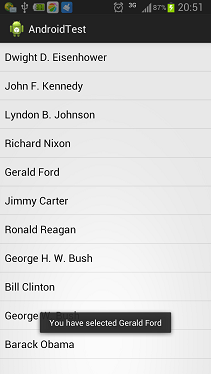
运行效果
示例二:多选列表
把列表项存储在strings.xml中
<?xml version="1.0" encoding="utf-8"?>
<resources>
    <string-array name="presidents_array">
        <item>John F. Kennedy</item>
        <item>Lyndon B. Johnson</item>
        <item>Richard Nixon</item>
        <item>Gerald Ford</item>
        <item>Jimmy Carter</item>
        <item>Ronald Reagan</item>
        <item>George H. W. Bush</item>
        <item>Bill Clinton</item>
        <item>George W. Bush</item>
        <item>Barack Obama</item>
    </string-array>
</resources>
视图
<LinearLayout xmlns:android="http://schemas.android.com/apk/res/android"
    xmlns:tools="http://schemas.android.com/tools"
    android:layout_width="fill_parent"
    android:layout_height="fill_parent"
    android:orientation="vertical"
    tools:context="${relativePackage}.${activityClass}" >

    <Button android:id="@+id/btn"
        android:layout_width="wrap_content"
        android:layout_height="wrap_content"
        android:text="Show selected items"
        android:onClick="onClick" />

    <ListView
        android:id="@+id/android:list"
        android:layout_width="wrap_content"
        android:layout_height="wrap_content" />
</LinearLayout>
代码
package com.example.androidtest;

import android.app.ListActivity;
import android.os.Bundle;
import android.view.View;
import android.widget.ArrayAdapter;
import android.widget.ListView;
import android.widget.Toast;

public class BasicView5Activity extends ListActivity {

	String[] presidents;

	@Override
	protected void onCreate(Bundle savedInstanceState) {
		super.onCreate(savedInstanceState);
		setContentView(R.layout.activity_basic_view5);

		ListView lstView = getListView();
		//lstView.setChoiceMode(ListView.CHOICE_MODE_NONE);
		//lstView.setChoiceMode(ListView.CHOICE_MODE_SINGLE);
		lstView.setChoiceMode(ListView.CHOICE_MODE_MULTIPLE);//多选

		presidents = getResources().getStringArray(R.array.presidents_array);

		setListAdapter(new ArrayAdapter<String>(this,
				android.R.layout.simple_list_item_checked, presidents));

		//启用筛选功能
		lstView.setTextFilterEnabled(true);
	}

	/**
	 * 当单击ListView中的一个列表项时,将触发onListItemClick()方法
	 */
	public void onListItemClick(ListView parent, View v, int position, long id)
	{
		Toast.makeText(this, "You have selected "+presidents[position], Toast.LENGTH_SHORT).show();
	}

	public void onClick(View view)
	{
		ListView lstView = getListView();

		String itemsSelected = "Selected items: \n";
		for (int i=0; i<lstView.getCount(); i++)
		{
			if(lstView.isItemChecked(i)){
				itemsSelected += lstView.getItemAtPosition(i) + "\n";
			}
		}
		Toast.makeText(this, itemsSelected, Toast.LENGTH_SHORT).show();
	}
}
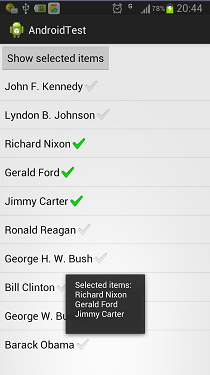
运行效果
评论:
发表评论: