基本视图——AutoCompleteTextView
post by:追风剑情 2015-8-29 19:10
视图
<LinearLayout xmlns:android="http://schemas.android.com/apk/res/android"
    xmlns:tools="http://schemas.android.com/tools"
    android:layout_width="fill_parent"
    android:layout_height="fill_parent"
    android:orientation="vertical"
    tools:context="${relativePackage}.${activityClass}" >

    <TextView
        android:layout_width="fill_parent"
        android:layout_height="wrap_content"
        android:text="Name of President" />

    <AutoCompleteTextView android:id="@+id/txtCountries"
        android:layout_width="fill_parent"
        android:layout_height="wrap_content"/>

</LinearLayout>
代码
package com.example.androidtest;

import android.app.Activity;
import android.os.Bundle;
import android.widget.ArrayAdapter;
import android.widget.AutoCompleteTextView;

public class AutoCompleteTextViewActivity extends Activity {

	String[] presidents = {
		"Dwight D. Eisenhowe",
		"John F. Kennedy",
		"Lyndon B. Johnson",
		"Richard Nixon",
		"Gerald Ford",
		"Jimmy Catrter",
		"Ronald Reagan",
		"George H. W. Bush",
		"Bill Clinton",
		"George W. Bush",
		"Barack Obama"
	};

	@Override
	protected void onCreate(Bundle savedInstanceState) {
		super.onCreate(savedInstanceState);
		setContentView(R.layout.activity_auto_complete_text_view);

		ArrayAdapter<String> adapter = new ArrayAdapter<String>(this,
				android.R.layout.simple_dropdown_item_1line, presidents);
		AutoCompleteTextView textView = (AutoCompleteTextView) findViewById(R.id.txtCountries);
		textView.setThreshold(3);//用户必须输入最少3个字符才自动显示建议列表。
		textView.setAdapter(adapter);
	}
}
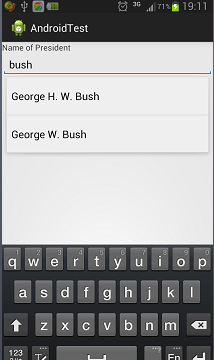
运行效果
评论:
发表评论: