显示通知——Notification
post by:追风剑情 2015-8-16 17:21
一、在AndroidManifest.xml中添加权限
<uses-permission android:name="android.permission.VIBRATE" />
二、创建活动NotificationsActivity
视图
<LinearLayout xmlns:android="http://schemas.android.com/apk/res/android"
    xmlns:tools="http://schemas.android.com/tools"
    android:layout_width="fill_parent"
    android:layout_height="fill_parent"
    android:orientation="vertical"
    tools:context="${relativePackage}.${activityClass}" >

    <Button
        android:id="@+id/btn_displaynotif"
        android:layout_width="wrap_content"
        android:layout_height="wrap_content"
        android:text="Display Notification"
        android:onClick="onClick" />
</LinearLayout>
代码
package com.example.androidtest;

import android.app.Activity;
import android.app.Notification;
import android.app.NotificationManager;
import android.app.PendingIntent;
import android.content.Intent;
import android.os.Bundle;
import android.view.View;

public class NotificationsActivity extends Activity {

	int notificationID = 1;

	@Override
	protected void onCreate(Bundle savedInstanceState) {
		super.onCreate(savedInstanceState);
		setContentView(R.layout.activity_notifications);
	}

	public void onClick(View view)
	{
		displayNotification();
	}

	protected void displayNotification()
	{
		//当用户从通知列表中选择了一个通知时,这个意图将被用来启动NofificationView活动。
		Intent i = new Intent(this, NotificationView.class);
		i.putExtra("notificationID", notificationID);

		//PendingIntent对象可以代表应用程序帮助您在后面某个时候执行一个动作,而不用考虑应用程序是否正在运行。
		PendingIntent pendingIntent = PendingIntent.getActivity(this, 0, i, 0);

		NotificationManager nm = (NotificationManager) getSystemService(NOTIFICATION_SERVICE);

		Notification notif = new Notification(
				R.drawable.ic_launcher,
				"Reminder: Meeting starts in 5 minutes",//顶部滚动信息
				System.currentTimeMillis());
		//正文
		CharSequence from = "System Alarm";
		CharSequence message = "Meeting with customer at 3pm...";
		notif.setLatestEventInfo(this, from, message, pendingIntent);

		//100毫秒后开始振动,振动250毫秒后停止,再过100毫秒后再次振动500毫秒
		notif.vibrate = new long[] {100, 250, 100, 500};
		nm.notify(notificationID, notif);
	}
}
三、创建活动NotificationView
视图
<LinearLayout xmlns:android="http://schemas.android.com/apk/res/android"
    xmlns:tools="http://schemas.android.com/tools"
    android:layout_width="fill_parent"
    android:layout_height="fill_parent"
    android:orientation="vertical"
    tools:context="${relativePackage}.${activityClass}" >

    <TextView
        android:layout_width="fill_parent"
        android:layout_height="wrap_content"
        android:text="Here are the details for the notification..." />
</LinearLayout>
代码
package com.example.androidtest;

import android.app.Activity;
import android.app.NotificationManager;
import android.os.Bundle;
/**
 * 用户点击通知后,此活动被启动。
 */
public class NotificationView extends Activity {

	@Override
	protected void onCreate(Bundle savedInstanceState) {
		super.onCreate(savedInstanceState);
		setContentView(R.layout.activity_notification_view);
		//清除通知。
		NotificationManager nm = (NotificationManager) getSystemService(NOTIFICATION_SERVICE);
		nm.cancel(getIntent().getExtras().getInt("notificationID"));
	}
}
运行效果
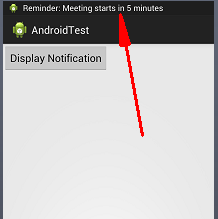
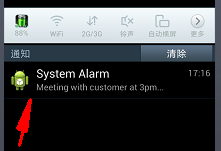
评论:
发表评论: