使用意图对象传递数据
post by:追风剑情 2015-8-5 21:18
视图activity_passing_data.xml
<RelativeLayout xmlns:android="http://schemas.android.com/apk/res/android"
    xmlns:tools="http://schemas.android.com/tools"
    android:layout_width="match_parent"
    android:layout_height="match_parent"
    tools:context="${relativePackage}.${activityClass}" >

    <Button
        android:layout_width="fill_parent"
        android:layout_height="wrap_content"
        android:text="Go to SecondActivity1"
        android:onClick="onClick" />

</RelativeLayout>
视图activity_second_activity1.xml
<RelativeLayout xmlns:android="http://schemas.android.com/apk/res/android"
    xmlns:tools="http://schemas.android.com/tools"
    android:layout_width="match_parent"
    android:layout_height="match_parent"
    tools:context="${relativePackage}.${activityClass}" >

    <Button
        android:id="@+id/btn_SecondActivity1"
        android:layout_width="fill_parent"
        android:layout_height="wrap_content"
        android:text="Return to PassingDataActivity"
        android:onClick="onClick" />

</RelativeLayout>
活动PassingDataActivity
package com.example.androidtest;

import android.app.Activity;
import android.content.Intent;
import android.os.Bundle;
import android.view.View;
import android.widget.Toast;

public class PassingDataActivity extends Activity {

	@Override
	protected void onCreate(Bundle savedInstanceState) {
		super.onCreate(savedInstanceState);
		setContentView(R.layout.activity_passing_data);
	}

	public void onClick(View view){
		Intent i = new Intent("com.example.androidtest.SecondActivity1");
		i.putExtra("str1", "string1");
		i.putExtra("age1", 25);

		Bundle extras = new Bundle();
		extras.putString("str2", "string2");
		extras.putInt("age2", 35);
		i.putExtras(extras);

		startActivityForResult(i, 1);
	}

	public void onActivityResult(int requestCode, int resultCode, Intent data)
	{
		if(requestCode == 1){
			if(resultCode == RESULT_OK){
				int age3 = data.getIntExtra("age3", 0);
				Toast.makeText(this, Integer.toString(age3), Toast.LENGTH_SHORT).show();

				String uri = data.getData().toString();
				Toast.makeText(this, uri, Toast.LENGTH_SHORT).show();
			}
		}
	}
}
活动SecondActivity1
package com.example.androidtest;

import android.app.Activity;
import android.content.Intent;
import android.net.Uri;
import android.os.Bundle;
import android.view.View;
import android.widget.Toast;

public class SecondActivity1 extends Activity {

	@Override
	protected void onCreate(Bundle savedInstanceState) {
		super.onCreate(savedInstanceState);
		setContentView(R.layout.activity_second_activity1);

		String str1 = getIntent().getStringExtra("str1");
		int age1 = getIntent().getIntExtra("age1", 0);

		Bundle bundle = getIntent().getExtras();
		String str2 = bundle.getString("str2");
		int age2 = bundle.getInt("age2");

		String passData = "str1="+str1+", age1="+age1+", str2="+str2+", age2="+age2;

		Toast.makeText(this, passData , Toast.LENGTH_SHORT).show();
	}

	/**
	 * 返回到调用SecondActivity1的活动(即,PassingDataActivity),并回传数据。
	 * @param view
	 */
	public void onClick(View view){
		Intent i = new Intent();
		i.putExtra("age3", 45);
		i.setData(Uri.parse("Something passed back to PassingDataActivity"));
		setResult(RESULT_OK, i);
		finish();
	}
}
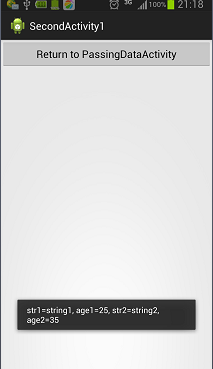
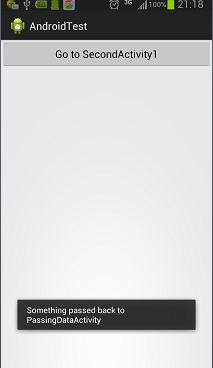
运行效果
评论:
发表评论: