理解线程
post by:追风剑情 2015-8-3 23:06
以下为一个计数器示例,通过这个示例来理解线程。
视图
<LinearLayout xmlns:android="http://schemas.android.com/apk/res/android"
    xmlns:tools="http://schemas.android.com/tools"
    android:layout_width="fill_parent"
    android:layout_height="fill_parent"
    android:orientation="vertical"
    tools:context="${relativePackage}.${activityClass}" >


    <Button
        android:id="@+id/btnStartCounter"
        android:layout_width="match_parent"
        android:layout_height="wrap_content"
        android:text="Start"
        android:onClick="startCounter5" />

    <TextView
        android:id="@+id/textView1"
        android:layout_width="match_parent"
        android:layout_height="wrap_content"
        android:text="TextView" />

</LinearLayout>
活动
package com.example.androidtest;

import android.app.Activity;
import android.os.AsyncTask;
import android.os.Bundle;
import android.os.Handler;
import android.os.Message;
import android.util.Log;
import android.view.Menu;
import android.view.MenuItem;
import android.view.View;
import android.widget.TextView;

public class ThreadingActivity extends Activity {

	static TextView txtView1;
	DoCountingTask task;

	@Override
	protected void onCreate(Bundle savedInstanceState) {
		super.onCreate(savedInstanceState);
		setContentView(R.layout.activity_threading);

		txtView1 = (TextView) findViewById(R.id.textView1);
	}

	@Override
	protected void onPause(){
		super.onPause();
		stopCounter(txtView1);
	}

	/**
	 * 方案一
	 * 此方案会使UI无响应。
	 * @param view
	 */
	public void startCounter1(View view){
		for(int i=0; i<=1000; i++){
			txtView1.setText(String.valueOf(i));
			try {
				Thread.sleep(1000);//UI线程中执行
			} catch (InterruptedException e) {
				Log.d("AndroidTest", e.getLocalizedMessage());
			}
		}
	}

	/**
	 * 方案二
	 * 此方案会使程序崩溃。
	 * @param view
	 */
	public void startCounter2(View view){
		new Thread(new Runnable(){
			@Override
			public void run() {//工作者线程
				for(int i=0; i<=1000; i++){
					//在工作者线程中更新UI,会导致程序崩溃。
					txtView1.setText(String.valueOf(i));//这句会使程序崩溃
					try {
						Thread.sleep(1000);
					} catch (InterruptedException e) {
						Log.d("AndroidTest", e.getLocalizedMessage());
					}
				}
			}

		}).start();
	}

	/**
	 * 方案三
	 * 此方案可行,但是代码十分复杂,不易维护。
	 * @param view
	 */
	public void startCounter3(View view){
		new Thread(new Runnable(){
			@Override
			public void run() {//工作者线程
				for(int i=0; i<=1000; i++){
					final int valueOfi = i;
					txtView1.post(new Runnable(){//UI线程
						public void run(){
							txtView1.setText(String.valueOf(valueOfi));
						}
					});

					//---插入一个延迟
					try {
						Thread.sleep(1000);
					} catch (InterruptedException e) {
						Log.d("AndroidTest", e.getLocalizedMessage());
					}
				}
			}

		}).start();
	}

	/**
	 * 方案四
	 * 此方案可行。利用Handler类。
	 * @param view
	 */
	public void startCounter4(View view){
		new Thread(new Runnable(){
			@Override
			public void run() {//工作者线程
				for(int i=0; i<=1000; i++){
					ThreadingActivity.UIupdater.obtainMessage(0, String.valueOf(i).getBytes()).sendToTarget();
					try {
						Thread.sleep(1000);
					} catch (InterruptedException e) {
						Log.d("AndroidTest", e.getLocalizedMessage());
					}
				}
			}

		}).start();
	}

	/**
	 * 方案五
	 * 此为推荐方案。
	 * @param view
	 */
	public void startCounter5(View view){
		task = (DoCountingTask) new DoCountingTask().execute();
	}

	/**
	 * 取消任务
	 * 如果不调用任务的cancel()方法,就算活动销毁了(比如用户按了black键),任务还是会继续执行。
	 * @param view
	 */
	public void stopCounter(View view){
		if(null != task)
			task.cancel(true);
	}

	static Handler UIupdater = new Handler(){
		@Override
		public void handleMessage(Message msg){
			byte[] buffer = (byte[]) msg.obj;
			String strReceived = new String(buffer);
			txtView1.setText(strReceived);
			Log.d("AndroidTest", "running");
		}
	};

	private class DoCountingTask extends AsyncTask<Void, Integer, Void> {
		@Override
		protected Void doInBackground(Void... params) {
			for(int i=0; i<=1000; i++){
				publishProgress(i);
				try {
					Thread.sleep(1000);
				} catch (InterruptedException e) {
					Log.d("AndroidTest", e.getLocalizedMessage());
				}
				//检查任务是否该终止
				if(isCancelled()) break;
			}
			return null;
		}

		protected void onProgressUpdate(Integer... progress){
			txtView1.setText(progress[0].toString());
			Log.d("AndroidTest", "updating...");
		}
	}
}
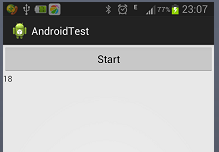
运行效果
评论:
发表评论: