为视图注册事件
post by:追风剑情 2015-7-26 17:23
视图
<LinearLayout xmlns:android="http://schemas.android.com/apk/res/android"
    xmlns:tools="http://schemas.android.com/tools"
    android:layout_width="fill_parent"
    android:layout_height="fill_parent"
    android:orientation="vertical"
    tools:context="${relativePackage}.${activityClass}" >

    <TextView
        android:layout_width="214dp"
        android:layout_height="wrap_content"
        android:text="Your Name" />
    <EditText
        android:id="@+id/txt1"
        android:layout_width="214dp"
        android:layout_height="wrap_content"/>
    <Button
        android:id="@+id/btn1"
        android:layout_width="106dp"
        android:layout_height="wrap_content"
        android:text="OK"/>
	<Button
        android:id="@+id/btn2"
        android:layout_width="106dp"
        android:layout_height="wrap_content"
        android:text="Cancel"/>
</LinearLayout>
代码
package com.example.androidtest;

import android.app.Activity;
import android.os.Bundle;
import android.view.View;
import android.view.View.OnClickListener;
import android.widget.Button;
import android.widget.EditText;
import android.widget.Toast;

public class UIActivityActivity extends Activity {

	@Override
	protected void onCreate(Bundle savedInstanceState) {
		super.onCreate(savedInstanceState);
		setContentView(R.layout.activity_uiactivity);

		Button btn1 = (Button)findViewById(R.id.btn1);
		btn1.setOnClickListener(btnListener);

		Button btn2 = (Button)findViewById(R.id.btn2);
		btn2.setOnClickListener(btnListener);

		EditText txt1 = (EditText)findViewById(R.id.txt1);
		txt1.setOnFocusChangeListener(new View.OnFocusChangeListener() {//匿名内部类
			@Override
			public void onFocusChange(View v, boolean hasFocus) {
				Toast.makeText(getBaseContext(), ((EditText) v).getId()+" has focus - "+hasFocus, Toast.LENGTH_LONG).show();
			}
		});
	}

	//创建一个匿名类
	private OnClickListener btnListener = new OnClickListener()
	{
		public void onClick(View v)
		{
			Toast.makeText(getBaseContext(), ((Button) v).getText(), Toast.LENGTH_LONG).show();
		}
	};
}
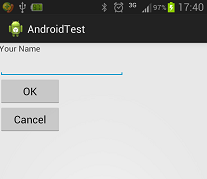
运行效果
评论:
发表评论: