创建服务
post by:追风剑情 2015-7-23 21:10
一、创建MyService
package com.example.androidtest;

import android.app.Service;
import android.content.Intent;
import android.os.IBinder;
import android.widget.Toast;

public class MyService extends Service {

	@Override
	public IBinder onBind(Intent intent) {
		// TODO Auto-generated method stub
		return null;
	}

	@Override
	public int onStartCommand(Intent intent, int flags, int startId){
		Toast.makeText(this, "Service Started", Toast.LENGTH_LONG).show();
		//START_STICKY: 只要服务不被显式地停止,它都将继续运行。
		return START_STICKY;
	}

	@Override
	public void onDestroy(){
		super.onDestroy();
		Toast.makeText(this, "Service Destroyed", Toast.LENGTH_LONG).show();
	}
}
二、创建ServicesActivity
视图
<LinearLayout xmlns:android="http://schemas.android.com/apk/res/android"
    xmlns:tools="http://schemas.android.com/tools"
    android:layout_width="fill_parent"
    android:layout_height="fill_parent"
    android:orientation="vertical"
    tools:context="${relativePackage}.${activityClass}" >


    <Button android:id="@+id/btnStartService"
        android:layout_width="fill_parent"
        android:layout_height="wrap_content"
        android:text="Start Service"
        android:onClick="startService" />

    <Button android:id="@+id/btnStopService"
        android:layout_width="fill_parent"
        android:layout_height="wrap_content"
        android:text="Stop Service"
        android:onClick="stopService" />

</LinearLayout>
代码
package com.example.androidtest;

import android.app.Activity;
import android.content.Intent;
import android.os.Bundle;
import android.view.Menu;
import android.view.MenuItem;
import android.view.View;

public class ServicesActivity extends Activity {

	@Override
	protected void onCreate(Bundle savedInstanceState) {
		super.onCreate(savedInstanceState);
		setContentView(R.layout.activity_services);
	}

	public void startService(View view){
		startService(new Intent(getBaseContext(), MyService.class));
		//或者通过意图筛选器名称启动
		//startService(new Intent("com.example.androidtest.MyService"));
	}

	public void stopService(View view){
		stopService(new Intent(getBaseContext(), MyService.class));
	}
}
三、配置AndroidManifest.xml
<service android:name=".MyService">
        <intent-filter>
              <action android:name="com.example.androidtest.MyService" />
        </intent-filter>
</service>
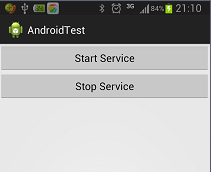
运行效果
评论:
发表评论: