布局视图组——FrameLayout
post by:追风剑情 2015-7-13 21:05
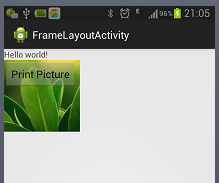
在FrameLayout中添加多个视图,但每一个视图都堆叠在前一个上面。这在想将一系列图像变成动画,使得每次只有一个视图可见的情况下很有用。
<RelativeLayout xmlns:android="http://schemas.android.com/apk/res/android"
    xmlns:tools="http://schemas.android.com/tools"
    android:layout_width="match_parent"
    android:layout_height="match_parent"
    tools:context="${relativePackage}.${activityClass}" >

    <TextView
        android:id="@+id/lblComments"
        android:layout_width="wrap_content"
        android:layout_height="wrap_content"
        android:text="@string/hello_world" />

    <FrameLayout
        android:layout_width="wrap_content"
        android:layout_height="wrap_content"
        android:layout_alignLeft="@+id/lblComments"
        android:layout_below="@+id/lblComments"
        android:layout_centerHorizontal="true">

        <ImageView
            android:src="@drawable/droid"
            android:layout_width="wrap_content"
            android:layout_height="wrap_content"/>

        <Button
            android:layout_width="124dp"
            android:layout_height="wrap_content"
            android:text="Print Picture"/>

    </FrameLayout>

</RelativeLayout>
运行效果
评论:
发表评论: