布局视图组——RelativeLayout
post by:追风剑情 2015-7-9 21:55
RelativeLayout可用于指定子视图相对于彼此之间是如何定位的。
每一个嵌入RelativeLayout中的视图都有使它与其他视图对齐的属性。这些属性如下:
- layout_alignParentTop
- layout_alignParentLeft
- layout_alignLeft
- layout_alignRight
- layout_below
- layout_centerHorizontal
<RelativeLayout xmlns:android="http://schemas.android.com/apk/res/android"
    xmlns:tools="http://schemas.android.com/tools"
    android:id="@+id/RLayout"
    android:layout_width="fill_parent"
    android:layout_height="fill_parent"
    tools:context="${relativePackage}.${activityClass}" >

    <TextView
        android:id="@+id/lblComments"
        android:layout_width="wrap_content"
        android:layout_height="wrap_content"
        android:text="Comments"
        android:layout_alignParentTop="true"
        android:layout_alignParentLeft="true" />

    <EditText
        android:id="@+id/txtComments"
        android:layout_width="fill_parent"
        android:layout_height="170px"
        android:textSize="18sp"
        android:layout_alignLeft="@+id/lblComments"
        android:layout_below="@+id/lblComments"
        android:layout_centerHorizontal="true" />

    <Button
        android:id="@+id/btnSave"
        android:layout_width="165px"
        android:layout_height="wrap_content"
        android:text="Save"
        android:layout_below="@+id/txtComments"
        android:layout_alignRight="@+id/txtComments" />

    <Button
        android:id="@+id/btnCancel"
        android:layout_width="164px"
        android:layout_height="wrap_content"
        android:text="Cancel"
        android:layout_below="@+id/txtComments"
        android:layout_alignLeft="@+id/txtComments" />

</RelativeLayout>
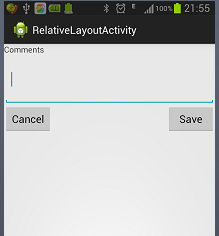
运行效果
评论:
发表评论: