布局视图组——TableLayout
post by:追风剑情 2015-7-9 21:19
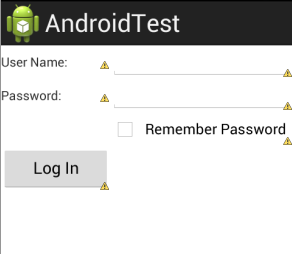
TableLayout以行和列的形式组织视图。使用<TableRow>元素来指定表中的某一行。每一行可以包含一个或多个视图。行内的每个视图构成一个单元格。每一列的宽度由此列中最大单元格的宽度决定。
<TableLayout xmlns:android="http://schemas.android.com/apk/res/android"
    xmlns:tools="http://schemas.android.com/tools"
    android:layout_width="fill_parent"
    android:layout_height="fill_parent"
    tools:context="${relativePackage}.${activityClass}" >

    <TableRow>
        <TextView
           	android:text="User Name:"
        	android:layout_width="120dp" />
        <EditText
            android:id="@+id/txtUserName"
            android:width="200dp" />
    </TableRow>

    <TableRow>
        <TextView
           	android:text="Password:"/>
        <EditText
            android:id="@+id/txtPassword"
            android:password="true" />
    </TableRow>

   <TableRow>
        <TextView />
        <CheckBox android:id="@+id/chkRememberPassword"
            android:layout_width="fill_parent"
            android:layout_height="wrap_content"
            android:text="Remember Password" />
    </TableRow>

   <TableRow>
        <Button
            android:id="@+id/buttonSignIn"
            android:text="Log In" />
    </TableRow>
</TableLayout>
运行效果
评论:
发表评论: